Cleaning up imported drawings
Drawings exported by plotting, laser and graphics software often carry their curves as many short lines, their straight sides in pieces and their ends a hair apart. planex2d reads such a drawing, closes the gaps, fits arcs back to the tessellated curves and checks how far the result moved, so that the part is ready for Boolean operations, meshing or a CAM program. The same cleanup works on a face from a DXF drawing, a planar STEP or BREP file, a sketch from a .CATPart file, a circuit board, a Shapely polygon or a list of measured points. The first cell is the complete workflow, ready to copy and run, and the section Step by step runs it in parts, with the plots one looks at along the way.
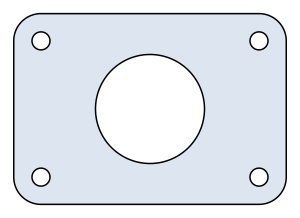
The example is a pump-cover gasket of 100 × 70 mm with corners of radius 10, an opening of diameter 40 and four bolt holes of diameter 6.6, in the file gasket.svg. Every curve in it is a polyline, the holes 72-gons and the corners 12 segments each, its straight sides come in four pieces, its coordinates are rounded to 0.01 mm, and its outline stops 0.005 mm short of its start.
[2]:
import planex as px

raw = px.Face(px.FromSVG("gasket.svg", tol=1e-5))
gasket = raw.Simplified(fit_arcs=dict(tol=2e-5))
print(len(raw.edges), "edges read |", len(gasket.edges), "edges after the cleanup")
print("radii", sorted({round(e.edge.radius, 7) for e in gasket.edges if hasattr(e.edge, "radius")}))
print("largest deviation", gasket.Hausdorff(raw))
px.WriteDXF(gasket.wires, "gasket-clean.dxf", unit=px.mm)
gasket
412 edges read | 18 edges after the cleanup
radii [0.0033, 0.0100008, 0.02]
largest deviation 2.3465725344733573e-05
[2]:
Step by step
Finding what is wrong
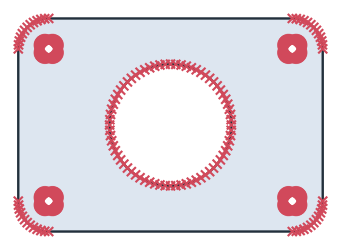
Read without a tolerance, the drawing gives six wires, and the outline is the one that does not close. OpenEnds lists its loose ends by edge and end, here the start of its first edge and the end of its last (see Small gaps). tol joins ends that lie closer together than it, in meters, since the reader takes the unit from the file’s width and height, millimeters here, and returns meters (see SVG files). The face then holds 412
edges, all of them lines, with a vertex at every point of the curves’ polylines (Figure 1). The reader has already joined the four pieces of each straight side, since they lie exactly on one line.
[3]:
import planex as px

print("closed", [w.IsClosed() for w in px.FromSVG("gasket.svg")])
print("open ends", [w.OpenEnds() for w in px.FromSVG("gasket.svg") if not w.IsClosed()])
raw = px.Face(px.FromSVG("gasket.svg", tol=1e-5))
print(len(raw.edges), "edges, all lines")
# px.Plot(raw)
closed [False, True, True, True, True, True]
open ends [[(0, False), (63, True)]]
412 edges, all lines
Cleaning up
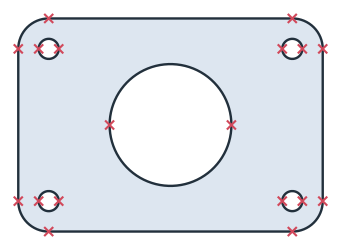
Simplified returns a cleaned copy and leaves the face as read. fit_arcs fits arcs to runs of short lines that follow a circle, here within 0.02 mm of the drawing’s points, twice the rounding of its coordinates (see Fitting arcs). The gasket then has 18 edges, which are four straight sides, four corner arcs of radius 10 and five holes of two arcs each. The corners come out 0.0008 mm larger than drawn, because the drawing’s points are rounded to 0.01 mm
(Figure 2).
[5]:
gasket = raw.Simplified(fit_arcs=dict(tol=2e-5))
print(len(gasket.edges), "edges after the cleanup")
print("radii", sorted({round(e.edge.radius, 7) for e in gasket.edges if hasattr(e.edge, "radius")}))
# px.Plot(gasket)
18 edges after the cleanup
radii [0.0033, 0.0100008, 0.02]
Other drawings need the other steps of Simplified as well. merge_collinear_closer joins straight pieces that lie nearly but not exactly on one line (see Collinear lines), and remove_edges_smaller removes edges far shorter than the part (see Small edges). See Defeaturing and simplification for every step, its defaults and Simplify, which cleans the face in place.
Checking the result
The Hausdorff distance between the cleaned face and the face as read is the largest distance from a point of one outline to the other (see Part analysis). It is 0.023 mm, the height of the polylines’ chords over the arcs they cut, so the cleanup moved nothing that the drawing actually holds:
[7]:
print("largest deviation", gasket.Hausdorff(raw))
largest deviation 2.3465725344733573e-05
Writing the clean drawing
px.WriteDXF of the face’s wires writes the outlines alone, without a fill, for a CAM program or a laser cutter. unit=px.mm writes millimeters, converted from the meters of the geometry, and the drawing read back is 100 × 70 mm again, 0.1 × 0.07 in meters. See Files for the other writers.
[8]:
px.WriteDXF(gasket.wires, "gasket-clean.dxf", unit=px.mm)
print(px.Compound(px.FromDXF("gasket-clean.dxf")).bounding_box)
((0.0, -0.07), (0.10000000000000003, 4.440892098500626e-18))
The clean drawing is gasket-clean.dxf.
Other formats
Every reader returns wires that the same cleanup takes:
Format |
Reader |
See |
|---|---|---|
SVG |
|
|
DXF |
|
|
STEP, BREP (planar) |
|
|
KiCad, Altium, Eagle and other boards |
|
|
Shapely |
|
|
.CATPart sketches |
|
|
Measured or traced points |
|
Pitfalls
The fit’s tolerance. It must be at least as large as the rounding of the drawing’s coordinates, or no arc fits. A much larger one fits arcs to runs of short lines that the part does not have as arcs. Each fit is checked against the edges it replaces and rejected if it strays further.
Real small features.
tolandremove_edges_smallermust stay below the smallest real feature of the part, such as a narrow slot or a short chamfer.Units. An SVG file whose width names no unit is read as CSS pixels of 1/96 inch, with a warning, and
unit=sets the unit instead. All tolerances are in meters, as the geometry is.Free-form curves. A curve that is no circle, such as an airfoil or a cam, takes
fit_splinesinstead offit_arcs. See Fitting splines.
In the browser
The contour checker finds open contours, gaps, doubled lines and small edges in a DXF, SVG or STEP file in the browser and repairs them, with the same calls. The converters turn DXF, SVG and STEP files into each other.