Corner block
A block has one corner cut off at an odd angle. The cut meets the three edges at the corner at different distances from it, so it is a triangle with three different sides, inclined to every face of the block. The cut is a plane through three points, one on each edge. Model the block from the drawing in planex2d or in any CAD system, then check its volume, the area of the cut and the center of mass against the values at the end of the page. A solution in planex2d follows.

[1]:
import math
import netgen.occ as occ
import planex as px
The block
The block is a rectangle in the xy plane, 80 by 50 with a corner at the origin, drawn with Rectangle and padded 40 up. Its lines are base.Line.1 to base.Line.4, counterclockwise from the front edge. With auto_constraint={"horizontal": True, "vertical": True}, its edges, drawn level and plumb, stay so, and its corner sits at the origin (Figure 1):
[3]:
base = px.Sketch(auto_constraint={"horizontal": True, "vertical": True})
base.Rectangle(80, 50, id="base")
base.Constrain("base.Line.1.start", "origin", px.Coincident)
base.Constrain("base.Line.1", px.Distance, 80, id="length")
base.Constrain("base.Line.2", px.Distance, 50, id="width")
print("status", base.status, "| degrees of freedom", base.dof)
block = px.Pad(base, 40)
status full | degrees of freedom 0
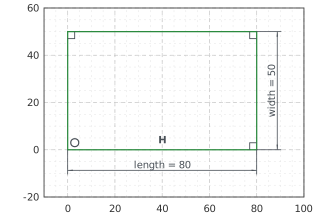
(a) The rectangle, every dimension and tie
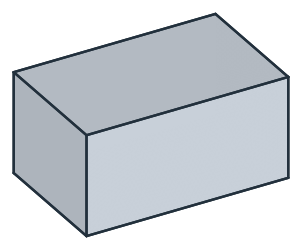
(b) The block, padded 40
The cut
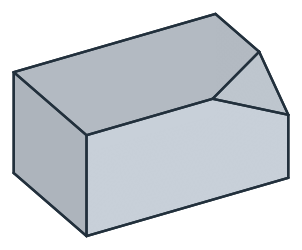
The corner cut off is the top right front one, at (80, 0, 40). The cut meets the top front edge 30 from it, the top right edge 20 from it and the vertical edge 15 below it. px.Plane through these three points is the plane of the cut, and the triangle between them, drawn in a sketch on that plane, is its face. ToHV gives a 3D point’s coordinates in the sketch, and the three points lie in its plane:
[5]:
corner = (80, 0, 40)
on_front = (80 - 30, 0, 40)
on_right = (80, 20, 40)
on_end = (80, 0, 40 - 15)
plane = px.Plane(on_front, on_right, on_end)  # the plane through three points
cut = px.Sketch(plane)
cut.Move(cut.ToHV(on_front)).Line(cut.ToHV(on_right)).Line(cut.ToHV(on_end)).Close()
print("normal", tuple(round(v, 4) for v in plane.normal))
normal (0.3714, -0.5571, 0.7428)
A plane through three points has its normal toward \(+z\), whatever the order of the points, so here it points out of the block, toward the corner. A pocket runs against the normal. reverse=True turns it toward the corner, and a length of 20 takes it past the corner (Figure 2):
[6]:
block = px.Pocket(block, cut, 20, reverse=True) # along the normal, toward the corner, past it
The checks
These are the volume, the area of the cut, the mass in steel S235 (7.85 g/cm³) and the center of mass, with the origin at the bottom left front corner, to compare with your own model. The corner cut off is a tetrahedron with the edges 30, 20 and 15 at a right corner, of volume \(30 \cdot 20 \cdot 15 / 6\). The cut is its triangle, with sides of 36.06, 25 and 33.54, and its area is half the length of the cross product of two of its sides, \(\tfrac{1}{2} \sqrt{(30 \cdot 20)^2 + (20 \cdot 15)^2 + (15 \cdot 30)^2}\):
[8]:
face = min(block.faces, key=lambda f: math.dist(tuple(f.center), (80 - 10, 20 / 3, 40 - 5)))  # the cut, near its centroid
c = block.center
print("volume", round(block.mass, 1), "mm³, exact", 80 * 50 * 40 - 30 * 20 * 15 / 6)
print("cut", round(face.mass, 3), "mm², exact", round(math.sqrt((30 * 20) ** 2 + (20 * 15) ** 2 + (15 * 30) ** 2) / 2, 3))
print("sides", [round(math.dist(a, b), 2) for a, b in ((on_front, on_right), (on_right, on_end), (on_end, on_front))])
print("mass", round(block.mass * 7.85e-6, 3), "kg")
print("center of mass", tuple(round(v, 3) for v in (c.x, c.y, c.z)))
volume 158500.0 mm³, exact 158500.0
cut 403.887 mm², exact 403.887
sides [36.06, 25.0, 33.54]
mass 1.244 kg
center of mass (39.692, 25.189, 19.846)
The block as STEP, for another CAD system:
[9]:
block.WriteStep("corner_block.step")
The block as STEP: corner_block.step