Naming and marking
netgen reads the names of a planex2d geometry as the names of its mesh. A face name becomes a material, an edge name becomes a boundary name, and a vertex name becomes a point name. Boundary conditions and material data in NGSolve can therefore refer to the names of the sketch instead of to numbers. Names can be given while drawing, with name=, or set afterwards on any selected edge, face or vertex, with .name. The same works for the mesh size maxh, the geometric refinement hpref
and the color col.
[1]:
import ngsolve as ngs
import planex as px
Names while drawing
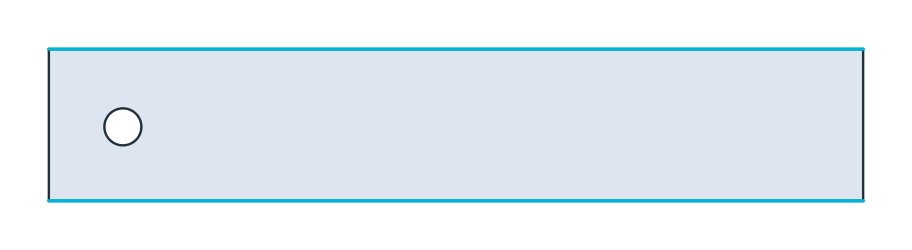
Every drawing call takes name=, and so does Close. The example is the channel of the flow around a cylinder benchmark (Schäfer and Turek). Its walls, inlet and outlet are named as they are drawn, the cylinder gets its name and a fine mesh size maxh=0.01 with its Circle call, and the face is named fluid (Figure 1).
The channel is 2.2 long and 0.41 high, and the cylinder has a radius of 0.05 at (0.2, 0.2):
[3]:
s = px.QuickSketch().Line(2.2, name="wall").Line(0, 0.41, name="outlet")
channel = s.Line(-2.2, 0, name="wall").Close(name="inlet").Face()
cylinder = px.QuickSketch().Circle(0.2, 0.2, 0.05, name="cyl", maxh=0.01).Face()
fluid = channel - cylinder
fluid.name = "fluid"
print(sorted({e.name for e in fluid.edges}))
['cyl', 'inlet', 'outlet', 'wall']
Names set afterwards
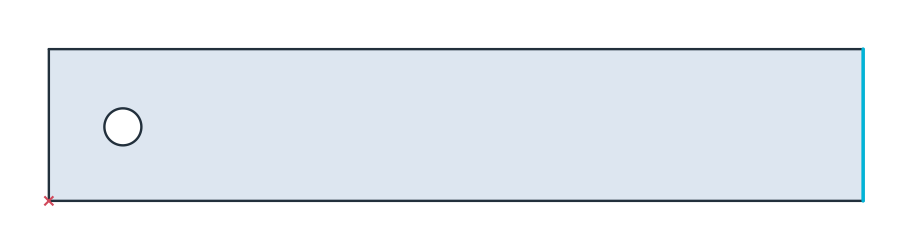
Names and sizes can also be set after drawing, on a selection. edges(near=point) selects the edge nearest to a point, edges(name=...) selects edges by their name, and vertices(near=point) selects a vertex. Assigning to the selection sets the property on every selected element. The example renames the outlet, gives the cylinder an even finer mesh size, and gives the lower left corner a name and geometric refinement (Figure 2).
[5]:
fluid.edges(near=(2.2, 0.205)).name = "outflow"
fluid.edges(name="cyl").maxh = 0.005
corner = fluid.vertices(near=(0, 0))
corner.name = "corner"
corner.hpref = 1
print(sorted({e.name for e in fluid.edges}))
print([(v.name, v.hpref) for v in fluid.vertices if v.name])
['cyl', 'inlet', 'outflow', 'wall']
[('corner', 1.0)]
face.edges.name = "..." names every edge of a face at once, and the same works for maxh and col. See Names and colors for the properties in general and how they behave in Boolean operations.
What netgen reads
px.OCCGeometry(face) passes the face to netgen with all its properties. In the mesh, the face name is the material, the edge names are the boundaries, and the vertex names are the point names, which NGSolve lists with GetBBoundaries. Vertices without a name are called default.
[7]:
mesh = ngs.Mesh(px.OCCGeometry(fluid).GenerateMesh(maxh=0.07))
print("materials ", mesh.GetMaterials())
print("boundaries", sorted(set(mesh.GetBoundaries())))
print("points    ", sorted(set(mesh.GetBBoundaries())))
materials  ('fluid',)
boundaries ['cyl', 'inlet', 'outflow', 'wall']
points     ['corner', 'default']
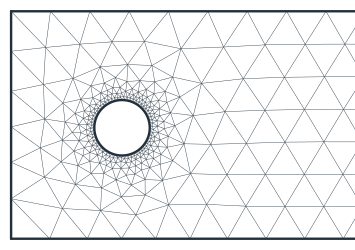
Boundary conditions then refer to the names, for example ngs.H1(mesh, dirichlet="inlet|wall|cyl"), and the mesh is fine around the cylinder because of its maxh (Figure 3).
In the OpenCASCADE export
The names, colors and mesh sizes are written into the OpenCASCADE shape, where netgen and other tools read them. The exported shape carries the face’s name, and every edge carries its name and its maxh:
[9]:
shape = fluid.ToOCCShape()
print(shape.name, len(shape.edges), "edges")
for name, maxh in sorted({(e.name, e.maxh) for e in shape.edges}, key=str):
    print(name, "maxh", maxh if maxh < 1e90 else "none")
fluid 5 edges
cyl maxh 0.005
inlet maxh none
outflow maxh none
wall maxh none
The cleanup steps of the export (see Defeaturing) keep the properties, and merged edges keep the name of the first edge and the smaller maxh.
Property |
Set on |
netgen reads it as |
|---|---|---|
|
Face |
The material |
|
Edge |
The boundary name |
|
Vertex |
The point name ( |
|
Face, edge, vertex |
The local mesh size |
|
Edge, vertex |
Geometric refinement towards it |
|
Face, edge |
The color in the webgui |