Wires and faces
A wire is one chain of edges, open or closed. It never crosses or overlaps itself, never branches, and has no inside or outside. A face is a region bounded by closed loops, and a loop inside another loop is a hole. See Objects in planex2d for the exact definitions.
[1]:
import math
import planex as px
A wire from edges: a D-shaft
The example is a D-shaft of radius 10 with a flat 8 from the axis (Figure 1). Its wire consists of an arc the long way round and the flat. px.Wire(edges) joins the edges into one wire, whose two vertices are marked (a). The edges may come in any order, but they must form exactly one chain. The face of the wire is the cross-section of the shaft (b). For loose edges that form several chains or cross each other, px.Wires(edges) cuts them and returns a list of wires.
[3]:
radius, flat = 10.0, 8.0
half = math.sqrt(radius**2 - flat**2)
arc = px.Arc((flat, half), (flat, -half), center=(0, 0))
cut = px.Line((flat, -half), (flat, half))
shaft = px.Wire([arc, cut])
section = shaft.Face()
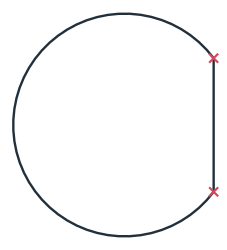
(a) The wire: arc and flat
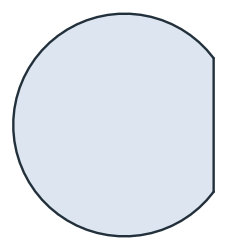
(b) Its face
The exact length and area follow from the circular segment that the flat cuts off, with the half angle acos(flat / radius):
[5]:
angle = math.acos(flat / radius)
print("closed:", shaft.IsClosed())
print("length", shaft.mass, "exact", 2 * radius * (math.pi - angle) + 2 * half)
print("area", section.mass, "exact", math.pi * radius**2 - (radius**2 * angle - flat * half))
closed: True
length 61.96183089593018 exact 61.96183089593018
area 297.8091544796509 exact 297.8091544796509
Holes by nesting: a cover plate
The example is a cover plate of 120 × 80 with a slot-shaped window and four screw holes of diameter 5.5, drawn as six separate loops (Figure 2a). px.Face determines which loop lies inside which. The window and the screw holes lie inside the outline, so they become its holes (Figure 2b).
[6]:
outline = px.QuickSketch().RectangleC(120, 80).Wire()
window = px.QuickSketch((-25, 0)).Slot(50, 30).Wire()
holes = [px.Circle((x, y), 2.75) for x in (-52, 52) for y in (-32, 32)]
cover = px.Face([outline, window, *holes])
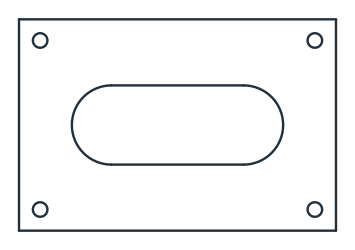
(a) Six loops
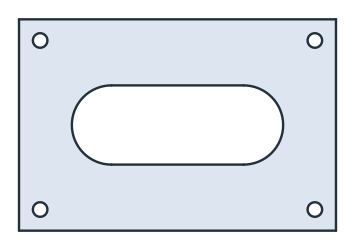
(b) The face
The area is the plate minus the window, a 50 × 30 rectangle with two half circles of radius 15, and the four holes:
[8]:
print("area", cover.mass, "exact", 120 * 80 - (50 * 30 + math.pi * 15**2) - 4 * math.pi * 2.75**2)
area 7298.108475171204 exact 7298.108475171205
Back to wires
The loops of the face are its wires. Sorted by length, the outline comes first with 2 · (120 + 80), followed by the window with 2 · 50 + 30π.
[9]:
loops = sorted((loop.mass for loop in cover.wires), reverse=True)
print("outline", loops[0], "exact", 2 * (120 + 80))
print("window", loops[1], "exact", 2 * 50 + math.pi * 30)
outline 400.0 exact 400
window 194.2477796076938 exact 194.2477796076938
Results with several regions, and collections of parts, are described in Faces, shapes and compounds.