STEP and BREP
STEP is the format in which CAD programs exchange geometry, and BREP is OpenCASCADE’s own. planex2d writes and reads planar STEP and BREP files itself, without OpenCASCADE. They hold faces and wires on any plane in 3D, and STEP files also hold the names of faces, edges and vertices, the colors of the faces, and the mesh sizes that netgen uses. The files take the form of OpenCASCADE’s own export, so netgen and OpenCASCADE read them as they read their own. Curved faces and solids remain
OpenCASCADE’s, and px.Intersect3d and px.Project give their planar sections and projections.
Call |
What it does |
|---|---|
|
Writes a face, shape, wire, sketch or compound, each part of a compound as a part of the file. |
|
Reads the planar parts of a file, one part as that object and several as a compound. |
|
The same as BREP, without names or other properties. |
|
Reads the planar parts of a BREP file. |
[1]:
import netgen.occ as occ
import planex as px
A part on an inclined plane
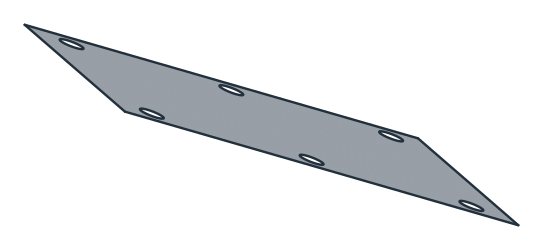
The example is the cover of an inspection opening, 160 × 100 mm with six bolt holes of diameter 9, in the wall of a hopper that slopes at 45°. It is drawn on the plane of the wall, in millimeter numbers. The outline is named “seal” and the holes “bolt”, and the cover has a name, a color and a mesh size (Figure 1). Since its numbers are millimeters, it is written with unit=px.mm and scale=1, a file that counts in millimeters with the numbers as they are (see the section on units below).
[3]:
wall = px.Plane(origin=(0, 0, 100), normal=(0, -1, 1))
sketch = px.QuickSketch(wall).RectangleC(160, 100, name="seal")
for x in (-65, 0, 65):
    for y in (-40, 40):
        sketch.Circle((x, y), 4.5, name="bolt")
cover = sketch.Face()
cover.name = "cover"
cover.col = (0.55, 0.7, 0.85)
cover.maxh = 10
cover.WriteStep("cover.step", unit=px.mm, scale=1)
FromStep reads the cover back as a face on its plane, with its names, its color and its mesh size. It returns meters by default, and scale=1 keeps the file’s millimeter numbers, so the cover comes back as it was drawn. Its points pass through 3D coordinates in the file, so on an inclined plane its area comes back to rounding:
[5]:
back = px.FromStep("cover.step", scale=1)
print(type(back).__name__, back.name, back.col, back.maxh, sorted({e.name for e in back.edges}))
print("normal", back.Normal(), "written", cover.Normal())
print("area", back.mass, "written", cover.mass)
Face cover [0.55, 0.7, 0.85, 1.0] 10.0 ['bolt', 'seal']
normal (0.0, -0.7071067811865476, 0.7071067811865476) written (0.0, -0.7071067811865476, 0.7071067811865476)
area 15618.296492588843 written 15618.296492588841
The file is an ordinary STEP file. netgen reads it through OpenCASCADE, in millimeters, with the names of the face and its edges:
[6]:
shape = occ.OCCGeometry("cover.step").shape
print([f.name for f in shape.faces], sorted({e.name for e in shape.edges}))
['cover'] ['bolt', 'seal']
Several parts
A compound is written as one part of the file per object, and FromStep returns the parts as they were written, each on its own plane, with nothing glued across them. The example adds the gasket under the cover, a frame 22 wide with the same bolt holes, made as the cover less its middle. Cover and gasket overlap, which a shape could not hold without cutting them into common pieces.
[7]:
gasket = cover - px.QuickSketch(wall).RectangleC(116, 56).Face()
gasket.name = "gasket"
px.Compound([cover, gasket]).WriteStep("assembly.step", unit=px.mm, scale=1)
parts = px.FromStep("assembly.step", scale=1)
print(type(parts).__name__, [type(p).__name__ for p in parts], [p.name for p in parts])
print("areas", [p.mass for p in parts], "written", [cover.mass, gasket.mass])
Compound ['Face', 'Shape'] ['cover', 'gasket']
areas [15618.296492588843, 9122.296492588841] written [15618.296492588841, 9122.296492588841]
Files from other programs
In a file from another program, each top-level shape is a part, whether a solid, a shell, a face or a set of curves. Lines, arcs, circles, ellipses and B-splines are read exactly. The example is the top face of a box of 80 × 60 × 20, made with netgen.occ and written by OpenCASCADE, which writes millimeters. FromStep converts it into meters, so the lid of 80 × 60 mm has an area of 0.0048 m²:
[8]:
box = occ.Box(occ.Pnt(0, 0, 0), occ.Pnt(80, 60, 20))
lid = box.faces.Max(occ.Z)
lid.name = "lid"
lid.WriteStep("lid.step")
top = px.FromStep("lid.step")
print(type(top).__name__, top.name, top.mass, top.Normal())
Shape lid 0.0048 (0.0, 0.0, 1.0)
A part that does not lie in one plane, such as the whole box, raises a ValueError:
[9]:
box.WriteStep("box.step")
try:
    px.FromStep("box.step")
except ValueError as e:
    print(e)
FromStep: the faces of a part lie on several planes; netgen.occ reads the file (OCCGeometry(path).shape), px.Intersect3d(plane, shape) cuts a section from it, px.Project(shape, plane) projects it
For such parts, px.Intersect3d(plane, shape) gives the section with a plane and px.Project(shape, plane) the projection onto it, both as planex2d geometry. See Sketching on and projecting 3D geometry for details.
Units
A STEP file names the unit it counts in. WriteStep(obj, path, unit=px.m, scale=px.Auto) writes the file in unit, which has to be a unit that STEP names, the meter with an SI prefix (px.m, px.cm, px.mm, px.um), the inch, the foot or the mil. scale is what the model’s numbers are multiplied by:
px.Auto, the default, takes the model’s numbers as meters, as everywhere in planex2d, and converts them intounit. A model drawn with the factors, such as160 * px.mm, goes into a millimeter file withunit=px.mm.scale=1writes the numbers as they are, for a model drawn in plain millimeter numbers, as the cover above.
FromStep(path, unit=px.Auto, scale=px.Auto) returns meters, converted from the unit the file names. scale=1 keeps the file’s numbers, and unit= replaces the unit the file names. The mesh sizes are scaled with the coordinates:
[10]:
in_meters = px.FromStep("cover.step")
print("area", in_meters.mass, "m², maxh", in_meters.maxh, "m")
area 0.015618296492588838 m², maxh 0.01 m
netgen reads every STEP file in millimeters. A model in millimeter numbers written without unit= and scale= is taken as meters, so netgen would read the cover as 160 m wide.
Export options
On the way out, WriteStep cleans the edges as the export to OpenCASCADE does, with the same options, such as fit_arcs and remove_edges_smaller. See Export options for details.
BREP
WriteBrep and px.FromBrep follow the same rules as STEP. They take planar faces and wires on any plane, write one part of the file per object, keep the parts of a compound apart, and raise an error for a part that does not lie in one plane. BREP carries no names, colors or mesh sizes, and no unit, so the numbers are written and read as they are, multiplied by scale= when it is given. The example writes the cover and its gasket again, which come back without their names:
[11]:
px.Compound([cover, gasket]).WriteBrep("assembly.brep")
parts = px.FromBrep("assembly.brep")
print([type(p).__name__ for p in parts], [p.name for p in parts])
print("areas", [p.mass for p in parts], "written", [cover.mass, gasket.mass])
['Face', 'Face'] [None, None]
areas [15618.296492588843, 9122.296492588841] written [15618.296492588841, 9122.296492588841]
See Files for the other formats.