Chain link plate
A chain link plate joins two pins of a roller chain. It has two eyes around the pin holes and a waist between them whose flanks are arcs tangent to both eyes. Model the plate from the drawing in planex2d or in any CAD system, then check its area and centroid against the values at the end of the page. A solution in planex2d follows.

[1]:
import math
import planex as px
The circles
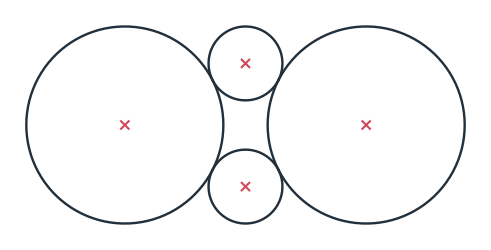
The plate is drawn on four circles, the two eyes, of radius 15 and 50 apart, and the two flanks, of radius 40, each tangent to both eyes, one above the axis and one below it. reverse=True picks the flank below. With auto_constraint=True, the flanks stay tangent to the eyes when a dimension changes (Figure 1).
[3]:
plate = px.Sketch(auto_constraint=True)
plate.Circle(15, id="left_eye")
plate.Circle(15, center=(50, 0), id="right_eye")
plate.Circle(40, id="upper_flank", tangent=("left_eye", "right_eye"))
plate.Circle(40, id="lower_flank", tangent=("left_eye", "right_eye"), reverse=True)
print("upper flank center", tuple(round(v, 3) for v in plate.Location("upper_flank.center")))
upper flank center (25.0, 48.99)
Trimming
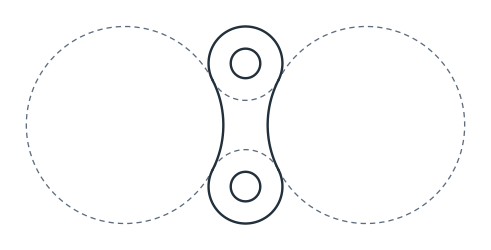
Each circle is cut where it touches the others, and Trim turns the piece nearest to a point into construction. That is the inner piece of each eye, toward the other eye, and the outer piece of each flank, away from the plate. What stays is the outline. The pin holes of 12 go around the centers of the eyes (Figure 2).
[5]:
plate.Trim(("left_eye", (20, 0)))  # the piece nearest to (20, 0), the inner one, becomes construction
plate.Trim(("right_eye", (30, 0)))
plate.Trim(("upper_flank", (25, 100)))
plate.Trim(("lower_flank", (25, -100)))
plate.Circle(6, concentric="left_eye", id="left_hole")
plate.Circle(6, concentric="right_eye", id="right_hole");
The dimensions
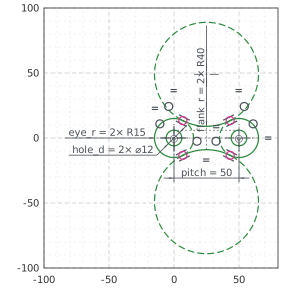
The left eye’s center is the origin, and the right eye’s center lies on the horizontal axis. The second eye, the second flank and the second hole are equal to the first ones, so the sketch carries each size once, as the drawing gives it. With these, nothing in the sketch is left free (Figure 3):
[7]:
plate.Constrain("left_eye.center", "origin", px.Coincident)
plate.Constrain("right_eye.center", "H", px.Coincident)
plate.Constrain("left_eye.center", "right_eye.center", px.Distance, 50, id="pitch")
plate.Constrain("left_eye", px.Radius, 15, id="eye_r")
plate.Constrain("right_eye", "left_eye", px.Equal)
plate.Constrain("upper_flank", px.Radius, 40, id="flank_r")
plate.Constrain("lower_flank", "upper_flank", px.Equal)
plate.Constrain("left_hole", px.Diameter, 12, id="hole_d")
plate.Constrain("right_hole", "left_hole", px.Equal)
print("status", plate.status, "| degrees of freedom", plate.dof)
status full | degrees of freedom 0
The checks
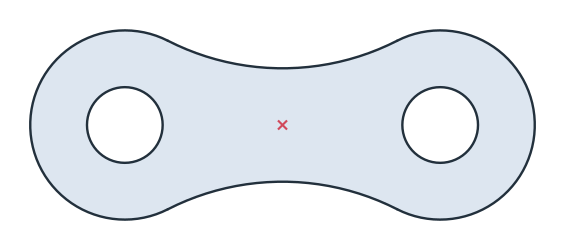
These are the area and the centroid of the plate, with the left eye’s center at the origin, to compare with your own model. The plate is symmetric about the axis and about the middle between the eyes, so its centroid lies at that middle (Figure 4):
[9]:
face = plate.Face()
c = face.center
print("area", round(face.mass, 2), "mm²")
print("centroid", round(c[0], 2), "on the axis, off it by", round(abs(c[1]), 6))
area 1632.53 mm²
centroid 25.0 on the axis, off it by 0.0
The plate as DXF in millimeters, for another CAD system or a laser cutter:
[11]:
plate.WriteDXF("chain_plate.dxf", unit=px.mm, scale=1) # scale=1: the numbers as they are
The plate as DXF: chain_plate.dxf