Tangents
A line or an arc can be given what it touches instead of where it ends. tangent= names the circle, arc or spline, and planex2d computes the touch point, so no point of a tangent has to be worked out by hand. With two targets, as in tangent=("a", "b"), a line touches both.
[1]:
import math
import planex as px
A link from two bosses
The example is a link, a flat lever with a boss of radius 1.5 at one end and a boss of radius 1 at the other, 6 apart (Figure 1). The bosses are drawn as construction circles. Two lines are tangent to both, the upper one and, with reverse=True, the lower one. The ends of the link are arcs on the bosses’ circles, from one line to the other, and each boss has a hole. Face() then makes the face of the link from the drawn edges (b).
[3]:
link = px.QuickSketch()
link.Circle(0, 0, 1.5, id="boss1", construction=True)
link.Circle(6, 0, 1.0, id="boss2", construction=True)
link.Line(tangent=("boss1", "boss2"), id="upper")
link.Line(tangent=("boss1", "boss2"), reverse=True, id="lower")
link.Arc("lower", "upper", congruent="boss2", id="end2")
link.Arc("upper", "lower", congruent="boss1", id="end1")
link.Circle(0, 0, 0.6, id="hole1").Circle(6, 0, 0.4, id="hole2")
face = link.Face()
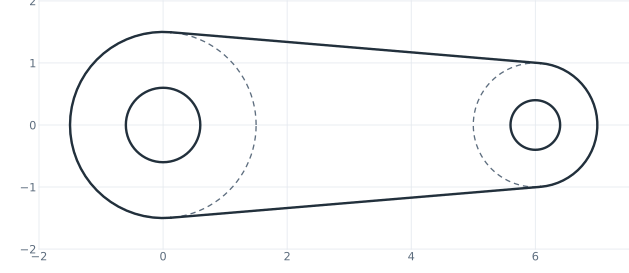
(a) The sketch
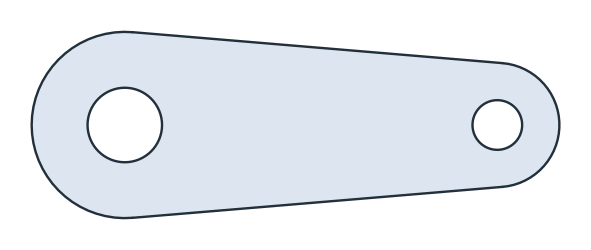
(b) The face
The area of the link is the area of the belt around two circles, which has a closed form, minus the two holes:
[5]:
r1, r2, d = 1.5, 1.0, 6.0
alpha = math.asin((r1 - r2) / d)
belt = (r1 + r2) * math.sqrt(d * d - (r1 - r2) ** 2) + r1**2 * (math.pi / 2 + alpha) + r2**2 * (math.pi / 2 - alpha)
print("area", face.mass, "exact", belt - math.pi * (0.6**2 + 0.4**2))
area 18.523573419356737 exact 18.523573419356737
From a point, along a circle, to a spline
A tangent can start at a point, leave a circle, or touch a spline (Figure 2).
From a point,
tangent="circle"draws one of the two tangents to the circle, andreverse=Truethe other (a).From a point on a circle,
Line(3, tangent="c")leaves the circle along its tangent there, 3 long (b).From a point outside a spline,
tangent="curve"touches the spline (c).
Where a line could touch a target at several points, a point given with the target, as in tangent=("curve", p), selects the touch point nearest to p.
[6]:
point = px.QuickSketch().Circle(5, 0, 1.5, id="circle", construction=True)
point.Move((0, 0)).Line(tangent="circle")
point.Move((0, 0)).Line(tangent="circle", reverse=True)

leaving = px.QuickSketch().Circle(0, 0, 1, id="c")
leaving.Move((0, 1)).Line(3, tangent="c")

spline = px.QuickSketch((0, 2)).Spline([(1, 1), (2, 0.8), (3, 1.2), (4, 2)], id="curve")
spline.Move((2, -1)).Line(tangent="curve");
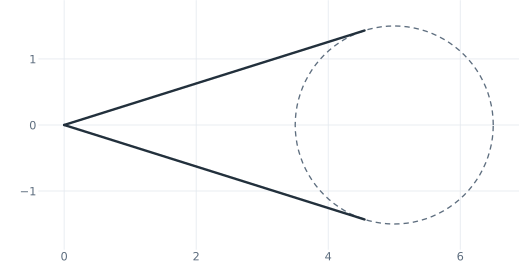
(a) From a point
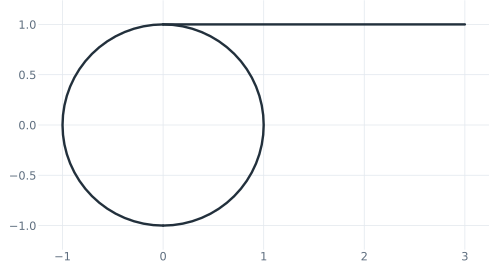
(b) Leaving a circle
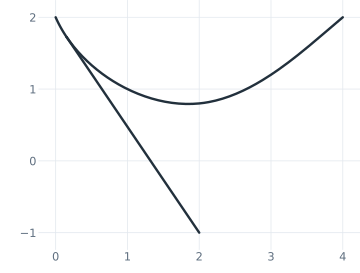
(c) Touching a spline
An arc can be tangent too. See Arcs from references for arcs that touch two edges, and Choosing between solutions for picking one of several tangents.