Parametric curves
sk.Curve((h, v), (t0, t1)) draws the curve that the point \((h(t), v(t))\) traces as the parameter \(t\) runs from \(t_0\) to \(t_1\), in either form of px.Curve:
Call |
The point |
|---|---|
|
Two expression strings in \(t\). In a constraint sketch, they and \(t_0\) and \(t_1\) may name driving dimensions, and the curve follows when a dimension changes |
|
A Python function \(f(t)\) that returns the point \((h, v)\) |
planex2d fits a spline to the formula itself, to about 1e-12 of the curve’s size, so the curve is exact to rounding, where a spline through points is only as close as its points allow. The expressions use numbers, pi, + − * / ^ and the usual functions, with angles in degrees, \(t\) too where it is an angle. In a px.Sketch, the curve is a rigid body, fixed where its formula puts it. See Parametric curves for both forms and px.Curve outside a sketch, and
Curves driven by dimensions for placing a curve with constraints.
[1]:
import math

import planex as px
An involute
The flank of a gear tooth is the involute of the gear’s base circle, the path of the end of a string unwound from the circle. The example is the involute of a base circle of radius \(r_b\), unwound by 40°. The base circle is a construction circle whose radius is the dimension rb, and the formula names rb:
with \(t\) in radians where it multiplies, t*pi/180 in the formula. The curve lies where its formula puts it, starting on the base circle (Figure 1). Unwound by the angle \(\theta\), the involute is \(r_b \theta^2/2\) long, which the print compares:
[3]:
gear = px.Sketch()
gear.Circle(20, center=(0, 0), construction=True, id="base")
gear.Constrain("base.center", "origin", px.Coincident)
gear.Constrain("base", px.Radius, 20, id="rb")
gear.Curve(("rb*(cos(t) + t*pi/180*sin(t))", "rb*(sin(t) - t*pi/180*cos(t))"), (0, 40), id="flank")
print("status", gear.status, "| length", gear.Measure("flank")["length"], "| rb θ²/2", 20 * math.radians(40) ** 2 / 2)
status full | length 4.873878716587327 | rb θ²/2 4.873878716587337
The formula stays with the sketch. When Update changes rb, the curve is fitted again to the new base circle. With \(r_b = 25\), the involute starts on the larger circle and is longer by the factor 25/20:
[4]:
small = gear.Copy()
gear.Update({"rb": 25})
print("start", gear.Location("flank.start")[:2], "| length", gear.Measure("flank")["length"],
      "| rb θ²/2", 25 * math.radians(40) ** 2 / 2)
start (25.0, -9.330173470410995e-26) | length 6.092348395734162 | rb θ²/2 6.092348395734171
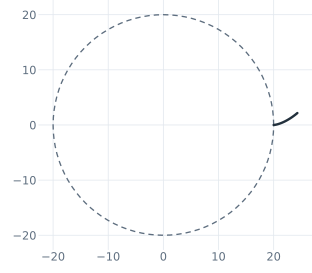
(a) r_b = 20
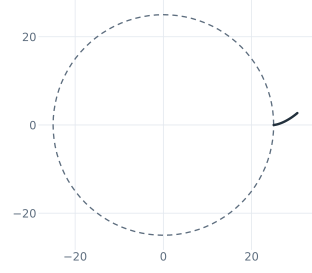
(b) r_b = 25
An airfoil from its formula
The NACA 0012 airfoil of Splines has a thickness formula in the chord position \(x\), which the page there samples at 80 points. Its root \(\sqrt{x}\) makes a curve in \(x\) steep at the leading edge, so the formula runs in \(t\) with cosine spacing instead, \(h = c\,(1 - \cos t)/2\) for \(t\) from 0° to 180°, and \(v\) uses \(h\), the other coordinate at the same \(t\). The upper side is one curve from the leading edge to the trailing edge,
and Mirrored copies it about the horizontal axis as the lower side (see Symmetry for mirroring). The sketch is a QuickSketch with plain numbers in its formulas (Figure 2). Its area is compared with the integral of the thickness formula:
[6]:
thickness = "60*(0.2969*sqrt(h/100) - 0.1260*(h/100) - 0.3516*(h/100)^2 + 0.2843*(h/100)^3 - 0.1036*(h/100)^4)"
wing = px.QuickSketch().Curve(("100*(1 - cos(t))/2", thickness), (0, 180), id="upper")
wing.Mirrored(["upper"], "H", id="lower")
profile = wing.Face()
exact = 12000 * (0.2969 * 2 / 3 - 0.1260 / 2 - 0.3516 / 3 + 0.2843 / 4 - 0.1036 / 5)
print("area", profile.mass, "exact", exact, "relative", (profile.mass - exact) / exact)
area 817.0600000003153 exact 817.0599999999997 relative 3.8625640897266565e-13
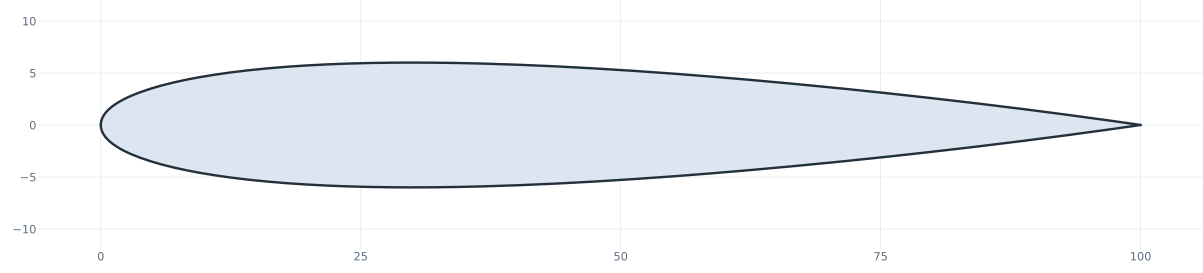
The spline through 80 points on the Splines page has an area within about 1e-6 of the formula’s. The curve from the formula is within about 4e-13.
A closed curve
A curve whose end meets its start is closed, one edge with no vertex, and smooth all around where the formula is periodic. The example is the cam of Splines, its radius \(r = R + s\,(1 - \cos t)/2\) with \(R = 20\) and the lift \(s = 8\) over a full turn, with a bore of 10 (Figure 3). Its area is compared with \(\pi\,(R + s/2)^2 + \pi s^2/8\) less the bore:
[8]:
lift = "(20 + 8*(1 - cos(t))/2)"
cam = px.QuickSketch().Curve((lift + "*cos(t)", lift + "*sin(t)"), (0, 360), id="lift").Circle(5, center=(0, 0))
disc = cam.Face()
exact = math.pi * 24**2 + math.pi * 8**2 / 8 - math.pi * 5**2
print("edges", len(disc.edges), "| area", disc.mass, "exact", exact, "relative", (disc.mass - exact) / exact)
edges 2 | area 1756.1502933570428 exact 1756.1502933566942 relative 1.9848178471572162e-13
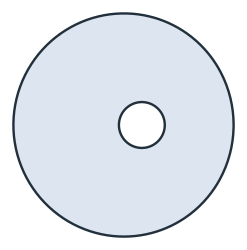
See Splines for splines through points, Parametric curves for px.Curve and Python functions, and Changing dimensions for Update.