Objects in planex2d
Most planex2d code works with three objects. A wire is a chain of edges, a face is a region with holes, and a shape is several faces and wires that share their edges. A sketch draws them, Boolean operations combine them, and they can be exported to other tools and file formats, for example OpenCASCADE, netgen, gmsh, shapely, DXF, STEP or KiCad. See Files for details.
Object |
What it is |
How you get one |
|---|---|---|
Line, Arc, Circle |
Exact straight and circular edges, each returned as a wire of one edge. |
|
Spline |
A smooth edge through points, or a B-spline from CAD data. |
|
Wire |
One chain of edges, open or closed, that does not cross, overlap or branch. |
|
Face |
One connected region: an outline and its holes. |
|
Shape |
Faces and wires cut against each other, with shared edges. |
Boolean operations, |
Compound |
A plain collection of objects, nothing cut or merged. |
|
Plane |
Where an object lies in 3D: an origin and two axes. |
|
QuickSketch |
A drawing without a solver. |
|
Sketch |
A drawing with constraints and dimensions, solved after every change. |
|
Wires, faces and shapes have names, colors and mesh sizes, which travel with the geometry through Boolean operations and export. They also have measurements such as mass (the length of a wire, the area of a face), center and bounding_box. A compound has a bounding box, but no properties or measurements of its own. See Names and colors and Measuring for details.
Geometry has no unit: a number is a length in whatever unit you choose. See Units for details.
Wires
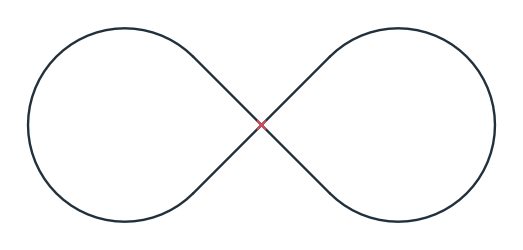
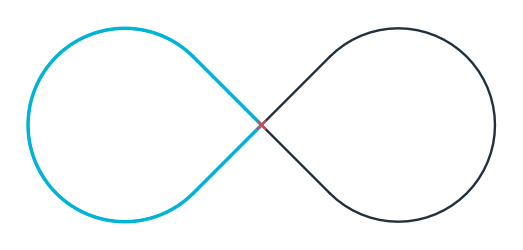
A wire is one chain of edges. It never crosses or overlaps itself, and it never branches, so a T shape consists of two wires. The example is a figure eight drawn in one stroke: two lines that cross in the middle, each followed by an arc that continues it tangentially (Figure 1a). Because the stroke crosses itself, planex2d cuts it at the crossing and returns two wires (Figure 1b). Each wire is a closed loop of two lines and an arc.
[1]:
import planex as px
[3]:
eight = px.QuickSketch((-10, -10))
eight.Line((10, 10)).Arc((10, -10)).Line((-10, 10)).Arc((-10, -10))
wires = eight.Wires()
print(len(wires), "wires")
2 wires
(a) Drawn in one stroke, crossing itself
(b) Two wires, one in cyan
The edges of a wire meet only at their ends, and each end is the exact start of the next edge. A wire has no inside: it becomes a region only when you make a face of it.
Faces
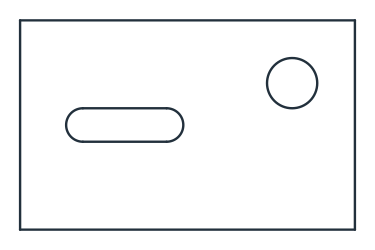
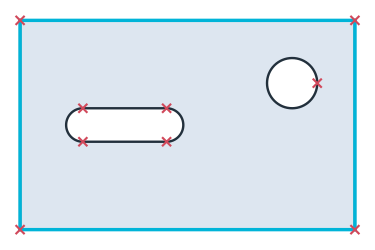
A face is one connected region. Its outline and its holes are loops, and planex2d decides which loop is a hole from how the loops nest, not from the direction they were drawn in. The example is a plate with a slot and a hole, made of three separate loops (Figure 2a). The face takes the outline as its boundary and the other two as holes (Figure 2b, with the outline in cyan).
[5]:
plate = px.QuickSketch().RectangleC(80, 50).Wire()
slot = px.QuickSketch((-25, 0)).Slot(20, 8).Wire()
hole = px.QuickSketch().Circle(25, 10, 6).Wire()
face = px.Face([plate, slot, hole])
print(len(face.wires), "loops,", len(face.inner), "holes")
3 loops, 2 holes
(a) Three loops
(b) The face: the outline and two holes
A face is clean by construction. Its edges meet only at shared vertices, which are marked in Figure 2b, so it has no crossings, overlaps, loose edges or edges of zero length. Every Boolean operation can use it as it is.
Shapes and compounds
A shape holds several faces and wires that have been cut against each other. Where two faces touch, they share one edge. A compound only collects objects: nothing in it is cut or merged, so its parts may overlap and may even lie on different planes.
The example is two plates that touch along part of an edge, with a disc lying over both. As a compound, they stay three separate parts (Figure 3a). px.Glue makes a shape of the two plates: each keeps its own face, but the stretch where they touch becomes one edge that both faces share (Figure 3b, in cyan). px.Unify merges all three into one face (Figure 3c).
[7]:
left = px.QuickSketch((0, 0)).Rectangle(40, 30).Face()
right = px.QuickSketch((40, 0)).Rectangle(30, 20).Face()
disc = px.QuickSketch().Circle(40, 25, 10).Face()

parts = px.Compound([left, right, disc])
glued = px.Glue([left, right])
united = px.Unify([left, right, disc])
print(len(parts), "parts,", len(glued.faces), "faces glued,", len(united.faces), "face united")
3 parts, 2 faces glued, 1 face united
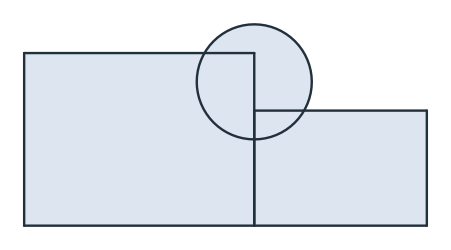
(a) A compound: three parts
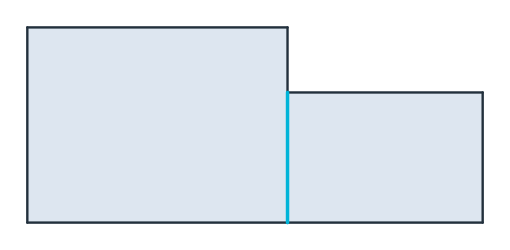
(b) Two plates glued: one shared edge
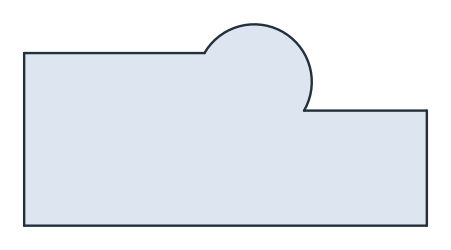
(c) United: one face
Every Boolean operation returns a shape, even when the result is a single face; shape.Face() returns that face. When glued parts overlap, the overlap becomes a face of its own: two overlapping parts give three faces, one for each part alone and one for the overlap. See Faces, shapes and compounds for details.
The operators +, - and * do not work on a compound, and neither do px.Intersect and px.Subtract. px.Unify and px.Glue accept a compound and use its parts.