Fork lever
A fork lever turns on a shaft through its hub and drives a link held in the fork at its other end by a pin. The fork is a slot through the middle of the lever’s thickness, cut in from the end and stopped by an arc around the hub, so it is a pocket that does not go through the part. Model the lever from the drawing in planex2d or in any CAD system, then check its volume, mass and center of mass against the values at the end of the page. A solution in planex2d follows.

[1]:
import math
import netgen.occ as occ
import planex as px
The outline
The outline is the lever’s plan, sketched in the xy plane, which becomes the middle plane of its thickness. It is one chain from the bottom of the hub, a line, a half circle around the eye, a line back and a half circle around the hub. With auto_constraint=True, each joint of the chain becomes a tangency. The chain’s two ends meet at the start, where a coincidence and a tangency close it. The hub’s center is the origin, the eye’s center lies on the horizontal axis 100 away, and the radii
complete the sketch (Figure 1):
[3]:
lever = px.Sketch(auto_constraint=True)
lever.Move((0, -22), dir=(1, 0)).Line(100, id="lower").Arc(16, 180, id="eye").Line(100, id="upper").Arc(22, 180, id="hub")
lever.Constrain("hub.end", "lower.start", px.Coincident)
lever.Constrain("hub", "lower", px.Tangent)
lever.Constrain("hub.center", "origin", px.Coincident)
lever.Constrain("eye.center", "H", px.Coincident)
lever.Constrain("hub.center", "eye.center", px.Distance, 100, id="length")
lever.Constrain("hub", px.Radius, 22, id="hub_r")
lever.Constrain("eye", px.Radius, 16, id="eye_r")
print("status", lever.status, "| degrees of freedom", lever.dof)
status full | degrees of freedom 0
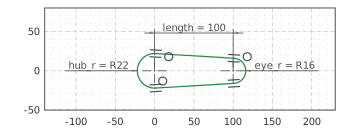
The lever
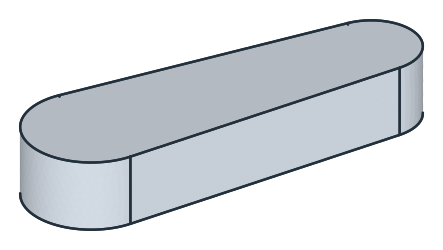
px.Pad extrudes the outline 12 to both sides of the xy plane, 24 in all, so that the plane lies in the middle of the thickness (Figure 2):
[5]:
block = px.Pad(lever, 12, length2=12)
The hub
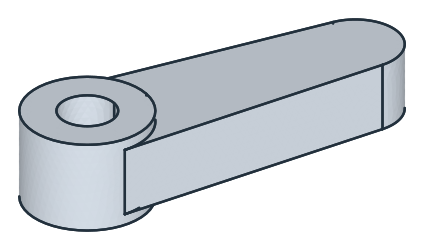
The hub stands 4 proud of both faces. A boss of 44, the hub’s own diameter, is sketched on the top face, the face highest in \(z\), and another on the bottom face, lowest in \(z\). Each is padded 4 out of its face, along the face’s normal, and fused with +. The bore of 20 is sketched on the top boss and cut through everything with until=px.last (Figure 3):
[7]:
for face in (block.faces.Max(occ.Z), block.faces.Min(occ.Z)):
    boss = px.Sketch(face)
    boss.Circle(44 / 2, id="boss")
    boss.Constrain("boss.center", "origin", px.Coincident)
    boss.Constrain("boss", px.Diameter, 44, id="boss_d")
    block = block + px.Pad(boss, 4)
bore = px.Sketch(block.faces.Max(occ.Z))
bore.Circle(20 / 2, id="bore")
bore.Constrain("bore.center", "origin", px.Coincident)
bore.Constrain("bore", px.Diameter, 20, id="bore_d")
block = px.Pocket(block, bore, until=px.last)  # through both bosses and the lever
The fork
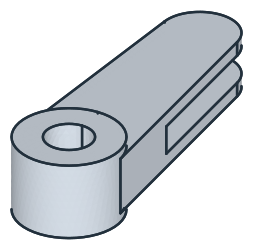
The fork’s slot, 12 wide, runs through the middle of the thickness from the eye’s end to an arc of radius 45 around the hub. Its profile is a region in the middle plane: a rectangle over the lever’s end less a disc of radius 45 around the hub, a Boolean subtraction of two faces. px.Pocket with length2 cuts 6 to each side of the plane, and only where the region meets the lever (Figure 4):
[9]:
region = px.QuickSketch().Move((0, -40)).Rectangle(140, 80).Face() - px.Face([px.Circle((0, 0), 45)])
block = px.Pocket(block, region, 6, length2=6)  # 6 to each side of the middle plane: a slot 12 wide
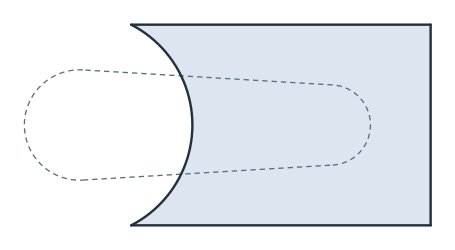
(a) The region of the slot in the middle plane
(b) The slot through the middle of the thickness
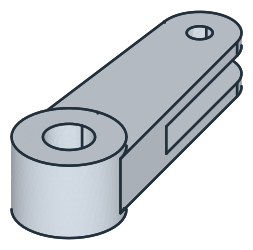
The pin hole of 10 goes through the eye, sketched on the top face, and until=px.last takes it through the upper cheek, across the slot and through the lower cheek (Figure 5):
[11]:
pin = px.Sketch(block.faces.Max(occ.Z))
pin.Circle(10 / 2, center=(100, 0), id="pin_hole")
pin.Constrain("pin_hole", px.Diameter, 10, id="pin_d")
pin.Constrain("pin_hole.center", "H", px.Coincident)
pin.Constrain("pin_hole.center", "origin", px.Distance, 100, id="pin_at")
block = px.Pocket(block, pin, until=px.last)
The checks
These are the volume, the mass in steel S235 (7.85 g/cm³) and the center of mass, with the origin at the hub’s center in the middle plane, to compare with your own model. The volume is the outline’s area times 24, plus the two bosses, less the bore through 32, less the slot, and less the pin hole through the two cheeks, 12 of the thickness. The slot’s area in plan is where the region and the outline overlap, their intersection *. The lever is symmetric about the middle plane and the plane
\(y = 0\), so its center of mass lies on the \(x\) axis:
[13]:
outline = lever.Face()
slot = (outline * region).mass  # the slot's area in plan
exact = outline.mass * 24 + 2 * math.pi * 22**2 * 4 - math.pi * 10**2 * 32 - slot * 12 - math.pi * 5**2 * 12
c = block.center
print("volume", round(block.mass, 1), "mm³, exact", round(exact, 1))
print("mass", round(block.mass * 7.85e-6, 3), "kg")
print("center of mass", round(c.x, 2), "from the hub's axis, off the x axis by", round(math.hypot(c.y, c.z), 6))
volume 91588.7 mm³, exact 91588.7
mass 0.719 kg
center of mass 31.41 from the hub's axis, off the x axis by 0.0
The lever as STEP, for another CAD system:
[14]:
block.WriteStep("fork_lever.step")
The lever as STEP: fork_lever.step