Inclined block
An inclined block holds a part at an angle to its base, such as a sensor that looks at a workpiece from the side. The part is screwed to the slope through a counterbored hole square to it, and the block is bolted down through two holes in its top. A sketch on the slope has the slope’s own plane, in which the global origin and axes are of no help: the counterbore is dimensioned from the slope’s edges. Model the block from the drawing in planex2d or in any CAD system, then check its volume, mass and center of mass against the values at the end of the page. A solution in planex2d follows.

[1]:
import math
import netgen.occ as occ
import planex as px
The profile
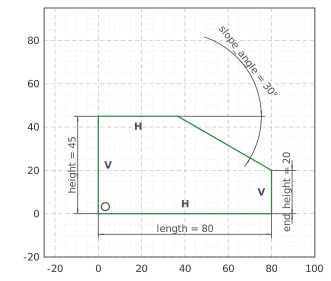
The profile is the front view, sketched in the front plane, the plane with its normal toward the viewer, \(-y\). It has \(x\) to the right and \(z\) up, with the origin at the block’s bottom left front corner. The outline runs from the origin along the bottom, up the right end, up the slope to the left, along the top and down the left end. With auto_constraint={"horizontal": True, "vertical": True}, the lines drawn level or plumb stay so. The slope and the top get names, which
the faces padded from them carry.
The block is 80 long and 45 high at its left end and 20 high at its right end. The slope falls from the top at 30°, the angle that px.Angle measures between the slope and the top, and the length of the top follows from these. With them, nothing in the sketch is left free (Figure 1):
[3]:
front = px.XZ
profile = px.Sketch(front, auto_constraint={"horizontal": True, "vertical": True})
profile.Line(80, id="bottom")
profile.Turn(90).Line(20, id="right_end")  # Turn(90) turns the pen left, Turn(-90) right
profile.Turn(60).Line(50, id="slope", name="slope")
profile.Turn(30).Line(37, id="top", name="top")
profile.Close(px.Vertical, id="left_end")  # drawn only roughly plumb: the flag holds it
profile.Constrain("bottom.start", "origin", px.Coincident)
profile.Constrain("bottom", px.Distance, 80, id="length")
profile.Constrain("left_end", px.Distance, 45, id="height")
profile.Constrain("right_end", px.Distance, 20, id="end_height")
profile.Constrain("slope", "top", px.Angle, 30, id="slope_angle")  # in degrees
print("status", profile.status, "| degrees of freedom", profile.dof)
print("length of the top", round(profile.Measure("top")["length"], 3), "| 80 - 25 / tan 30°", round(80 - 25 / math.tan(math.radians(30)), 3))
status full | degrees of freedom 0
length of the top 36.699 | 80 - 25 / tan 30° 36.699
The block
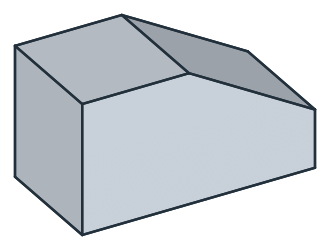
px.Pad extrudes the profile 40 deep, with reverse=True away from the viewer, so that the block lies behind the front plane, from \(y = 0\) to 40 (Figure 2):
[5]:
block = px.Pad(profile, 40, reverse=True)
print("volume", block.mass, "area × 40", profile.Face().mass * 40)
volume 122349.36490538903 area × 40 122349.36490538903
The counterbore
The counterbore is sketched on the slope. A sketch on a face takes the face’s plane, with the global origin projected onto it and \(x\) projected as its \(h\) axis, so on the slope \(h\) runs down the slope and the origin lies off the part:
[7]:
slope = block.faces["slope"][0]  # the one face of that name
counterbore = px.Sketch(slope)
print("(0, 0) lies at", counterbore.ToXYZ((0, 0)), "| (10, 0) at", counterbore.ToXYZ((10, 0)))
(0, 0) lies at (28.66025403784438, 0.0, 49.64101615137755) | (10, 0) at (37.320508075688764, 0.0, 44.64101615137755)
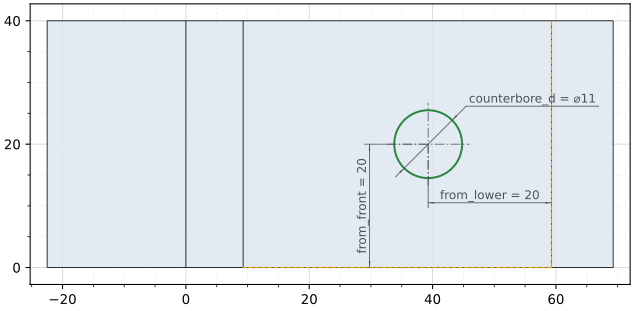
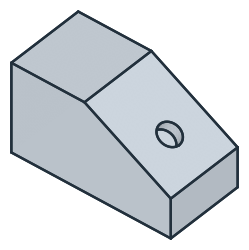
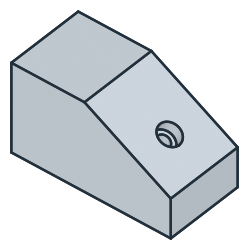
The counterbore is dimensioned from the slope’s edges, the lower one, lowest in \(z\), and the front one, lowest in \(y\), both projected into the sketch. The counterbore, 11 across, starts at the middle of the face, where ToHV gives the face’s center in the sketch’s coordinates. Its dimensions move it to 20 from the lower edge and 20 from the front edge. It is pocketed 6.5 deep, square to the slope (Figure 3):
[8]:
counterbore.Project(slope.edges.Min(occ.Z), id="lower_edge")
counterbore.Project(slope.edges.Min(occ.Y), id="front_edge")
counterbore.Circle(11 / 2, center=counterbore.ToHV(tuple(slope.center)), id="counterbore")  # the face's center, as (h, v)
counterbore.Constrain("counterbore", px.Diameter, 11, id="counterbore_d")
counterbore.Constrain("counterbore.center", "lower_edge.Edge.0", px.Distance, 20, id="from_lower")
counterbore.Constrain("counterbore.center", "front_edge.Edge.0", px.Distance, 20, id="from_front")
print("status", counterbore.status, "| degrees of freedom", counterbore.dof)
block = px.Pocket(block, counterbore, 6.5)  # 6.5 deep, against the face's normal: into the block
status full | degrees of freedom 0
(a) The counterbore on the slope, in the sketch's axes
(b) The counterbore in the slope
The hole for the screw, 6.6 across, goes through the counterbore’s center, square to the slope too, and until=px.last cuts it on down through the bottom (Figure 4):
[10]:
hole = px.Sketch(slope)
hole.Circle(6.6 / 2, center=counterbore.Location("counterbore.center"), id="hole")  # the solved center
hole.Constrain("hole", px.Diameter, 6.6, id="hole_d")
block = px.Pocket(block, hole, until=px.last)  # through to the last flat face it crosses
The holes in the top
The holes for the bolts, 9 across, are sketched on the top and dimensioned from its left and front edges. Both are 12 from the left end, the front one 10 from the front edge and the other 20 behind it (Figure 5):
[12]:
top = block.faces["top"][0]
holes = px.Sketch(top)
holes.Project(top.edges.Min(occ.X), id="left_edge")
holes.Project(top.edges.Min(occ.Y), id="front_edge")
holes.Circle(9 / 2, center=(10, 10), id="front_hole")
holes.Circle(9 / 2, center=(10, 30), id="back_hole")
holes.Constrain("front_hole", px.Diameter, 9, id="top_hole_d")
holes.Constrain("back_hole", "front_hole", px.Equal)
holes.Constrain("front_hole.center", "left_edge.Edge.0", px.Distance, 12, id="top_hole_x")
holes.Constrain("back_hole.center", "left_edge.Edge.0", px.Distance, 12)
holes.Constrain("front_hole.center", "front_edge.Edge.0", px.Distance, 10, id="top_hole_y")
holes.Constrain("front_hole.center", "back_hole.center", px.Distance, 20, id="top_spacing")
print("status", holes.status, "| degrees of freedom", holes.dof)
block = px.Pocket(block, holes, until=px.last)
status full | degrees of freedom 0
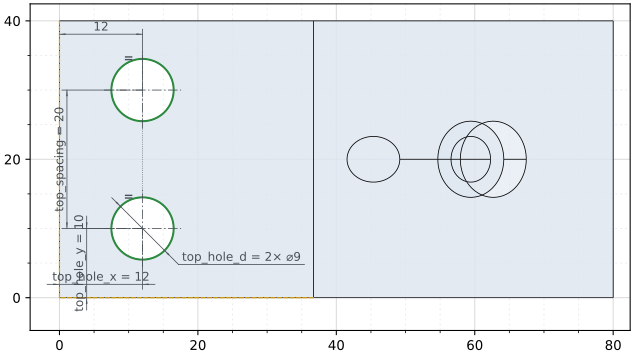
(a) The holes on the top, the block under it
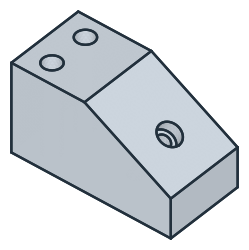
(b) Both holes through the block
The checks
These are the volume, the mass in steel S235 (7.85 g/cm³) and the center of mass, with the origin at the bottom left front corner, to compare with your own model. The volume is the profile’s area, the rectangle 80 by 45 less the triangle above the slope, times 40, less the holes. The screw hole’s axis meets the slope \(20 + 20 \sin 30^\circ\) above the bottom and runs at 30° to the vertical, so its length up to the slope is \((20 + 20 \sin 30^\circ) / \cos 30^\circ\), of which the counterbore takes 6.5:
[14]:
t = math.radians(30)
area = 80 * 45 - 25 * (25 / math.tan(t)) / 2
axis = (20 + 20 * math.sin(t)) / math.cos(t)
exact = area * 40 - 2 * math.pi * 4.5**2 * 45 - math.pi * 5.5**2 * 6.5 - math.pi * 3.3**2 * (axis - 6.5)
c = block.center
print("volume", round(block.mass, 1), "mm³, exact", round(exact, 1))
print("mass", round(block.mass * 7.85e-6, 3), "kg")
print("center of mass", tuple(round(v, 2) for v in (c.x, c.y, c.z)))
volume 115043.3 mm³, exact 115043.3
mass 0.903 kg
center of mass (36.37, 20.0, 19.89)
The block as STEP, for another CAD system:
[15]:
block.WriteStep("inclined_block.step")
The block as STEP: inclined_block.step