Crane hook
A crane hook carries its load in the throat, the round inside of the hook, and hangs from its shank. Its outline is a classic drafting exercise, a chain of arcs, each tangent to the next. Model the hook from the drawing in planex2d or in any CAD system, then check its area and centroid against the values at the end of the page. A solution in planex2d follows.

[1]:
import math
import planex as px
The construction circles
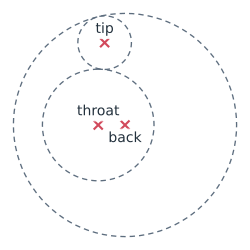
The hook is drawn on three circles:
the throat, 50 in diameter, which takes the load, with its center at the origin;
the back, of radius 50, with its center 12 below on the same vertical;
the tip, of radius 12, tangent to both.
They are construction circles, so they place the outline but are not part of it (Figure 1). With auto_constraint=True, every drawing helper also becomes a constraint: the tip circle stays tangent to the other two when a dimension changes.
[3]:
hook = px.Sketch(auto_constraint=True)
hook.Circle(25, id="throat", construction=True)
hook.Circle(50, center=(0, -12), id="back", construction=True)
hook.Circle(12, id="tip", construction=True, tangent=("throat", "back"))
print("tip center", tuple(round(v, 3) for v in hook.Location("tip.center")))
tip center (36.888, -2.875)
The outline
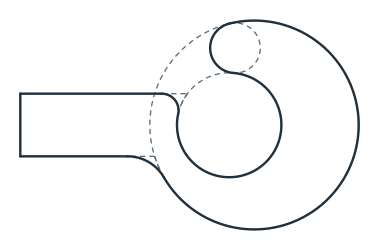
The outline starts at the top left of the shank, 30 wide and 100 above the throat’s center. The right side runs down to the throat, and the inner arc follows the throat almost all the way round, to the tip circle. It runs the other way round than an arc’s default, so it takes reverse=True. The point follows the tip circle over its top to the back, the outer arc follows the back around the belly, and Close draws the left side up to the start. Two fillets then blend the shank into the
hook, R 20 on the left and R 8 on the right (Figure 2).
[5]:
hook.Move((-15, 100)).Line((15, 100), id="top")
hook.Line("throat", angle=-90, id="right")  # straight down until it meets the throat circle
hook.Arc("tip", coincident="throat", reverse=True, id="inner")
hook.Arc("back", coincident="tip", id="point")
hook.Arc((-15, -12 + math.sqrt(50**2 - 15**2)), coincident="back", id="outer")
hook.Close(id="left")
hook.Fillet("outer.end", 20, id="flare")
hook.Fillet("right.end", 8, id="neck");
The dimensions
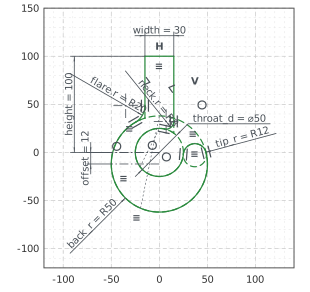
The sizes of the drawing become the sketch’s dimensions. The shank stays centered on the throat by its symmetry about the vertical axis, its top is horizontal and its left side vertical, which makes the right side vertical too. With these, nothing in the sketch is left free (Figure 3):
[7]:
hook.Constrain("throat.center", "origin", px.Coincident)
hook.Constrain("throat", px.Diameter, 50, id="throat_d")
hook.Constrain("back", px.Radius, 50, id="back_r")
hook.Constrain("tip", px.Radius, 12, id="tip_r")
hook.Constrain("back.center", "throat.center", px.Distance, 12, id="offset")
hook.Constrain("back.center", "V", px.Coincident)
hook.Constrain("top", px.Distance, 30, id="width")
hook.Constrain("top", "throat.center", px.Distance, 100, id="height")
hook.Constrain("left", "right", "V", px.SymmetricCarriers)
hook.Constrain("top", px.Horizontal)
hook.Constrain("left", px.Vertical)
print("status", hook.status, "| degrees of freedom", hook.dof)
status full | degrees of freedom 0
The checks
These are the area and the centroid of the hook, with the throat’s center at the origin, to compare with your own model (Figure 4):
[9]:
face = hook.Face()
print("area", round(face.mass, 2), "mm²")
print("centroid", tuple(round(v, 2) for v in face.center[:2]))
area 7256.82 mm²
centroid (-2.09, 3.53)
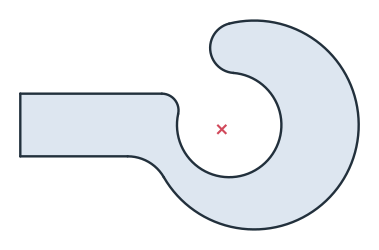
The outline as DXF in millimeters, for another CAD system or a laser cutter:
[11]:
hook.WriteDXF("crane_hook.dxf", unit=px.mm, scale=1) # scale=1: the numbers as they are
The outline as DXF: crane_hook.dxf