Wall hanger
A wall hanger hangs a part on two screws in a wall. Their heads pass through the round holes of its keyholes, and the plate drops onto their shanks in the narrow slots above. The plate is a rectangle with rounded corners, and the keyholes are a profile tool of the sketch. Model the hanger from the drawing in planex2d or in any CAD system, then check its area and centroid against the values at the end of the page. A solution in planex2d follows.

[1]:
import math
import planex as px
The plate
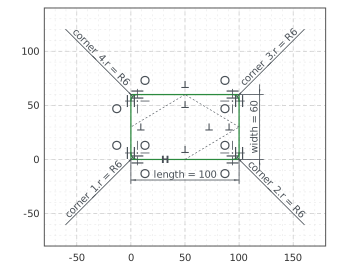
The plate is a Rectangle 100 by 60 from the pen at the origin. Its lines are plate.Line.1 to plate.Line.4, counterclockwise from the bottom edge, and its right angles are constraints already. Its corner sits at the origin, and with auto_constraint={"horizontal": True, "vertical": True} its bottom edge, drawn level, stays horizontal. Fillet rounds the four corners with a radius of 6 (Figure 1):
[3]:
hanger = px.Sketch(auto_constraint={"horizontal": True, "vertical": True})
hanger.Rectangle(100, 60, id="plate")
hanger.Constrain("plate.Line.1.start", "origin", px.Coincident)
hanger.Constrain("plate.Line.1", px.Distance, 100, id="length")
hanger.Constrain("plate.Line.2", px.Distance, 60, id="width")
hanger.Fillet(["plate.Line.1.start", "plate.Line.2.start", "plate.Line.3.start", "plate.Line.4.start"], 6,
              id=["corner_1", "corner_2", "corner_3", "corner_4"])
print("status", hanger.status, "| degrees of freedom", hanger.dof)
status full | degrees of freedom 0
The keyholes
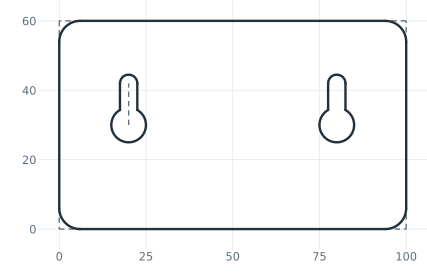
Keyhole draws a straight slot from the pen that starts in a round hole, here a slot 12 long and 5 wide for the screw’s shank, from a hole of radius 5 for its head, drawn upward. It makes the slot’s width and the hole’s radius dimensions, key.w and key.r. The hole’s center, the start of the keyhole’s spine, is 20 from the left edge and 30 from the bottom edge. LinearPattern repeats the whole keyhole once, 60 to the right (Figure 2):
[5]:
hanger.Move((22, 28), dir=(0, 1)).Keyhole(12, 5, 5, id="key")  # 12 long, 5 wide, a hole of radius 5, pointing up
hanger.Constrain("key.spine", px.Distance, 12, id="key_l")
hanger.Constrain("key.spine.start", "plate.Line.4", px.Distance, 20, id="key_x")
hanger.Constrain("key.spine.start", "plate.Line.1", px.Distance, 30, id="key_y")
hanger.LinearPattern("key", px.H, 2, 60, id="keys")  # the keyhole and one copy, 60 apart
print("status", hanger.status, "| degrees of freedom", hanger.dof)
status full | degrees of freedom 0
The checks
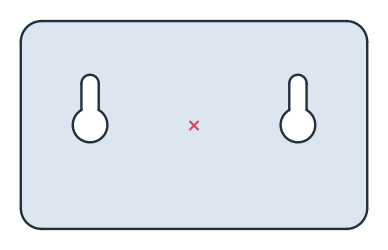
These are the area and the centroid, with the bottom left corner at the origin, to compare with your own model. The area is the rectangle less what the corners round off, \((4 - \pi) \cdot 6^2\), less the two keyholes. A keyhole is its hole of radius 5, the slot’s 5 by 12 above the hole’s center less the part of the hole under it, and the half disc of the slot’s end. The hanger is symmetric about its vertical middle line, so its centroid lies on it (Figure 3):
[7]:
face = hanger.Face()
under = 2.5 * math.sqrt(5**2 - 2.5**2) + 5**2 * math.asin(2.5 / 5)  # the hole's area under the slot, |x| < 2.5
keyhole = math.pi * 5**2 + (5 * 12 - under) + math.pi * 2.5**2 / 2
exact = 100 * 60 - (4 - math.pi) * 6**2 - 2 * keyhole
c = face.center
print("area", round(face.mass, 2), "mm², exact", round(exact, 2))
print("centroid", tuple(round(v, 2) for v in c[:2]))
area 5720.21 mm², exact 5720.21
centroid (50.0, 29.85)
The hanger as DXF in millimeters, for another CAD system or a laser cutter:
[9]:
hanger.WriteDXF("wall_hanger.dxf", unit=px.mm, scale=1) # scale=1: the numbers as they are
The hanger as DXF: wall_hanger.dxf