Automatic ids
Every element drawn in a sketch gets an id made of its kind and a number, such as Line.1, Arc.2, Circle.1 or Spline.1, as in CAD sketchers. Every point gets an id like Point.3, and every chain drawn in one go an id like Chain.1. id= gives an element an id of your own instead.
Ids are the references within the sketch, and they never leave it. Faces, wires and exports carry only the names given with name=, which travel with the geometry through Boolean operations and into the mesh.
[1]:
import math
import planex as px
An L bracket drawn quickly
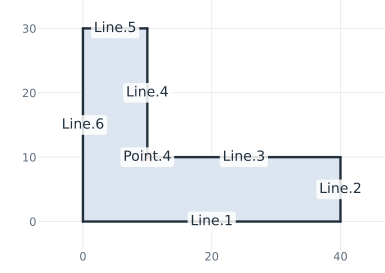
The example is an L bracket with legs 40 and 30 long and 10 thick, drawn without a single id= (Figure 1). Its six sides are therefore Line.1 to Line.6 in drawing order, and its corners Point.1 to Point.6, from the start at the origin. The re-entrant corner is Point.4.
[3]:
s = px.QuickSketch().Line(40).Turn(90).Line(10).Turn(90).Line(30)
s.Turn(-90).Line(20).Turn(90).Line(10).Close()
corner = s.Location("Point.4")
print("Point.1", s.Location("Point.1"), "Point.4", corner)
Point.1 (0.0, 0.0) Point.4 (10.0, 10.0)
Referring to them
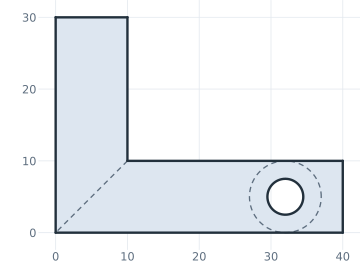
Later calls refer to the automatic ids like to any other (Figure 2):
a bolt hole of 5 lies opposite the middle of
Line.2, the end of the long leg, 8 in from it, and gets the nameboltfor the export;the washer around it is a construction circle, concentric with
Circle.1, the automatic id of the hole;a construction line from the re-entrant corner
Point.4to the outer cornerPoint.1marks where a gusset would go.
[5]:
end = s.Location("Line.2.mid")
s.Circle(2.5, center=(end[0] - 8, end[1]), name="bolt")
s.Circle(5, concentric="Circle.1", construction=True)
s.Move("Point.4").Line("Point.1", id="gusset line", construction=True)
bracket = s.Face()
Only the name given with name= reaches the face, while the ids stay in the sketch:
[7]:
print("area", bracket.mass, "exact", 40 * 10 + 20 * 10 - math.pi * 2.5**2)
print({e.name for e in bracket.edges})
area 580.3650459150638 exact 580.3650459150638
{None, 'bolt'}
Ids are also how the editing calls find their elements. Fillet("Point.4", 5), for example, rounds the re-entrant corner by the id of its point. See Fillets and chamfers for details.