Lifting lug
A lifting lug is welded to a part so that a shackle can be pinned through its eye for hoisting. Its outline is symmetric, with a base, two flanks tangent to the eye, and the eye around the hole. As a sketch, the right half is one chain, and the left half is its mirror image, kept symmetric by the sketch. Model the lug from the drawing in planex2d or in any CAD system, then check its area and centroid against the values at the end of the page. A solution in planex2d follows.

[1]:
import math
import planex as px
The right half
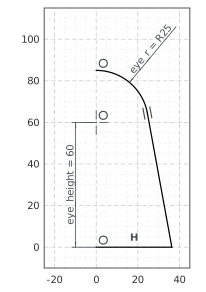
The origin is the middle of the base. The right half runs from it along the base, up the flank and around the eye to its top, roughly, with auto_constraint=True. The chain then keeps the flank tangent to the eye. The eye’s center lies on the vertical axis, 60 above the base, with a radius of 25, and the eye ends on the axis, where its mirror image continues it. The base’s length is left free for now (Figure 1):
[3]:
lug = px.Sketch(auto_constraint=True)
lug.Move((0, 0), dir=(1, 0)).Line(40, px.Horizontal, id="base")
lug.Turn(100).Line(60, id="flank")  # Turn(100) turns the pen left by 100°, roughly up the flank
lug.Arc(25, 75, id="eye")
lug.Constrain("base.start", "origin", px.Coincident)
lug.Constrain("eye.center", "V", px.Coincident)
lug.Constrain("eye.end", "V", px.Coincident)
lug.Constrain("eye.center", "H", px.Distance, 60, id="eye_height")
lug.Constrain("eye", px.Radius, 25, id="eye_r")
print("status", lug.status, "| degrees of freedom", lug.dof)
status under | degrees of freedom 1
The left half
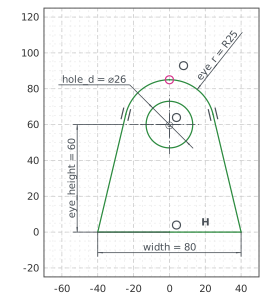
Mirrored adds a copy of the three elements, mirrored about the vertical axis, as left.base, left.flank and left.eye. The copies stay symmetric to the originals, so the width of 80 across both bases fixes the last degree of freedom. The hole, 26 across for the shackle’s pin, is concentric with the eye (Figure 2):
[5]:
lug.Mirrored(["base", "flank", "eye"], px.V, id="left")
lug.Constrain("left.base.end", "base.end", px.Distance, 80, id="width")
lug.Circle(26 / 2, concentric="eye", id="hole")
lug.Constrain("hole", px.Diameter, 26, id="hole_d")
print("status", lug.status, "| degrees of freedom", lug.dof)
status full | degrees of freedom 0
The checks
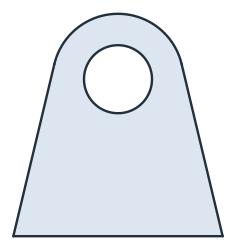
These are the area and the centroid, with the origin in the middle of the base, to compare with your own model. Each half is the triangle between the origin, the base’s end and the eye’s center, the right triangle between the base’s end, the flank’s tangent point and the eye’s center, and the sector of the eye from the tangent point up to the axis. The tangent point lies \(\arccos(25 / d)\) around the eye’s center from the base’s end, with \(d\) their distance. The lug is symmetric, so its centroid lies on the axis (Figure 3):
[7]:
face = lug.Face()
d = math.hypot(40, 60)  # from the base's end to the eye's center
a = math.atan2(-60, 40) + math.acos(25 / d)  # the tangent point's angle around the eye's center
half = 40 * 60 / 2 + 25 * math.sqrt(d**2 - 25**2) / 2 + 25**2 * (math.pi / 2 - a) / 2
c = face.center
print("area", round(face.mass, 2), "mm², exact", round(2 * half - math.pi * 13**2, 2))
print("centroid", round(c[1], 2), "above the base, off the axis by", round(abs(c[0]), 6))
area 4395.56 mm², exact 4395.56
centroid 33.51 above the base, off the axis by 0.0
The lug as DXF in millimeters, for another CAD system or a laser cutter:
[9]:
lug.WriteDXF("lifting_lug.dxf", unit=px.mm, scale=1) # scale=1: the numbers as they are
The lug as DXF: lifting_lug.dxf