From a drawing to a parametric sketch
A drawing read from a file is geometry without design intent. Its lines and arcs sit where they were drawn, but nothing says that a line touches an arc or that a hole shares the center of a boss. A constraint sketch takes such a drawing in and makes a parametric part of it in four steps: check the geometry, add the relations it nearly has, see what is still free, and add dimensions until it is fully constrained. After that, every dimension can change.
[1]:
import math

import planex as px
The drawing
The example file link.dxf holds the outline of a link, two bosses of radius 15 and 10 mm with their centers 60 mm apart, joined by two tangent lines, and two holes of 12 and 8 mm. Its numbers are rounded to three decimals of a millimeter, as many drawing programs write them. An arc is stored as its center, radius and angles, so the ends of the arcs miss the ends of the lines by up to a micrometer.
px.FromDXF reads the file in meters. Scaled by 1/px.mm about the origin, the wires are in millimeters again, as the drawing is, and px.Sketch(wires, copy=True, auto_constraint=True) copies them into a constraint sketch with the relations they show exactly:
[3]:
wires = [wire.Scaled((0, 0), 1 / px.mm) for wire in px.FromDXF("link.dxf")]
sk = px.Sketch(wires, copy=True, auto_constraint=True)
print(len(wires), "wires,", sk.dof, "degrees of freedom,", {kind: len(ids) for kind, ids in sk.constraints.items()})
6 wires, 20 degrees of freedom, {'Concentric': 2}
The holes are concentric with the bosses, since their centers are the same numbers in the file. No joint is found, since no end meets another one exactly. See Auto constraints for the relations found this way.
Checking the geometry
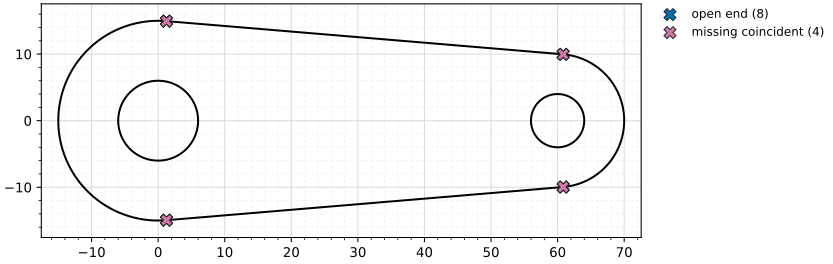
Diagnose lists the faults that keep a drawing from being a clean outline, which are open ends, ends that nearly meet, crossings, overlaps and elements of zero size. Each fault comes with the ids of its elements and its place. Here, the four joints are not closed:
[4]:
faults = sk.Diagnose()
print({kind: len(found) for kind, found in faults.items()})
for fault in faults["missing_coincident"]:
    print(fault["ids"], "at", [round(c, 3) for c in fault["at"]])
{'open_ends': 8, 'missing_coincident': 4, 'crossings': 0, 'overlaps': 0, 'degenerate': 0}
('Projection.1.Line.1', 'Projection.3.Arc.1') at [1.25, 14.948]
('Projection.1.Line.1', 'Projection.4.Arc.1') at [60.833, 9.965]
('Projection.2.Line.1', 'Projection.3.Arc.1') at [1.25, -14.948]
('Projection.2.Line.1', 'Projection.4.Arc.1') at [60.833, -9.965]
show_diagnostics=True marks the faults in the plot of the sketch (Figure 1).
Relations with a tolerance
SuggestConstraints lists the relations that the geometry nearly has, within a tolerance in the units of the sketch. A tolerance of 0.01 mm, ten times the rounding of the file, finds each joint and the tangent there. Each suggestion is the call that adds it:
[6]:
for suggestion in sk.SuggestConstraints(dimensional=False, tol=0.01):
    print(suggestion["call"])
sk.Constrain("Projection.1.Point.2", "Projection.3.Point.1", px.Coincident)
sk.Constrain("Projection.2.Point.2", "Projection.3.Point.2", px.Coincident)
sk.Constrain("Projection.2.Point.1", "Projection.4.Point.1", px.Coincident)
sk.Constrain("Projection.1.Point.1", "Projection.4.Point.2", px.Coincident)
sk.Constrain("Projection.3.Arc.1", "Projection.2.Line.1", px.Tangent)
sk.Constrain("Projection.2.Line.1", "Projection.4.Arc.1", px.Tangent)
sk.Constrain("Projection.1.Line.1", "Projection.3.Arc.1", px.Tangent)
sk.Constrain("Projection.1.Line.1", "Projection.4.Arc.1", px.Tangent)
AutoConstrain adds the same constraints and returns their ids. It is marked experimental. It also warns how far the relations moved the geometry, here by a quarter of a micrometer. After it, Diagnose finds nothing more:
[7]:
added = sk.AutoConstrain(dimensional=False, tol=0.01)
print(added)
print({kind: len(found) for kind, found in sk.Diagnose().items()})
['Coincident.1', 'Coincident.2', 'Coincident.3', 'Coincident.4', 'Tangent.1', 'Tangent.2', 'Tangent.3', 'Tangent.4']
{'open_ends': 0, 'missing_coincident': 0, 'crossings': 0, 'overlaps': 0, 'degenerate': 0}
PlanexWarning: AutoConstrain: the relations moved the geometry by up to 0.0002530661829425185
What is still free
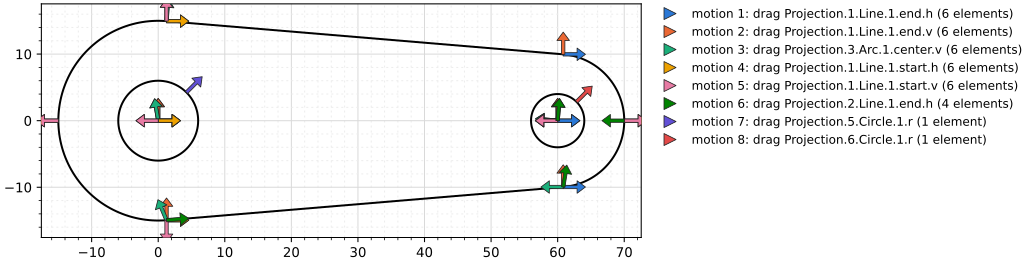
Eight degrees of freedom remain. Three are the position and the turn of the link, three its shape, the two radii of the bosses and their distance, and two the holes. FreeMotions lists one motion for each, and show_free_motions=True draws them as arrows on every point that a motion moves (Figure 2).
[8]:
print(sk.dof, "degrees of freedom:", [motion["drag"] for motion in sk.FreeMotions()])
8 degrees of freedom: ['Projection.1.Line.1.end.h', 'Projection.1.Line.1.end.v', 'Projection.3.Arc.1.center.v', 'Projection.1.Line.1.start.h', 'Projection.1.Line.1.start.v', 'Projection.2.Line.1.end.h', 'Projection.5.Circle.1.r', 'Projection.6.Circle.1.r']
Dimensions
SuggestConstraints(geometric=False) proposes one dimension for each free motion, with the value the geometry has, such as the length of a tangent line:
[10]:
for suggestion in sk.SuggestConstraints(geometric=False)[:3]:
    print(suggestion["call"])
sk.Constrain("Projection.1.Line.1", px.Distance, 59.791003042483815)
sk.Constrain("Projection.3.Arc.1", px.Radius, 15.000124520649132)
sk.Constrain("Projection.4.Arc.1", px.Radius, 9.999828249770998)
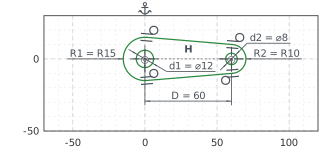
A part is dimensioned by its design intent rather than by whatever can be measured, so here the center of the large boss is fixed, the line through both centers is horizontal, and the center distance, the radii and the holes get their design values. The elements keep the ids they got when they were copied, so they are taken from sk.elements, the larger arc first:
[11]:
large, small = sorted(sk.elements["Arc"], key=lambda arc: -sk.Measure(arc)["radius"])
large_hole, small_hole = sorted(sk.elements["Circle"], key=lambda circle: -sk.Measure(circle)["radius"])
sk.Constrain(large + ".center", px.Fix)
sk.Constrain(large + ".center", small + ".center", px.Horizontal)
sk.Constrain(large + ".center", small + ".center", px.Distance, 60, id="D")
sk.Constrain(large, px.Radius, 15, id="R1")
sk.Constrain(small, px.Radius, 10, id="R2")
sk.Constrain(large_hole, px.Diameter, 12, id="d1")
sk.Constrain(small_hole, px.Diameter, 8, id="d2")
print(sk.status, sk.dof)
full 0
The link is fully constrained (Figure 3).
A new center distance
The link is now a parametric part. Its area is that of two circles joined by their outer tangents, less the holes,
with \(L = \sqrt{D^2 - (R_1 - R_2)^2}\) the length of a tangent line and \(\sin\alpha = (R_1 - R_2)/D\). At the drawn center distance of 60 and at 80:
[13]:
def area(D, R1=15, R2=10, d1=12, d2=8):
    alpha = math.asin((R1 - R2) / D)
    L = math.sqrt(D**2 - (R1 - R2) ** 2)
    return (R1 + R2) * L + (math.pi + 2 * alpha) * R1**2 / 2 + (math.pi - 2 * alpha) * R2**2 / 2 \
        - math.pi * (d1**2 + d2**2) / 4


print("D 60:", sk.Face().mass, "mm², exact", area(60))
sk["D"] = 80
sk.Update()
print("D 80:", sk.Face().mass, "mm², exact", area(80))
D 60: 1852.357341935674 mm², exact 1852.3573419356735
D 80: 2351.053511280148 mm², exact 2351.0535112801476