Choosing between solutions
Geometry given by references often has more than one solution. An arc of radius 1 that touches two crossing lines can sit in any of four corners, and a point outside a circle has two tangents to it. planex2d picks one by a fixed rule, and two options choose another:
By default, an arc touching two edges sits in the corner that the two edges face.
reverse=Trueswitches every free choice to the other side.A point given with a target, as in
("y", (5, 0)), fixes the side of that target: the arc lies on the same side as the point.
[1]:
import planex as px
Four corners and two tangents
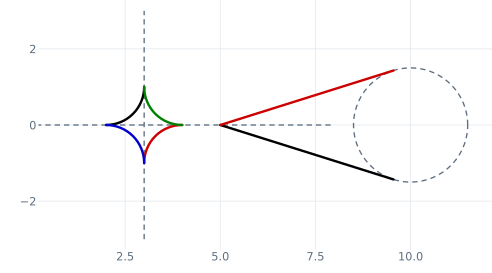
The example has two construction lines, x and y, that cross at (3, 0), and four arcs of radius 1 that touch both (Figure 1). The default arc is drawn in black and the one with reverse=True in red. The arc with the side of y fixed by the point (5, 0) is green, and the arc with the side of x fixed by (0, −1) is blue. On the right are the two tangents from (5, 0) to a circle around (10, 0): the default in black and the one with reverse=True in red. Every element is named after its option,
and the list of names shows that all six are drawn.
[3]:
red, green, blue = (0.8, 0, 0), (0, 0.5, 0), (0, 0, 0.8)
c = px.QuickSketch()
c.Move((-2, 0)).Line((8, 0), id="x", construction=True)
c.Move((3, -3)).Line((3, 3), id="y", construction=True)
c.Arc(1, tangent=("x", "y"), name="default")
c.Arc(1, tangent=("x", "y"), reverse=True, name="reverse=True", col=red)
c.Arc(1, tangent=("x", ("y", (5, 0))), name="y side fixed", col=green)
c.Arc(1, tangent=(("x", (0, -1)), "y"), name="x side fixed", col=blue)

c.Circle(10, 0, 1.5, id="circle", construction=True)
c.Move((5, 0)).Line(tangent="circle", name="tangent")
c.Move((5, 0)).Line(tangent="circle", reverse=True, name="tangent, reverse", col=red)
print(sorted(e.name for w in c.Wires() for e in w.edges))
['default', 'reverse=True', 'tangent', 'tangent, reverse', 'x side fixed', 'y side fixed']
The touch point nearest to a point
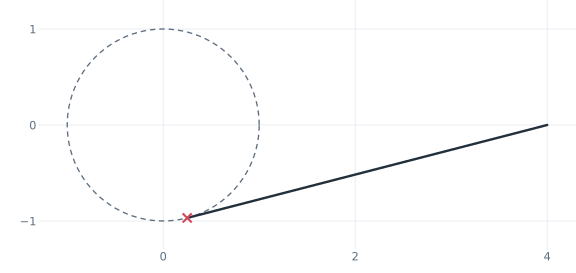
For a circle, a point given with it selects the touch point nearest to that point. The example draws the tangent from (4, 0) to the unit circle that touches it near (0, −1) (Figure 2). The exact touch point is (1/4, −√15/4).
[5]:
s = px.QuickSketch().Circle(0, 0, 1, id="c", construction=True)
s.Move((4, 0)).Line(tangent=("c", (0, -1)))
touch = s.pen.position
print("touch", touch, "exact", (0.25, -(15**0.5) / 4))
touch (0.25, -0.9682458365518543) exact (0.25, -0.9682458365518543)