Flange series
A flange is made in several sizes that differ in their numbers but not in their shape, and one tabulated drawing gives them all: the dimensions are letters, and a table gives each size’s values. A parametric model works the same way. One sketch carries the letters as named dimensions, a rule ties the bolt circle to them, and each size is one update of the sketch. Model the flange in its three sizes from the drawing in planex2d or in any CAD system, then check their areas against the values at the end of the page. A solution in planex2d follows.

[1]:
import math
import planex as px
The sketch
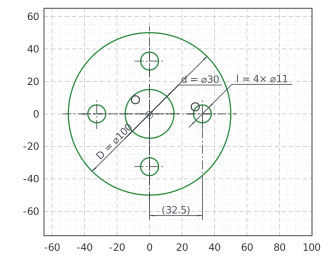
The flange is drawn as circles around the origin, roughly at size A, the outside, the bore and the first hole, on the \(x\) axis. The dimensions get the drawing’s letters as their ids, the outside’s diameter D, the bore’s d and the hole’s l. The bolt circle, of diameter \(k\), lies midway between the bore and the outside in every size, \(k = (D + d) / 2\). Expression states that rule for the hole’s center, whose \(h\) coordinate is half of \(k\).
CircularPattern repeats the hole around the origin, its number of holes the dimension holes.count. With these, nothing in the sketch is left free (Figure 1):
[3]:
flange = px.Sketch(auto_constraint=True)
flange.Circle(50, id="outside")
flange.Circle(15, id="bore")
flange.Circle(5.5, center=(32, 1), id="hole")
flange.Constrain("outside.center", "origin", px.Coincident)
flange.Constrain("hole.center", "H", px.Coincident)
flange.Constrain("outside", px.Diameter, 100, id="D")  # the drawing's letter as the dimension's id
flange.Constrain("bore", px.Diameter, 30, id="d")
flange.Constrain("hole", px.Diameter, 11, id="l")
flange.Expression("hole.center.h = (D + d) / 4", id="bolt_circle")  # half of k = (D + d) / 2
flange.CircularPattern(["hole"], "origin", 4, id="holes")  # its count, holes.count, is a dimension too
print("status", flange.status, "| degrees of freedom", flange.dof)
status full | degrees of freedom 0
The sizes
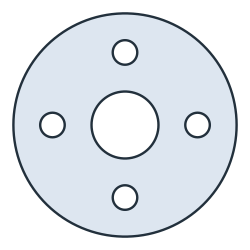
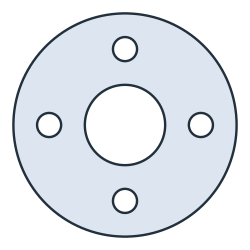
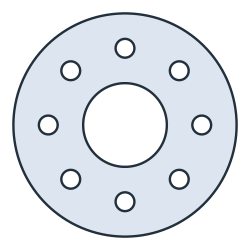
The table of the drawing gives the three sizes. Update sets the dimensions of a size and solves the sketch again. The bolt circle follows its rule, and the pattern takes its new number of holes, spaced evenly (Figure 2):
[5]:
sizes = {"A": {"D": 100, "d": 30, "l": 11, "holes.count": 4},
         "B": {"D": 125, "d": 45, "l": 13.5, "holes.count": 4},
         "C": {"D": 160, "d": 60, "l": 13.5, "holes.count": 8}}
faces = {}
for name, size in sizes.items():
    flange.Update(size)
    faces[name] = flange.Face()
    print(name, "status", flange.status, "| bolt circle k", round(2 * flange.Location("hole.center")[0], 6),
          "| holes", flange["holes.count"], round(flange["holes.angle"], 6), "° apart")
A status full | bolt circle k 65.0 | holes 4 90.0 ° apart
B status full | bolt circle k 85.0 | holes 4 90.0 ° apart
C status full | bolt circle k 110.0 | holes 8 45.0 ° apart
(a) Size A
(b) Size B
(c) Size C
The checks
These are the areas, to compare with your own model. Each size is its outside less the bore and the \(n\) holes, \(\tfrac{\pi}{4} \cdot (D^2 - d^2 - n\,l^2)\). Every flange is symmetric about the \(x\) axis and under a half turn, so its centroid is the center:
[7]:
for name, size in sizes.items():
    face = faces[name]
    exact = math.pi / 4 * (size["D"] ** 2 - size["d"] ** 2 - size["holes.count"] * size["l"] ** 2)
    print(name, "area", round(face.mass, 2), "mm², exact", round(exact, 2),
          "| centroid", tuple(round(v, 6) for v in face.center[:2]))
A area 6766.99 mm², exact 6766.99 | centroid (-0.0, -0.0)
B area 10108.86 mm², exact 10108.86 | centroid (-0.0, 0.0)
C area 16133.65 mm², exact 16133.65 | centroid (-0.0, 0.0)
The three flanges as DXF in millimeters, for another CAD system or a laser cutter:
[8]:
for name, face in faces.items():
    face.WriteDXF(f"flange_{name}.dxf", unit=px.mm, scale=1)  # scale=1: the numbers as they are
The flanges as DXF: flange_A.dxf, flange_B.dxf, flange_C.dxf