Parametric curves
px.Curve((h, v), (t0, t1)) draws the curve that the point \((h(t), v(t))\) traces as the parameter \(t\) runs from \(t_0\) to \(t_1\), and returns a wire with one spline edge. The point is given in one of two ways:
Call |
The point |
|---|---|
|
Two expression strings in \(t\), which planex2d evaluates itself, with exact derivatives, and fits by a spline to about 1e-12 of the curve’s size |
|
A Python function \(f(t)\) that returns the point \((h, v)\), which planex2d calls at the values of \(t\) it needs and fits by a cubic spline to about 1e-10 of the curve’s size |
plane= puts the curve on a plane in 3D, and id= names it.
Either way, the result is a spline like any other, for Boolean operations, offsets and measurements. It follows the formula to about 10⁻¹² or 10⁻¹⁰ of the curve’s size, where a spline through points is only as close as its points allow. A curve whose end meets its start is closed, one edge with no vertex, smooth all around where the formula is periodic. px.Curve keeps only the spline. In a sketch, Curve keeps the formula as well, and its dimensions can drive the curve. See Parametric
curves in a sketch for details.
[1]:
import math

import numpy as np
import planex as px
from scipy.special import fresnel
Expression strings
The expressions may use numbers, pi, + − * / ^, sqrt, abs, min, max, sin, cos, tan, asin, acos, atan2, exp, log (the natural logarithm), sinh, cosh, tanh, asinh, acosh and atanh. Angles are in degrees, as everywhere in planex2d, and so is \(t\) wherever it is an angle. Where \(t\) stands for an angle in radians, as in \(t \sin t\), the expression writes t*pi/180. The example is a cardioid, the curve that a point on a circle of radius \(a\) traces as the circle rolls around
another of the same size:
for \(t\) over a full turn. Its end meets its start, so it is one closed edge. Its area is \(6\pi a^2\) and its length \(16a\), which the print compares with the curve’s (Figure 1a):
[3]:
a = 10
cardioid = px.Curve((f"{a}*(2*cos(t) - cos(2*t))", f"{a}*(2*sin(t) - sin(2*t))"), (0, 360))
print("edges", len(cardioid.edges), "| area", px.Face([cardioid]).mass, "6πa²", 6 * math.pi * a**2,
      "| length", cardioid.mass, "16a", 16 * a)
edges 1 | area 1884.955592153694 6πa² 1884.9555921538758 | length 159.9999999999905 16a 160
A curve \(v = f(h)\) is written with \(t\) as \(h\), ("t", "f(t)"). The example is the parabola \(v = k h^2\) with \(k = 0.05\), from \(h = -20\) to \(20\). Its length is compared with the closed form of the integral of \(\sqrt{1 + (2kh)^2}\) (Figure 1b):
[4]:
k = 0.05
parabola = px.Curve(("t", f"{k}*t^2"), (-20, 20))
x = 2 * k * 20
print("length", parabola.mass, "exact", 2 * (20 / 2 * math.sqrt(1 + x**2) + math.asinh(x) / (4 * k)))
length 59.157714301783884 exact 59.1577143017839
One coordinate may use the other at the same \(t\). \(v\)’s expression may name \(h\), or \(h\)’s may name \(v\). This helps where a curve in \(h\) would be steep. The root \(v = \sqrt{h}\) has an infinite slope at \(h = 0\), but with \(h = X\,(1 - \cos t)/2\) for \(t\) from 0° to 180°, the cosine spacing that airfoils use, \(v = \sqrt{h}\) is smooth in \(t\). Closed by two lines, the curve bounds the area under the root (Figure 1c). Its area is compared with \(\tfrac{2}{3} X^{3/2}\):
[5]:
X = 50
root = px.Curve((f"{X}*(1 - cos(t))/2", "sqrt(h)"), (0, 180))
under = px.Shape([root, px.Line((X, math.sqrt(X)), (X, 0)), px.Line((X, 0), (0, 0))]).Face()
print("area", under.mass, "exact", 2 / 3 * X**1.5)
area 235.70226039550428 exact 235.70226039551585
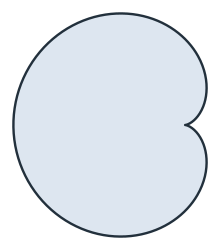
(a) A cardioid, one closed edge
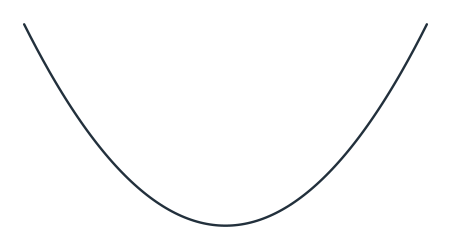
(b) v = 0.05 h²
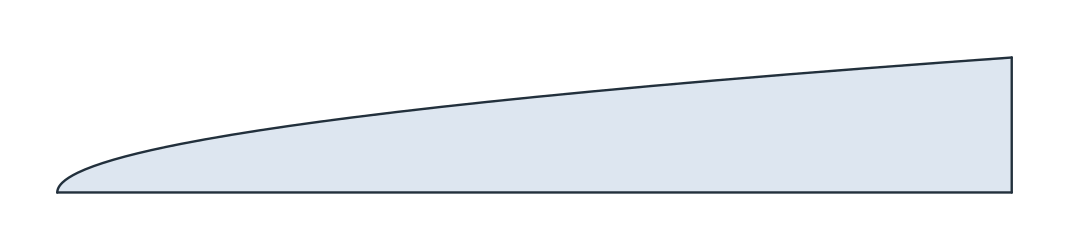
(c) Under v = √h, drawn in t
A formula that leaves its domain in the range raises, naming the value of \(t\):
[7]:
try:
    px.Curve(("t", "sqrt(t - 1)"), (0, 5))
except ValueError as error:
    print(error)
Curve(('t', 'sqrt(t - 1)'), (0, 5)): v at t = 0: sqrt of a negative number (-1)
Python functions
Where the point has no formula in these terms, a Python function gives it. It takes \(t\) as a float and returns the point as a tuple, a list or an array of two numbers, and planex2d calls it once for each t. The example is an Euler spiral, the transition curve of roads and railways, whose curvature grows in proportion to its length. Its points are the Fresnel integrals \((C(t), S(t))\), which SciPy’s fresnel computes. Scaled by \(a = 100\), the spiral from 0 to \(t\) is
\(a t\) long, which the print checks for \(t\) from 0 to 2 (Figure 2):
[8]:
def euler(t):
    """the Euler spiral at t, scaled by 100"""
    S, C = fresnel(t)
    return (100 * C, 100 * S)


spiral = px.Curve(euler, (0, 2))
print("length", spiral.mass, "| a t", 100 * 2, "| relative", spiral.mass / 200 - 1)
length 199.99999999158132 | a t 200 | relative -4.2093439844848035e-11
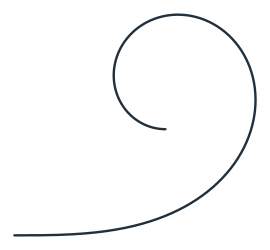
A function suits a curve that comes from a computation, such as a table interpolated with NumPy or the solution of an equation. The fit to 1e-10 is the price of calling Python, where the expression strings reach about 1e-12.
On a plane
Like px.Spline, px.Curve draws on the xy plane by default, and plane= puts the curve on another plane. On the xz plane, the parabola’s point with \(h = 10\) lies at \(x = 10\) and its \(v\) at \(z\):
[10]:
lifted = px.Curve(("t", f"{k}*t^2"), (-20, 20), plane=px.XZ)
print(lifted.ToXYZ((10, k * 10**2)))
(10.0, 0.0, 5.0)
See Splines for splines through points and Tolerances for how planex2d computes with splines.