Converting sketches
A part often starts as a quick sketch and needs dimensions later, or it comes from a solid whose face is the starting point. copy=True makes a new sketch from another one or from a face:
px.Sketch(quick, copy=True)turns a quick sketch into a constraint sketch;px.QuickSketch(sketch, copy=True)turns a constraint sketch into a quick sketch;px.QuickSketch(face, copy=True)takes over the outline of a face of a solid.
Without copy=True, the same calls give an empty sketch on the plane of the object.
[1]:
import math
import netgen.occ as occ
import planex as px
From a quick sketch to a constraint sketch
The example is a lever 40 long between the centers of its round ends, 12 wide, with a bore of 6 in its right end. It is drawn as a quick sketch, with each round end continuing the line before it (Figure 1a).
[3]:
quick = px.QuickSketch((0, -6))
quick.Line(40, id="lower").Arc(6, 180, id="end").Line(40, id="upper").Arc(6, 180, id="back")
quick.Circle(40, 0, 3, id="bore");
px.Sketch(quick, copy=True) copies the geometry with its ids, names, construction elements and the pen, but no constraints, because a quick sketch has none. With auto_constraint=True, it adds the constraints the drawing shows: an arc tangent where a chain runs on smoothly, and coincident points where separate elements meet. Here, it finds the four tangent joints and the closing point of the outline:
[4]:
lever = px.Sketch(quick, copy=True, auto_constraint=True)
print(lever.status, lever.dof, {kind: list(ids) for kind, ids in lever.constraints.items()})
under 7 {'Tangent': ['Tangent.1', 'Tangent.2', 'Tangent.3', 'Tangent.4'], 'Coincident': ['Coincident.1']}
The rest are the dimensions of the part: the length and the radius of the ends, the bore, and its place in the right end. With them, the lever is fully constrained (Figure 1b).
[5]:
lever.Constrain("lower.start", px.Fix)
lever.Constrain("lower", px.Horizontal)
lever.Constrain("lower", px.Distance, 40, id="L")
lever.Constrain("end", px.Radius, 6, id="R")
lever.Constrain("back", "end", px.Equal)
lever.Constrain("bore", px.Radius, 3, id="r")
lever.Constrain("bore.center", "end.center", px.Coincident)
print(lever.status, lever.dof)
full 0
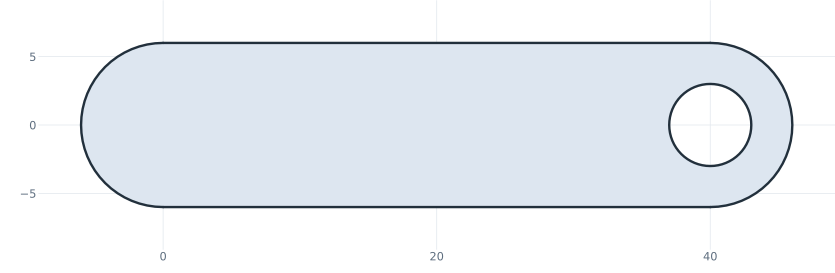
(a) (a) The quick sketch
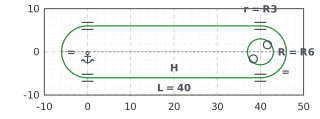
(b) (b) Converted and dimensioned
A new length is now one dimension. The lever 60 long has the area of a slot of 60 × 12 less the bore, 60 · 12 + π 6² − π 3²:
[7]:
lever["L"] = 60
lever.Update()
print("area", lever.Face().mass, "exact", 60 * 12 + math.pi * 6**2 - math.pi * 3**2)
area 804.8230016469245 exact 804.8230016469244
Rectangles, polygons, slots, fillets, offsets, patterns and mirrors of the quick sketch arrive as their lines and arcs, without the constraints that would keep them a rectangle or a slot.
From a constraint sketch to a quick sketch
px.QuickSketch(sketch, copy=True) keeps the solved geometry and drops the constraints, dimensions and expressions. A quick sketch is faster to draw into, for example for many copies in a study:
[8]:
frozen = px.QuickSketch(lever, copy=True)
print(type(frozen).__name__, "area", frozen.Face().mass)
QuickSketch area 804.8230016469245
From the face of a solid
px.QuickSketch(face, copy=True) with a planar OpenCASCADE face gives a sketch on the face’s plane with the face’s outline in it, as normal geometry. The example is the top of a block 30 × 20 × 10 with a bore of 8. The sketch has the block’s outline and the circle of the bore, and more elements can be drawn on top of them.
[9]:
block = occ.Box(occ.Pnt(0, 0, 0), occ.Pnt(30, 20, 10)) - occ.Cylinder(occ.Pnt(15, 10, 0), occ.Z, 4, 10)
top = block.faces.Max(occ.Z)
on_top = px.QuickSketch(top, copy=True)
print("area", on_top.Face().mass, "exact", 30 * 20 - math.pi * 4**2)
area 549.7345175425633 exact 549.7345175425633
A list of OpenCASCADE wires works the same way, and px.Sketch(wires, copy=True) gives a constraint sketch from them. See Placing a sketch for sketches on the faces of solids and Pad and Pocket for turning a sketch into a solid.