Control knob
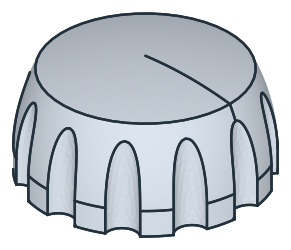
A control knob sits on the D-shaped shaft of a potentiometer or a switch. The flat of the shaft turns it, and the grip flutes around its side give the fingers a hold. Its side is a free curve, given in the drawing as a table of points that a spline runs through, and the knob is that half section revolved about its axis. The flutes are a circular pattern of circles pocketed down the side, and they run out where the side draws in toward the top. Model the knob from the drawing in planex2d or in any CAD system, then check its volume, mass and center of mass against the values at the end of the page. A solution in planex2d follows.

[1]:
import math
import netgen.occ as occ
import planex as px
The half section
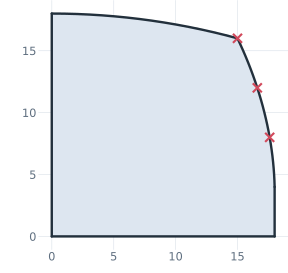
The half section is sketched in the front plane, the plane with its normal toward the viewer, \(-y\), with \(x\) out from the axis, \(z\) along it and the origin on the axis at the bottom. The knob is 36 across at its skirt, 4 high, and its side is a spline from the skirt’s top through the points P1 to P3 of the drawing’s table, the last one the edge of the top. The top is a dome, a circular arc around a center on the axis from P3 to the axis, 18 above the bottom. The points are
given, so the half section is a QuickSketch through them (Figure 1):
[3]:
front = px.XZ
zc = (15**2 + 16**2 - 18**2) / (2 * (16 - 18))  # the dome's center on the axis: as far from P3 (15, 16) as from (0, 18)
half = px.QuickSketch(front).Line((18, 0)).Line((18, 4))
half.Spline([(17.6, 8), (16.6, 12), (15, 16)], id="side")  # from the pen through P1, P2, P3
half.Arc(center=(0, zc), sweep=90 - math.degrees(math.atan2(16 - zc, 15)), id="dome")  # from P3 around its center to the axis
half.Close()
print("dome radius", 18 - zc)
dome radius 57.25
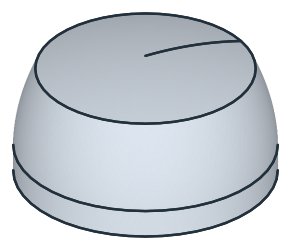
The half section’s face, taken to OpenCASCADE with ToOCCFace, is revolved a full turn about the \(z\) axis. By Pappus’s theorem, the volume is the face’s area times the length of the circle that its centroid runs on (Figure 2):
[5]:
face = half.Face()
knob = face.ToOCCFace().Revolve(occ.Axis((0, 0, 0), occ.Z), 360)
print("volume", round(knob.mass, 1), "| Pappus", round(2 * math.pi * face.center[0] * face.mass, 1))
volume 15644.0 | Pappus 15644.0
The flutes
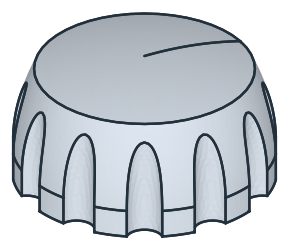
The flutes are circles of radius 2.5 whose centers lie on a circle of 37, 0.5 outside the skirt, one of them on the \(x\) axis. CircularPattern repeats it around the axis, 12 in all. They are sketched on the xy plane lifted to 20, above the knob, and pocketed 22 down, through the whole knob. Each flute cuts 2 into the skirt and less where the side draws in, until it runs out above the side’s radius of 16 (Figure 3):
[7]:
flutes = px.QuickSketch(px.Plane(px.XY, 20)).Circle(2.5, center=(18.5, 0), id="flute")
flutes.CircularPattern("flute", "origin", 12)
knob = px.Pocket(knob, flutes, 22)
The D-bore
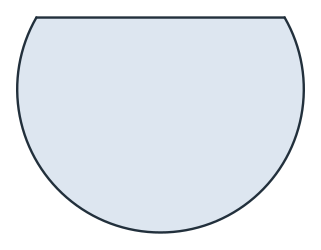
The bore takes a shaft of 6 with a flat, 4.5 across from the flat to the far side of the shaft. Its face is a disc of 6 around the axis cut by a rectangle to below the flat, their intersection *. It lies on the xy plane, the plane of the knob’s bottom, and is pocketed 12 up into the knob. A pocket runs against the plane’s normal, so reverse=True turns it up (Figure 4):
[9]:
d_bore = px.Circle((0, 0), 6 / 2).Face() * px.QuickSketch((-4, -4)).Rectangle(8, 4 + 1.5).Face()  # the flat at y = 1.5
knob = px.Pocket(knob, d_bore, 12, reverse=True)
print("D-bore", round(d_bore.mass, 4), "mm²")
D-bore 22.7467 mm²
(a) The D-bore's face
(b) The D-bore from below
The checks
These are the volume, the mass in aluminum EN AW-6082 (2.70 g/cm³) and the center of mass, with the origin on the axis at the bottom, to compare with your own model. The flutes keep the knob symmetric about its axis, but the bore’s flat does not, so the center of mass lies just off the axis, on the side of the flat:
[11]:
c = knob.center
print("volume", round(knob.mass, 1), "mm³")
print("mass", round(knob.mass * 2.70e-6 * 1000, 2), "g")
print("center of mass", round(c.z, 3), "above the bottom,", round(c.y, 4), "toward the flat")
volume 14557.7 mm³
mass 39.31 g
center of mass 8.178 above the bottom, 0.0096 toward the flat
The knob as STEP, for another CAD system:
[12]:
knob.WriteStep("control_knob.step")
The knob as STEP: control_knob.step