Split shaft collar
A shaft collar sits on a shaft as a stop and locates a bearing, a gear or a lever along it. A one-piece clamp collar is a ring with a slit through one side, and a screw across the slit pulls its two sides together, so that the ring closes on the shaft. The screw’s holes are square to the slit, away from the axis, where neither the ring’s faces nor its round outside give them a plane. They are sketched on planes of their own, set by their distance from the axis. Model the collar from the drawing in planex2d or in any CAD system, then check its volume, mass and center of mass against the values at the end of the page. A solution in planex2d follows.

[1]:
import math
import netgen.occ as occ
import planex as px
The ring
The ring is sketched on the xy plane, its axis the \(z\) axis, as the outside of 40 and the bore of 20, concentric around the origin. px.Pad extrudes it 12 up, the collar’s width (Figure 1):
[3]:
ring = px.Sketch(auto_constraint=True)
ring.Circle(40 / 2, id="outside")
ring.Circle(20 / 2, concentric="outside", id="bore")
ring.Constrain("outside.center", "origin", px.Coincident)
ring.Constrain("outside", px.Diameter, 40, id="outside_d")
ring.Constrain("bore", px.Diameter, 20, id="bore_d")
print("status", ring.status, "| degrees of freedom", ring.dof)
collar = px.Pad(ring, 12)
status full | degrees of freedom 0
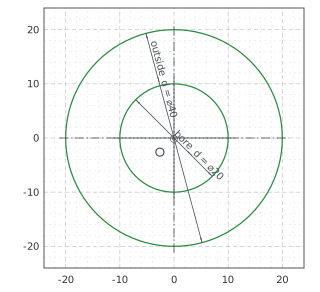
(a) The ring, every dimension and tie
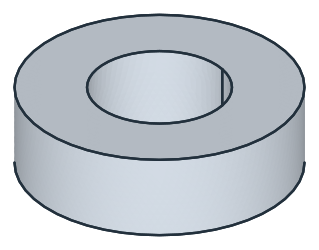
(b) Padded 12
The slit
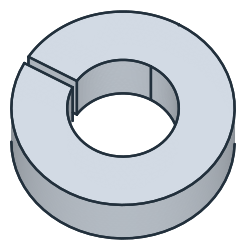
The slit is 1.5 wide, through the ring’s wall on the side of \(+y\), its middle plane the plane \(x = 0\). It is a RectangleC on the ring’s top, 1.5 across and 20 along the \(y\) axis, longer than the wall, its center on the vertical axis 15 out. It overhangs the wall on both sides, so it is pocketed by the ring’s width, 12 deep (Figure 2):
[5]:
slit = px.Sketch(collar.faces.Max(occ.Z), auto_constraint=True)  # on the top face: h along x, v along y
slit.RectangleC((0, 15), 1.5, 20, id="slit")  # 1.5 along x, 20 along y, around its center
slit.Constrain("slit.center", "V", px.Coincident)
slit.Constrain("slit.center", "H", px.Distance, 15, id="slit_at")
slit.Constrain("slit.Line.1", px.Horizontal)  # the rectangle does not turn
slit.Constrain("slit.Line.1", px.Distance, 1.5, id="slit_w")
slit.Constrain("slit.Line.2", px.Distance, 20, id="slit_l")
print("status", slit.status, "| degrees of freedom", slit.dof)
collar = px.Pocket(collar, slit, 12)
status full | degrees of freedom 0
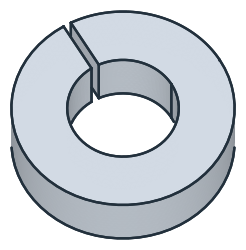
The clamp screw’s holes
The screw, M5, runs along \(x\) across the slit, 15 from the axis and in the middle of the width, 6 up. Its head sits in a counterbore of 9.5 on the side of \(+x\), and its thread goes into a tapped hole on the other side. The planes square to the screw are the yz plane, \(x = 0\), which is the slit’s middle plane, and its parallels. px.Plane(px.YZ, 20) is the plane \(x = 20\), outside the ring, its \(h\) along \(y\) and its \(v\) along \(z\).
The counterbore is sketched on that plane and pocketed 11 deep against its normal, toward the slit, so that the screw head’s seat lies 9 from the slit’s middle plane. It cuts through the round outside and leaves a flat seat for the head (Figure 3):
[7]:
counterbore = px.Sketch(px.Plane(px.YZ, 20))  # the plane x = 20: h along y, v along z
counterbore.Circle(9.5 / 2, center=(14, 5), id="counterbore")
counterbore.Constrain("counterbore.center", "V", px.Distance, 15, id="screw_at")
counterbore.Constrain("counterbore.center", "H", px.Distance, 6, id="screw_z")
counterbore.Constrain("counterbore", px.Diameter, 9.5, id="counterbore_d")
print("status", counterbore.status, "| degrees of freedom", counterbore.dof)
collar = px.Pocket(collar, counterbore, 11)
status full | degrees of freedom 0
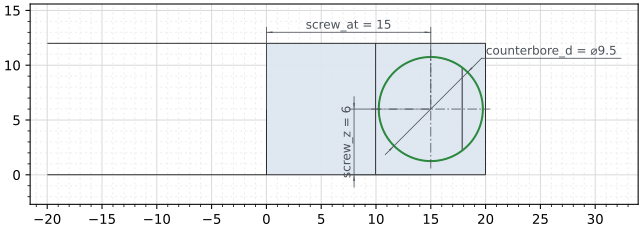
(a) The counterbore on the plane x = 20, the collar behind
(b) The counterbore through the outside
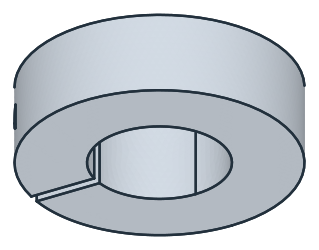
The clearance hole of 5.5 is sketched on the same plane around the counterbore’s solved center and pocketed 20 deep, to the slit’s middle plane. The tapped hole, the tapping drill of 4.2 for the M5 thread, 12 deep, is sketched on the slit’s middle plane, the yz plane, around the screw’s axis, and pocketed against its normal, away from the head (Figure 4):
[9]:
axis = counterbore.Location("counterbore.center")  # the screw's axis, in the planes' coordinates
clearance = px.Sketch(px.Plane(px.YZ, 20))
clearance.Circle(5.5 / 2, center=axis, id="clearance")
clearance.Constrain("clearance", px.Diameter, 5.5, id="clearance_d")
collar = px.Pocket(collar, clearance, 20)
tapped = px.Sketch(px.YZ)
tapped.Circle(4.2 / 2, center=axis, id="tapped")
tapped.Constrain("tapped", px.Diameter, 4.2, id="tapped_d")
collar = px.Pocket(collar, tapped, 12)
The checks
These are the volume, the mass in steel C45 (7.85 g/cm³) and the center of mass, with the origin on the axis at the bottom, to compare with your own model. The collar is symmetric about its middle plane \(z = 6\), so its center of mass lies in it. The slit and the holes take material on the side of \(+y\), so it lies off the axis toward \(-y\), and the counterbore and the holes along \(x\) move it a little toward \(-x\):
[11]:
c = collar.center
print("volume", round(collar.mass, 1), "mm³")
print("mass", round(collar.mass * 7.85e-6, 4), "kg")
print("center of mass", (round(c.x, 4), round(c.y, 4)), "| off the middle plane by", round(abs(c.z - 6), 6))
volume 10502.0 mm³
mass 0.0824 kg
center of mass (-0.3101, -1.1127) | off the middle plane by 0.0
The collar as STEP, for another CAD system:
[12]:
collar.WriteStep("shaft_collar.step")
The collar as STEP: shaft_collar.step