Pipe flange
A slip-on flange is pushed over the end of a pipe and welded to it, so that the pipe can be bolted to a valve or to the next pipe. It is a turned part, a plate with a hub at the back and a raised face at the front, which takes the gasket, revolved about the pipe’s axis. The bolt holes are a circular pattern through the plate. Model the flange from the drawing in planex2d or in any CAD system, then check its volume, mass and center of mass against the values at the end of the page. A solution in planex2d follows.

[1]:
import math
import netgen.occ as occ
import planex as px
The half section
The half section is sketched in the front plane, the plane with its normal toward the viewer, \(-y\), with \(x\) out from the axis, \(z\) along it and the origin on the axis at the hub’s end. The outline runs out along the hub’s end, up the hub, out along the plate’s back, up its rim, in along its front, up the raised face and in to the bore. Every line is horizontal or vertical, and with the auto-constraint dict for level and plumb lines it stays so. The bore is 49 across, for a pipe of 48.3. The hub is 70 across and 12 long, the plate 130 across and 16 thick, and the raised face 78 across and 2 high, clear of the bolt holes (Figure 1):
[3]:
front = px.XZ
half = px.Sketch(front, auto_constraint={"horizontal": True, "vertical": True})
half.Move((24.5, 0)).Line(10.5, id="hub_end")
half.Turn(90).Line(12, id="hub")  # Turn(90) turns the pen left, Turn(-90) right
half.Turn(-90).Line(30, id="plate_back")
half.Turn(90).Line(16, id="rim")
half.Turn(90).Line(26, id="plate_front")
half.Turn(-90).Line(2, id="raised_side")
half.Turn(90).Line(14.5, id="raised_face")
half.Close(id="bore")
half.Constrain("hub_end.start", "H", px.Coincident)
half.Constrain("bore", "V", px.Distance, 49 / 2, id="bore_r")  # from the axis: half the diameter
half.Constrain("hub", "V", px.Distance, 70 / 2, id="hub_r")
half.Constrain("rim", "V", px.Distance, 130 / 2, id="plate_r")
half.Constrain("raised_side", "V", px.Distance, 78 / 2, id="raised_r")
half.Constrain("hub", px.Distance, 12, id="hub_l")
half.Constrain("rim", px.Distance, 16, id="plate_t")
half.Constrain("raised_side", px.Distance, 2, id="raised_h")
print("status", half.status, "| degrees of freedom", half.dof)
status full | degrees of freedom 0
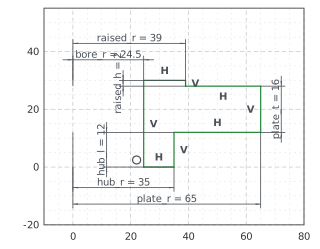
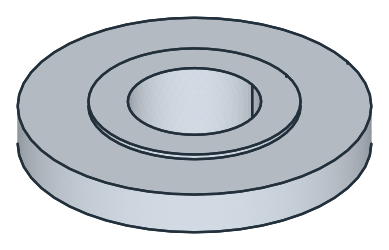
The section’s face, taken to OpenCASCADE with ToOCCFace, is revolved a full turn about the \(z\) axis (Figure 2):
[5]:
flange = half.Face().ToOCCFace().Revolve(occ.Axis((0, 0, 0), occ.Z), 360)
The bolt holes
The four bolt holes of 18 lie on a bolt circle of 100, between the axes. The first one lies at 45°, where its center’s \(h\) and \(v\) are equal, which Expression states, and CircularPattern repeats it 90° apart. They are sketched on the plate’s front, the xy plane lifted to 28, and pocketed 16 down through the plate (Figure 3):
[7]:
holes = px.Sketch(px.Plane(px.XY, 28), auto_constraint=True)
holes.Circle(100 / 2, id="bolt_circle", construction=True)
holes.Constrain("bolt_circle.center", "origin", px.Coincident)
holes.Constrain("bolt_circle", px.Diameter, 100, id="bolt_circle_d")
holes.Circle(18 / 2, center=(36, 34), id="hole")
holes.Constrain("hole.center", "bolt_circle", px.Coincident)  # a point on a circle
holes.Expression("hole.center.h = hole.center.v", id="at_45")  # the first hole at 45°
holes.Constrain("hole", px.Diameter, 18, id="hole_d")
holes.CircularPattern(["hole"], "origin", 4, id="pattern")
print("status", holes.status, "| degrees of freedom", holes.dof)
flange = px.Pocket(flange, holes, 16)
status full | degrees of freedom 0
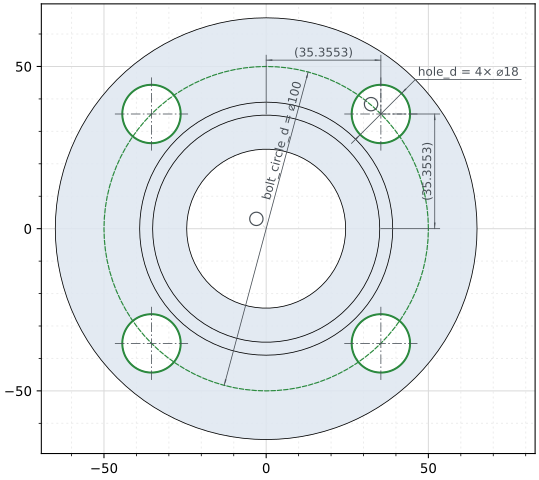
(a) The bolt holes on the plate's front
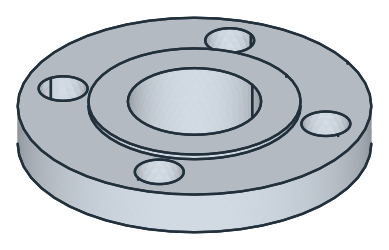
(b) Four holes through the plate
The checks
These are the volume, the mass in steel P250GH (7.85 g/cm³) and the center of mass, with the origin on the axis at the hub’s end, to compare with your own model. The flange is three rings, each \(\pi\,(R^2 - r^2)\) times its length around the bore of 24.5, less the four holes through the plate. It is symmetric about its axis, so its center of mass lies on it, at the height where the moments of the rings and the holes balance:
[9]:
parts = [(math.pi * (35**2 - 24.5**2) * 12, 6), (math.pi * (65**2 - 24.5**2) * 16, 20),
         (math.pi * (39**2 - 24.5**2) * 2, 29), (-4 * math.pi * 9**2 * 16, 20)]  # (volume, height of its middle)
exact = sum(v for v, z in parts)
c = flange.center
print("volume", round(flange.mass, 1), "mm³, exact", round(exact, 1))
print("mass", round(flange.mass * 7.85e-6, 4), "kg")
print("center of mass", round(c.z, 4), "above the hub's end, exact", round(sum(v * z for v, z in parts) / exact, 4),
      "| off the axis by", round(math.hypot(c.x, c.y), 6))
volume 195251.6 mm³, exact 195251.6
mass 1.5327 kg
center of mass 18.5779 above the hub's end, exact 18.5779 | off the axis by 0.0
The flange as STEP, for another CAD system:
[10]:
flange.WriteStep("pipe_flange.step")
The flange as STEP: pipe_flange.step