Fillets and chamfers
A fillet replaces a corner with an arc of a given radius, tangent to both edges, and a chamfer replaces it with a straight cut. Both work in two places: on finished geometry, where Fillet and Chamfer take a corner of a wire, face or shape, and in a sketch, where the corner is given by the id of its point. In a constraint sketch, the radius and the lengths become dimensions that can be changed later.
[1]:
import math
import planex as px
On faces
The example is the profile of an angle bracket, with legs 60 and 40 long and 8 thick (Figure 1). Its inner corner gets a fillet of radius 6, which adds material, and the outer corner at the end of the long leg gets a chamfer of 3. A corner is given as a vertex, as a point on a vertex, or as a vertex name, and a list gives several corners at once. Filleted and Chamfered return a copy, while Fillet and Chamfer change the object in place.
[3]:
bracket = px.FromPolyline([(0, 0), (60, 0), (60, 8), (8, 8), (8, 40), (0, 40)], closed=True).Face()
rounded = bracket.Filleted((8, 8), 6)
cut = rounded.Chamfered((60, 8), 3)
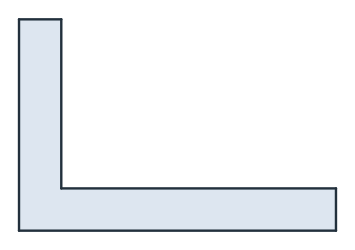
(a) (a) The bracket
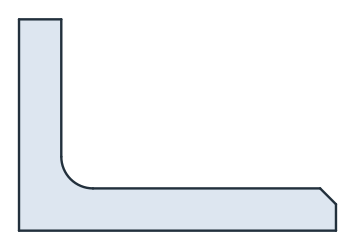
(b) (b) Filleted and chamfered
A fillet in a right-angled corner adds or removes r²(1 − π/4), and a chamfer of 3 on both edges removes 3²/2:
[5]:
print("fillet", rounded.mass - bracket.mass, "exact", 6**2 * (1 - math.pi / 4))
print("chamfer", rounded.mass - cut.mass, "exact", 3**2 / 2)
fillet 7.725666117691844 exact 7.725666117691862
chamfer 4.5 exact 4.5
A chamfer can also have two different lengths, with d2=, or a length and an angle, with angle= in degrees from the first edge. A chamfer of 3 at 30° removes a triangle with the legs 3 and 3 tan 30°:
[6]:
steep = bracket.Chamfered((60, 8), 3, angle=30)
print("chamfer at 30°", bracket.mass - steep.mass, "exact", 3 * 3 * math.tan(math.radians(30)) / 2)
chamfer at 30° 2.598076211353373 exact 2.598076211353316
In a sketch
In a sketch, Fillet and Chamfer take the corner as a point id, such as "bottom.end", as a point, or as a list of them. The new arc gets the id Fillet.1 and the new line Chamfer.1. The two edges at the corner keep their ids. The pieces they lose stay in the sketch as construction lines that meet at the sharp corner, so a dimension can still refer to that corner. The example is a cover plate of 50 × 30 with two corners rounded to 5 and one chamfered by 4 (Figure 2).
[7]:
sk = px.QuickSketch()
sk.Line(50, id="bottom").Turn(90).Line(30, id="right")
sk.Turn(90).Line(50, id="top").Close(id="left")
sk.Fillet(["bottom.end", "right.end"], 5)
sk.Chamfer("top.end", 4);
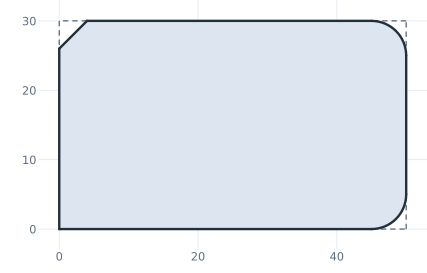
[9]:
plate = sk.Face()
print("area", plate.mass, "exact", 50 * 30 - 2 * 5**2 * (1 - math.pi / 4) - 4**2 / 2)
area 1481.2699081698725 exact 1481.2699081698725
The new arc or line takes the properties of the drawing calls, name=, maxh=, hpref= and col=, as one value for all corners or as a list with one value per corner, for example sk.Fillet(["a.end", "b.end"], 1, name=["r1", "r2"]).
In a constraint sketch, the radius of a fillet and the lengths of a chamfer are dimensions that can change later. See Offsets and profiles revisited for details.
See Trimming and splitting for corners cut by hand.