Curvature-continuous blends
An arc fillet is tangent to both edges, but its curvature jumps, from zero on a line to 1/r on the arc and back. A curvature-continuous blend, also called G2, runs from the curvature of one element to that of the next without a jump. This matters wherever something follows the outline at speed or light reflects off it, such as in a duct, on a cam track or along a styled edge. planex2d makes such blends in three ways, with Fillet and px.Curvature, with Connect between two elements,
and with the px.Curvature constraint in a constraint sketch.
[1]:
import numpy as np
from scipy.interpolate import BSpline

import planex as px
A duct corner
The example is a 90° corner of a duct wall, two lines of 60 rounded with a radius of 20. Fillet takes the continuity as its third argument. px.Tangent, the default, gives the arc, and px.Curvature gives a quintic spline between the same touch points:
[3]:
def corner(continuity):
    sk = px.QuickSketch().Line(60, id="a").Turn(90).Line(60, id="b")
    sk.Fillet(["a.end"], 20, continuity)
    return sk


def blend(sk):
    return [e for e in sk.Wires()[0].edges if not isinstance(e.edge, px.LineEdge)][0]


arc, g2 = corner(px.Tangent), corner(px.Curvature)
for name, sk in (("arc", arc), ("G2", g2)):
    b = blend(sk)
    print(name, type(b.edge).__name__, "from", tuple(b.start), "to", tuple(b.end), "length", b.mass)
arc ArcEdge from (40.0, 0.0) to (60.0, 20.0) length 31.41592653589793
G2 SplineEdge from (40.0, 0.0) to (60.0, 20.0) length 33.10867459938517
Both blends start and end at the same points, and the G2 blend is a little longer (Figure 1).
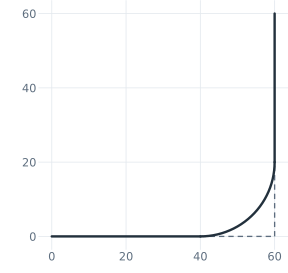
(a) Fillet with px.Tangent, an arc
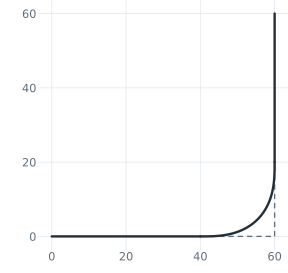
(b) Fillet with px.Curvature, a quintic
The curvature along the corner
The curvature of a spline follows from its exact B-spline. edge.bspline gives its degree, knots and poles, and SciPy’s BSpline evaluates the curve and its derivatives there. The function below returns the curvature at many points along a spline edge, with the length run so far:
[5]:
def curvature(edge, n=2001):
    data = edge.bspline
    p, knots = data["degree"], np.asarray(data["knots"])
    curve = BSpline(knots, np.asarray(data["poles"]), p)
    u = np.linspace(knots[p], knots[-p - 1], n)
    d1, d2 = curve.derivative(1)(u), curve.derivative(2)(u)
    speed = np.hypot(d1[:, 0], d1[:, 1])
    kappa = np.abs(d1[:, 0] * d2[:, 1] - d1[:, 1] * d2[:, 0]) / speed**3
    s = np.concatenate([[0], np.cumsum((speed[1:] + speed[:-1]) / 2 * np.diff(u))])
    return s, kappa


s, kappa = curvature(blend(g2).edge)
print("curvature at the ends", kappa[0], kappa[-1])
print("largest curvature", kappa.max(), "smallest radius", 1 / kappa.max(), "=", 1 / kappa.max() / 20, "r")
curvature at the ends 0.0 0.0
largest curvature 0.07350483232429958 smallest radius 13.60454773351568 = 0.680227386675784 r
The arc’s curvature is 1/20 from one touch point to the other and zero on the lines, so it jumps twice. The blend’s curvature starts at zero, where the line ends, rises to a peak and falls back to zero (Figure 2). In exchange, its smallest radius is 0.68 r, so it bends more sharply in its middle than the arc does.
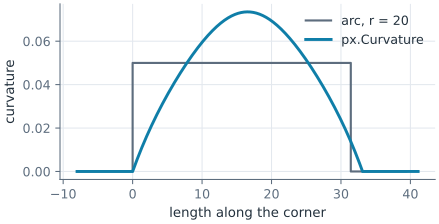
Bridging a gap
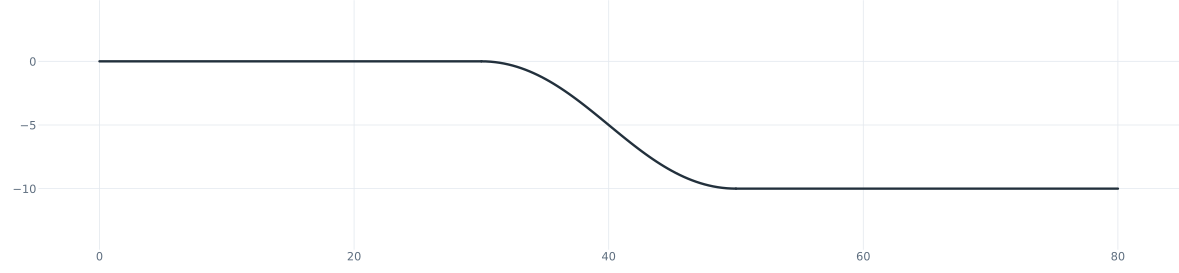
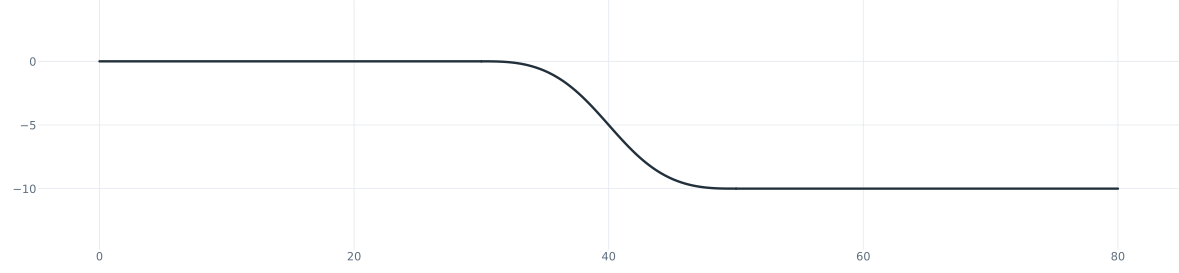
Connect(a, b, continuity) joins the nearest ends of two elements with a new one. With px.Coincident it is the line between the ends, with px.Tangent a cubic spline that leaves along a and arrives along b, and with px.Curvature a quintic that also takes up their curvature. The example is a duct wall that steps down by 10 over a gap of 20 (Figure 3):
[7]:
bridges = []
for continuity in (px.Coincident, px.Tangent, px.Curvature):
    sk = px.QuickSketch().Line(30, id="upper").Move((50, -10), dir=(1, 0)).Line(30, id="lower")
    sk.Connect("upper", "lower", continuity, id="step")
    bridges.append(sk)
    print(continuity, "->", type(sk.Wires()[0].edges[1].edge).__name__)
Constraint.Coincident -> LineEdge
Constraint.Tangent -> SplineEdge
Constraint.Curvature -> SplineEdge
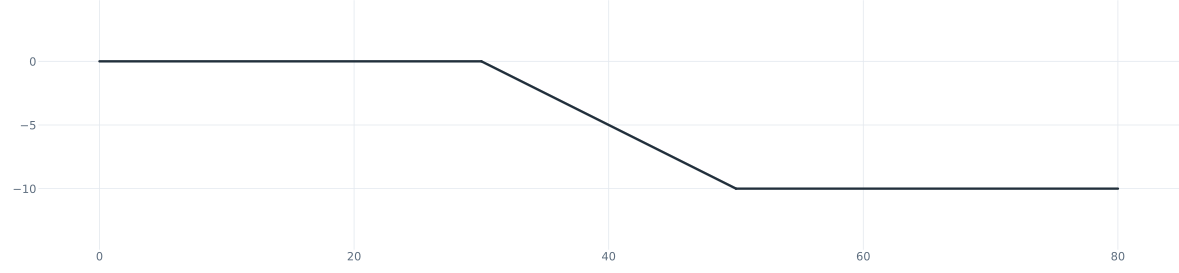
(a) px.Coincident
(b) px.Tangent
(c) px.Curvature
In a constraint sketch, the new element follows a and b when they move, and they cannot be removed while it exists.
In a constraint sketch
In a px.Sketch, a G2 fillet keeps its radius as the dimension Fillet.1.r, and the blend follows when the radius or the elements change. The corner from above, with its sides dimensioned, goes from a radius of 20 to 30:
[9]:
sk = px.Sketch().Line(60, id="a").Turn(90).Line(60, id="b")
sk.Constrain("a.start", px.Fix).Constrain("a", px.Horizontal).Constrain("b", px.Vertical)
sk.Constrain("a", px.Distance, 60, id="la").Constrain("b", px.Distance, 60, id="lb")
sk.Fillet(["a.end"], 20, px.Curvature)
print(sk.status, "touch points", sk.Location("Fillet.1.start")[:2], sk.Location("Fillet.1.end")[:2])
sk["Fillet.1.r"] = 30
sk.Update()
print(sk.status, "touch points", sk.Location("Fillet.1.start")[:2], sk.Location("Fillet.1.end")[:2])
full touch points (40.0, 0.0) (60.0, 20.0)
full touch points (30.0, 3.5494942085696966e-19) (60.0, 30.0)
The constraint px.Curvature makes two elements meet tangentially with equal curvature. The example is a bend of radius 10 that runs on into a spline. At the joint, the spline takes on the bend’s curvature, 1/10:
[10]:
sk = px.Sketch()
sk.Arc(10, 90, id="bend")
sk.Spline([(-8, 14), (-12, 22), (-12, 30)], id="run")
sk.Constrain("bend", px.Radius, 10, id="r").Constrain("bend.start", px.Fix)
sk.Constrain("bend", "run", px.Curvature)
run = [e for e in sk.Wires()[0].edges if isinstance(e.edge, px.SplineEdge)][0]
print("curvature of the spline at the joint", curvature(run.edge)[1][0])
curvature of the spline at the joint 0.09999999999999999
A line and an arc cannot meet with equal curvature, since a line has none, and the sketch then warns that the constraint has no solution.