Moving, rotating, mirroring, scaling
Motions work on wires, faces, shapes, compounds and sketches. There are four, each in the plane with 2D arguments:
Translate((dh, dv))moves by an offset;Rotate(center, angle)turns about a point by an angle in degrees, counterclockwise for a positive angle;Mirror(point, dir)mirrors about the axis through a point along a direction;Scale(center, factor)scales about a point.
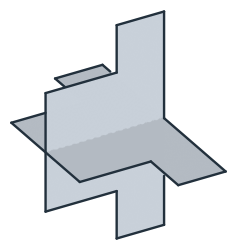
Rotate changes the object and returns it, while Rotated returns a copy, and the other motions follow the same rule. With 3D arguments, a motion moves the object’s plane instead (see In 3D). Symmetric parts can be drawn as one half and mirrored, and patterns are built from copies.
[1]:
import math
import planex as px
Symmetry: a T-slot nut
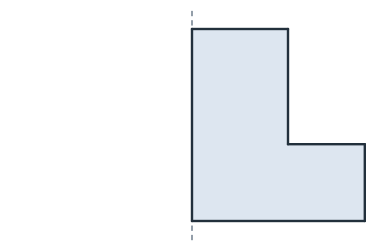
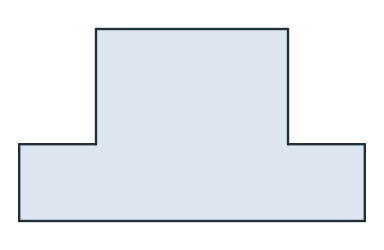
The example is a T-slot nut with a flange 18 wide and 4 high and a neck 10 wide and 6 high. Its right half (Figure 1a) is mirrored about the y axis, shown dashed, and united with its copy (Figure 1b). Mirroring about an axis through the origin is exact, so the two halves share the edge on the axis bit for bit. The union has no seam, and its top and bottom are one line each.
[3]:
half = px.QuickSketch().Line((9, 0)).Line((9, 4)).Line((5, 4)).Line((5, 10)).Line((0, 10)).Close().Face()
nut = half + half.Mirrored((0, 0), (0, 1))
(a) The right half
(b) Mirrored and united
[5]:
print("area", nut.mass, "exact", 2 * (9 * 4 + 5 * 6))
print(len(nut.edges), "edges")
area 132.0 exact 132
8 edges
Patterns: a perforated brake disc
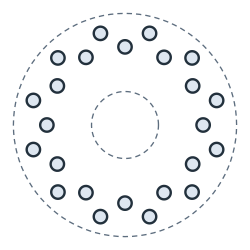
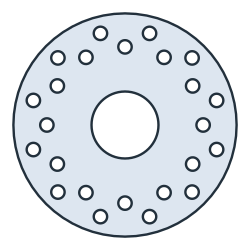
The example is a brake disc with a radius of 100 and a center bore of radius 30. One hole of radius 6 at a radius of 70 is rotated into a ring of twelve, 30° apart. The same hole, moved out to 85, is rotated into a second ring, offset by half a step (Figure 2a). Subtracting the bore and all 24 holes from the disc gives the brake disc (Figure 2b).
[6]:
hole = px.Circle((70, 0), 6).Face()
inner_ring = [hole.Rotated((0, 0), 30 * k) for k in range(12)]
outer_ring = [hole.Translated((15, 0)).Rotated((0, 0), 30 * k + 15) for k in range(12)]
disc = px.Subtract([px.Circle((0, 0), 100).Face(), px.Circle((0, 0), 30).Face(), *inner_ring, *outer_ring])
Inside a sketch, CircularPattern and LinearPattern repeat the sketch’s own elements in the same way. See Several loops for an example.
(a) One hole, 24 copies
(b) The brake disc
[8]:
print("area", disc.mass, "exact", math.pi * (100**2 - 30**2) - 24 * math.pi * 6**2)
area 25874.157094965514 exact 25874.157094965536
Scaling
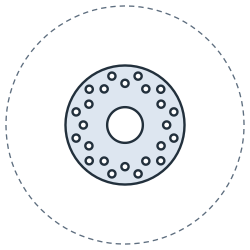
Scaled((0, 0), 0.5) scales the disc by one half about its center. It keeps its shape at a quarter of the area (Figure 3). The mesh sizes maxh and minh stay as they are unless scale_maxh=True or scale_minh=True is given.
[9]:
small = disc.Scaled((0, 0), 0.5)
print("area ratio", small.mass / disc.mass)
area ratio 0.25
In place
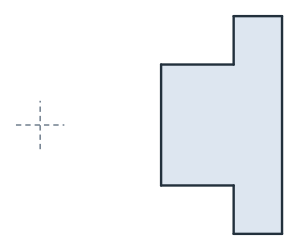
Rotate and Translate change the nut itself and return it, so the calls can be chained. The example turns the nut by 90° about the origin and then moves it 20 along x (Figure 4).
[11]:
nut.Rotate((0, 0), 90).Translate((20, 0))
print(nut.bounding_box)
((10.0, -9.0), (20.0, 9.0))
In 3D
With 3D arguments, a motion moves the object’s plane: Rotated(point, dir, angle) turns about an axis in space, and Mirrored(point, normal) mirrors about a plane. Turned about the x axis, the nut’s plane faces −y, up to the rounding of cos 90°. Mirrored about the xy plane, it faces −z (Figure 5). See The plane in 3D for planes in general.
[13]:
turned = nut.Rotated((0, 0, 0), (1, 0, 0), 90)
mirrored = nut.Mirrored((0, 0, 0), (0, 0, 1))
print("turned: normal", turned.Normal())
print("mirrored: normal", mirrored.Normal())
turned: normal (0.0, -1.0, 6.123233995736766e-17)
mirrored: normal (0.0, 0.0, -1.0)