Trimming and splitting
A common way to sketch is to draw elements past each other and cut them back afterwards, as on a drawing board. Trim(a, b) cuts the element a where it meets b and turns one piece of it into construction, shown dashed in the pictures:
by default, the piece nearest to the pen;
with
agiven as(id, point), the piece nearest to the point;with
reverse=True, the next piece instead.
Without b, a is cut wherever it meets another line, arc or circle. A full circle has no vertices, so it is cut only where other edges cross it. The part that stays keeps the id, and the cut-off piece gets the id <id>.trimmed.1. Split(a, b) cuts in the same way but keeps every piece, numbered <id>.1, <id>.2 and so on along the element.
[1]:
import math
import planex as px
A keyhole slot
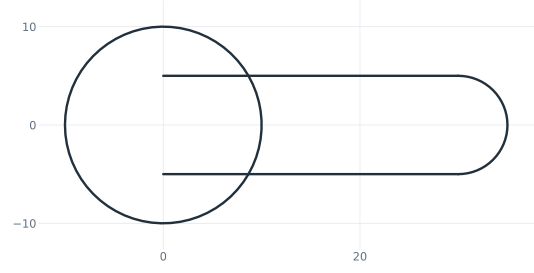
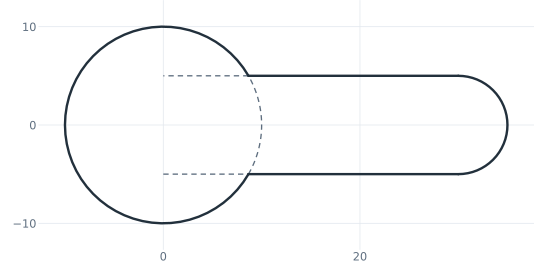
The example is a keyhole for hanging a part on a screw: a head hole of diameter 20 for the screw head and a slot 10 wide whose end lies 30 from the hole’s center. The slot is drawn from the center of the hole, so its sides reach into the hole (Figure 1a). Three trims cut it back:
the upper side at the head, which turns the piece nearest to the pen into construction;
the lower side at the head, at the piece nearest to its start;
the head wherever it meets the sides, at the piece between them.
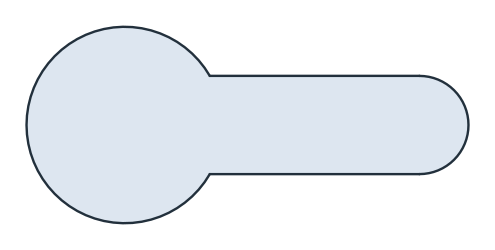
The cut pieces remain as dashed construction (Figure 1b), and Figure 1c shows the face. Keyhole(30, 10, 10) draws the same outline in one call (see Slots, keyholes and polygons). Here it is cut by hand to show the trims.
[3]:
s = px.QuickSketch()
s.Circle(10, id="head")
s.Move((0, -5)).Line(30, id="lower side")
s.Arc(5, 180, id="end").Line((0, 5), id="upper side")
drawn = s.Copy()

s.Trim("upper side", "head")
s.Trim(("lower side", (0, -5)), "head")
s.Trim(("head", (10, 0)))
keyhole = s.Face()
(a) Drawn past each other
(b) Trimmed
(c) The keyhole
The area is that of the disc, the slot and the half disc at its end, minus the part of the slot inside the disc:
[5]:
segment = 5 * math.sqrt(10**2 - 5**2) + 10**2 * math.asin(5 / 10)
print("area", keyhole.mass, "exact", math.pi * 10**2 + 30 * 10 - segment + math.pi * 5**2 / 2)
area 557.7680257797999 exact 557.7680257798
The other piece
reverse=True turns the other piece into construction, here the part of the upper side outside the head. The part that stays drawn keeps the id upper side. The head circle meets the side √(10² − 5²) from its center, so the two results have these lengths:
[6]:
meet = math.sqrt(10**2 - 5**2)
outside = drawn.Copy().Trim("upper side", "head")
inside = drawn.Copy().Trim("upper side", "head", reverse=True)
print("default:", outside.Measure("upper side")["length"], "exact", 30 - meet)
print("reverse=True:", inside.Measure("upper side")["length"], "exact", meet)
default: 21.33974596215561 exact 21.33974596215561
reverse=True: 8.660254037844387 exact 8.660254037844387
Split keeps every piece
Split cuts the upper side at the head into two lines, upper side.1 and upper side.2 along it. upper side itself now names the wire of both, so references to it keep working. Together, the two lines are as long as the side was before.
[7]:
split = drawn.Copy().Split("upper side", "head")
pieces = {ref: split.Measure(ref)["length"] for ref in ("upper side.1", "upper side.2")}
for ref, length in pieces.items():
    print(ref, length)
print("together", sum(pieces.values()), "the side was", 30)
upper side.1 21.33974596215561
upper side.2 8.660254037844387
together 30.0 the side was 30
A keyed bore in one sketch
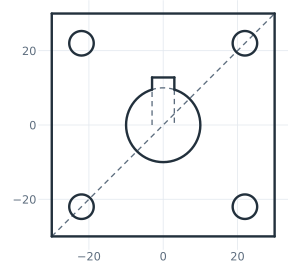
On Circles and rectangles, the keyed bore of the square flange was a second face, united from the bore and the keyway and subtracted from the plate. With trimming, the whole flange is one sketch. The bore is a circle, and the keyway is drawn as three lines up from the bore’s center line. The two sides are trimmed back to the bore, and then the bore is trimmed inside the keyway (Figure 2).
[8]:
flange = px.QuickSketch().RectangleC(60, 60)
for x in (-22, 22):
    for y in (-22, 22):
        flange.Circle(x, y, 3.3)
flange.Circle(10, id="bore")
flange.Move((-3, 0)).Line((-3, 12.8), id="left").Line((3, 12.8), id="top").Line((3, 0), id="right")
flange.Trim(("left", (-3, 1)), "bore")
flange.Trim(("right", (3, 1)), "bore")
flange.Trim(("bore", (0, 10)));
(a) The flange in one sketch, the cut pieces dashed
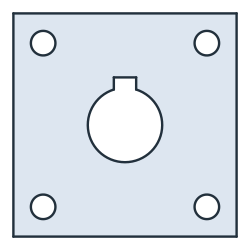
(b) The flange
The area is the same as on Circles and rectangles:
[10]:
overlap = 3 * math.sqrt(10**2 - 3**2) + 10**2 * math.asin(6 / 20)
print("area", flange.Face().mass, "exact", 60**2 - (math.pi * 10**2 + 6 * 12.8 - overlap) - math.pi * 6.6**2)
area 3131.280400094698 exact 3131.2804000946976