Center lines and axes
Center lines come from the sketch, as the dimensions do: a cross through every circle, a short cross at the center of an arc whose radius is dimensioned, and the sketch’s axes, such as a line of symmetry. dw.Center(id, ...) changes the center lines of one circle or arc, and dw.Axis(a, b) adds a center line the sketch does not have.
[1]:
import planex as px
Circles and bolt circles
The example is a flange of 100 with a bore of 30 and six holes of 9 on a bolt circle of 70, a construction circle. Center("bolt_circle", pitch=True) draws the bolt circle as a center line, and cross=True gives the bore a short cross instead of lines across it. The three diameters are concentric, so each goes on a diagonal of its own:
[2]:
flange = px.Sketch(auto_constraint=True)
flange.Circle(50, id="outside")
flange.Constrain("outside.center", "origin", px.Coincident)
flange.Constrain("outside", px.Diameter, 100, id="D")
flange.Circle(15, id="bore")  # at the pen, the outside's center: auto_constraint makes it concentric
flange.Constrain("bore", px.Diameter, 30, id="d")
flange.Circle(35, id="bolt_circle", construction=True)
flange.Constrain("bolt_circle", px.Diameter, 70, id="k")
flange.Circle(4.5, center=(35, 1), id="hole")
flange.Constrain("hole.center", "bolt_circle", px.Coincident)
flange.Constrain("hole.center", "H", px.Coincident)
flange.Constrain("hole", px.Diameter, 9, id="l")
flange.CircularPattern(["hole"], "origin", 6, id="holes")
dw = px.Drawing(flange, unit=px.mm).Center("bolt_circle", pitch=True).Center("bore", cross=True)
dw.Place("D", "ne").Place("k", "nw").Place("d", "sw")
[2]:
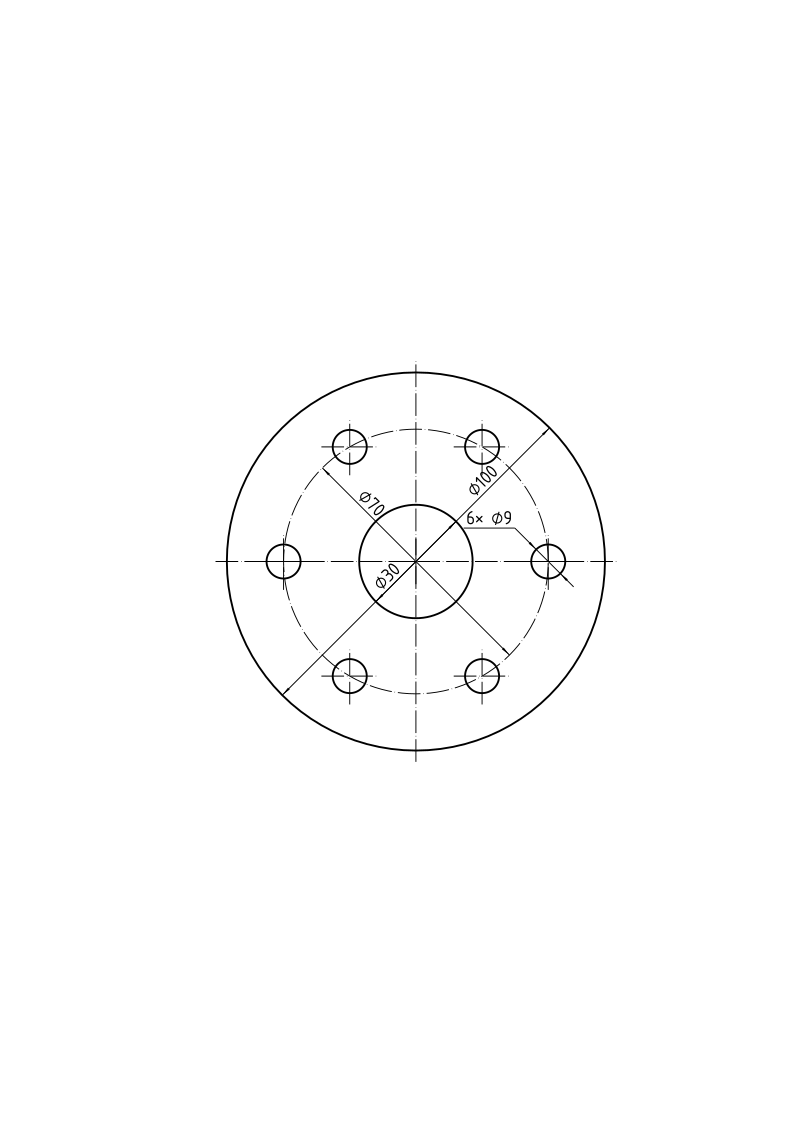
The axis of a turned part
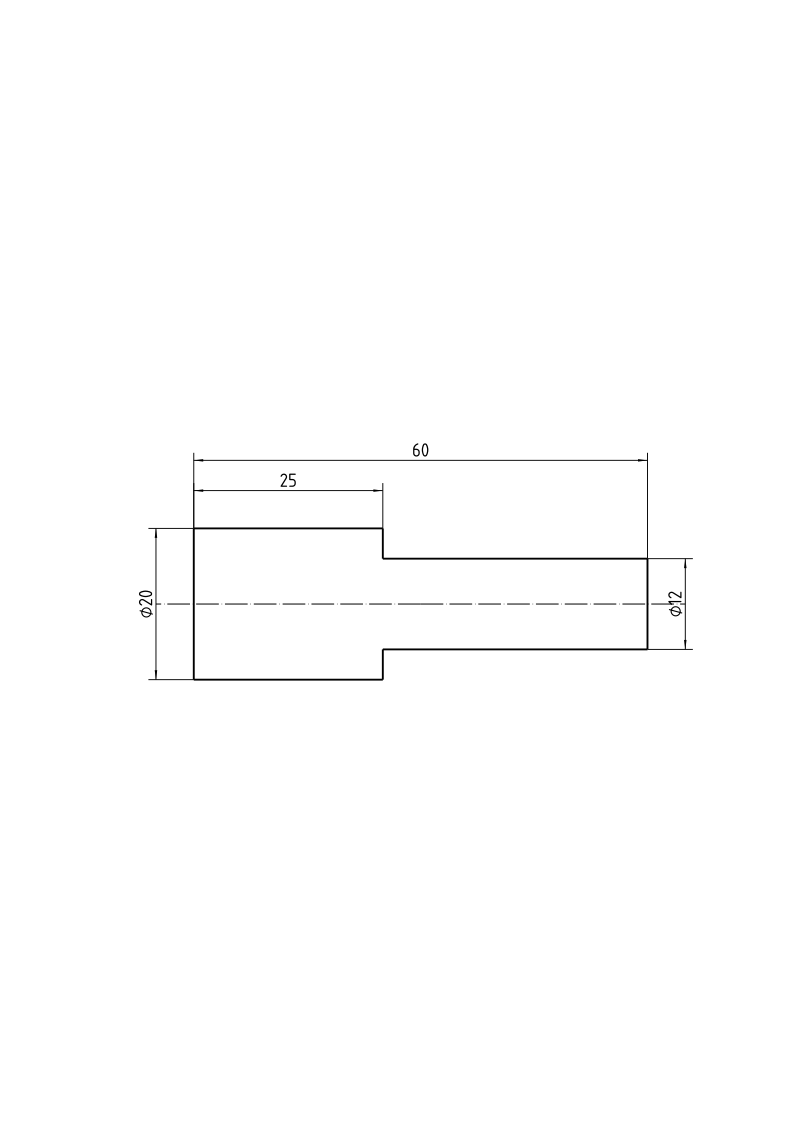
A turned part is drawn along its axis, a center line that runs a little past the outline at both ends, and its thicknesses are diameters. The example is a pin, 60 long, 20 thick for 25 and 12 thick for the rest. Its outline runs around both halves, so that the two ends are lines of the pin’s diameters: their lengths are the dimensions, written as diameters with text=. The shoulders are equal, so that the pin is symmetric about its axis. The sketch has no element on the axis, so Axis adds
it, from 5 before the pin to 5 after it:
[3]:
pin = px.Sketch(auto_constraint=True)
pin.Move((0, -10), px.Fix).Line(0, 20, px.Vertical, id="end_1").Line(25, 0, px.Horizontal, id="collar_top")
pin.Line(0, -4, px.Vertical, id="shoulder_top").Line(35, 0, px.Horizontal, id="shank_top")
pin.Line(0, -12, px.Vertical, id="end_2").Line(-35, 0, px.Horizontal, id="shank_bottom")
pin.Line(0, -4, px.Vertical, id="shoulder_bottom").Close(px.Horizontal, id="collar_bottom")
pin.Constrain("shoulder_top", "shoulder_bottom", px.Equal)
pin.Constrain("collar_top", "collar_bottom", px.Equal)
pin.Constrain("end_1", px.Distance, 20, id="collar_d")
pin.Constrain("end_2", px.Distance, 12, id="shank_d")
pin.Constrain("collar_top", px.Distance, 25, id="collar_l")
pin.Constrain("end_1", "end_2", px.Distance, 60, id="length")
print("status", pin.status, "| degrees of freedom", pin.dof)
px.Drawing(pin, unit=px.mm).Place("collar_d", text="⌀20").Place("shank_d", text="⌀12").Axis((-5, 0), (65, 0))
status full | degrees of freedom 0
[3]:
See Views and sheets for several views on one sheet.