Lever
A lever turns a shaft through its hub and carries a pin at its eye. It has two bosses joined by an arm whose edges are tangent to both, and a slot that saves weight. Model the lever from the drawing in planex2d or in any CAD system, then check its area and centroid against the values at the end of the page. A solution in planex2d follows.

[1]:
import planex as px
The outline
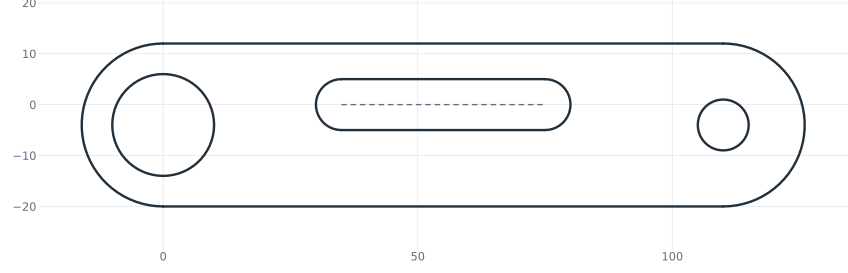
The outline is drawn roughly, starting at the bottom of the hub. It is a line, a half circle around the eye, a line back and a half circle around the hub, both half circles of radius 16 for now. The bore and the pin hole go around the centers of the two arcs with concentric=, which auto_constraint=True keeps as a constraint, and the slot starts 35 from the hub’s center. The outline only needs the right shape, and the dimensions in the next section give it its sizes (Figure 1).
[3]:
lever = px.Sketch(auto_constraint=True)
lever.Move((0, -20)).Line(110, id="lower")
lever.Arc(16, 180, id="eye")
lever.Line(110, id="upper")
lever.Arc(16, 180, id="hub")
lever.Circle(10, concentric="hub", id="bore")
lever.Circle(5, concentric="eye", id="pin_hole")
lever.Move((35, 0)).Slot(40, 10, id="slot");  # 40 between the centers of its ends, 10 wide
The dimensions
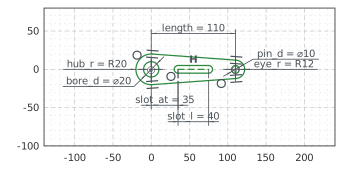
The hub’s center is the origin, and the eye’s center lies on the horizontal axis, 110 away. The chain has made each piece tangent to the one before it, and the hub to the bottom line where the outline closes, so the arm’s edges run straight from boss to boss. The slot lies on the axis. Slot has already made its width a dimension, slot.w, and its spine carries the length. With these, nothing in the sketch is left free (Figure 2):
[5]:
lever.Constrain("hub.center", "origin", px.Coincident)
lever.Constrain("eye.center", "H", px.Coincident)
lever.Constrain("hub", px.Radius, 20, id="hub_r")
lever.Constrain("eye", px.Radius, 12, id="eye_r")
lever.Constrain("hub.center", "eye.center", px.Distance, 110, id="length")
lever.Constrain("bore", px.Diameter, 20, id="bore_d")
lever.Constrain("pin_hole", px.Diameter, 10, id="pin_d")
lever.Constrain("slot.spine", px.Horizontal)
lever.Constrain("slot.spine.start", "H", px.Coincident)
lever.Constrain("hub.center", "slot.spine.start", px.Distance, 35, id="slot_at")
lever.Constrain("slot.spine", px.Distance, 40, id="slot_l")
print("status", lever.status, "| degrees of freedom", lever.dof)
status full | degrees of freedom 0
The checks
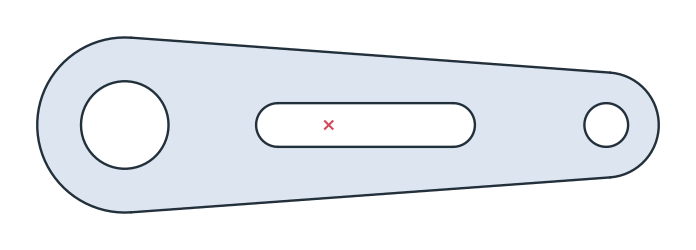
These are the area and the centroid of the lever, with the hub’s center at the origin, to compare with your own model (Figure 3):
[7]:
face = lever.Face()
print("area", round(face.mass, 2), "mm²")
print("centroid", tuple(round(v, 2) for v in face.center[:2]))
area 3512.59 mm²
centroid (46.6, 0.0)
The outline as DXF in millimeters, for another CAD system or a laser cutter:
[9]:
lever.WriteDXF("lever.dxf", unit=px.mm, scale=1) # scale=1: the numbers as they are
The outline as DXF: lever.dxf