In 3D
Every planex2d object lies on a plane in 3D. px.Plot3d draws faces, shapes, wires and sketches on their planes in one 3D view that can be rotated and zoomed, together with OpenCASCADE shapes. This shows where a profile sits on a part before it is extruded or cut. Every object also has .Plot3d(). In the view:
a face, shape or wire is drawn on its own plane;
a sketch contributes its drawn edges;
a
px.Planeis drawn as a square with a line along its h axis, withplane_sizeas its side;an OpenCASCADE shape is drawn as it is.
Plot3d draws with ngsolve_webgpu by default, and with netgen’s webgui when backend="webgui" is given.
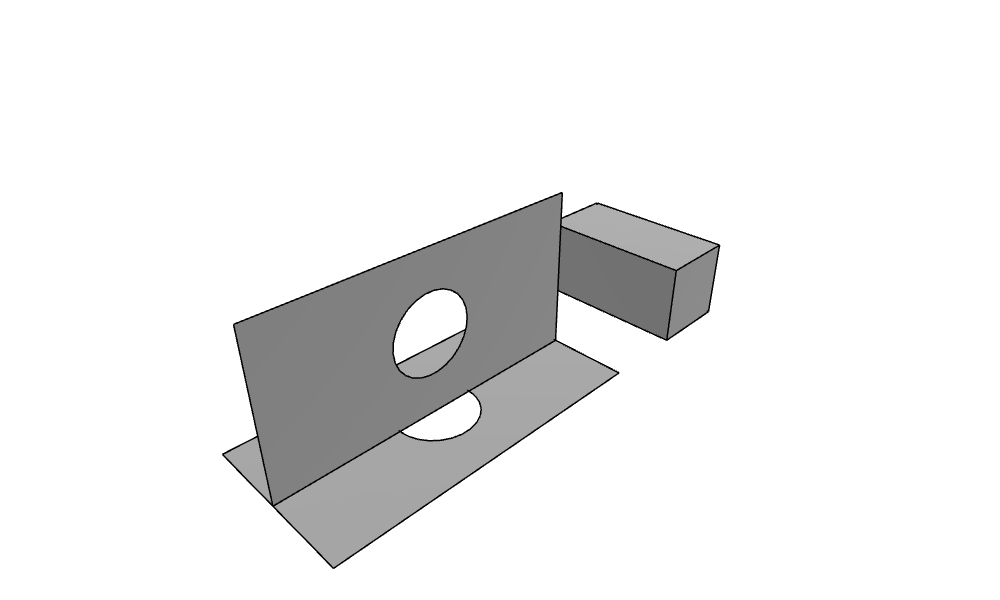
The example is a plate of 4 × 2 with a hole, a copy of it turned upright about the x axis and lifted by 1, and an OpenCASCADE box of 1 × 2 × 1 beside the plate:
[1]:
import netgen.occ as occ
import planex as px

part = px.QuickSketch().RectangleC(4, 2).Face() - px.Circle((0, 0), 0.5).Face()
upright = part.Rotated((0, 0, 0), (1, 0, 0), 90).Translated((0, 0, 1))
box = occ.Box(occ.Pnt(3, -1, 0), occ.Pnt(4, 1, 1))
px.Plot3d([part, upright, box])
See Solids and meshes in the webgui for solids extruded from planex2d faces and netgen’s meshes of them.