Coming from netgen’s WorkPlane
Drawing code written for netgen.occ.WorkPlane keeps working. px.WorkPlane takes the same drawing calls (MoveTo, LineTo, Line, Arc, ArcTo, Circle, Rectangle, RectangleC, Spline, Rotate, Direction, Close and the others) and returns planex2d objects: Face() gives a face, Wire() and Wires() give wires. These are faces and shapes with exact Boolean operations, passed back to OpenCASCADE only when requested (ToOCCFace,
ToOCCShape). Faces that netgen has already drawn come over with px.FromOCC. The example is a re-entrant honeycomb, a metamaterial with a negative Poisson’s ratio, originally drawn for netgen.
The minimal example
The minimal example draws an L-shaped plate with one function, once on netgen’s work plane and once on planex2d’s. The netgen face is also taken over with px.FromOCC:
[1]:
import netgen.occ as occ
import planex as px

def plate(wp):
    return wp.MoveTo(0, 0).LineTo(4, 0).LineTo(4, 1) \
        .LineTo(1, 1).LineTo(1, 3).LineTo(0, 3).Close().Face()

netgen_face = plate(occ.WorkPlane())
face = plate(px.WorkPlane())
taken_over = px.FromOCC(netgen_face)
print(isinstance(face, px.Face), netgen_face.mass, face.mass, taken_over.mass)
True 6.0 6.0 6.0
The area is 4 · 1 + 1 · 2 = 6 in all three cases. The rest of the page uses a larger part.
[2]:
import math
import time
import warnings
from ngsolve_webgpu.jupyter import Draw
One cell
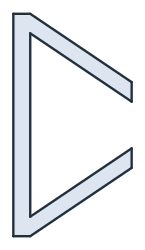
The cell has a strut thickness of 0.5, a width of 3.5, a height of 6 and a re-entrant angle of 30°. The function draws it on whichever work plane it is given, netgen’s or planex2d’s:
[4]:
t, w, h, phi = 0.5, 3.5, 6.0, 30.0
d = t / math.sin(math.radians(90 - phi))
a = w / math.tan(math.radians(90 - phi))

def cell(wp):
    return (wp.MoveTo(w - t / 2, a + d / 2).LineTo(t / 2, d / 2) \
            .LineTo(t / 2, h - d / 2).LineTo(w - t / 2, h - a - d / 2) \
            .LineTo(w - t / 2, h - a + d / 2).LineTo(t / 2, h + d / 2) \
            .LineTo(-t / 2, h + d / 2).LineTo(-t / 2, -d / 2) \
            .LineTo(t / 2, -d / 2).LineTo(w - t / 2, a - d / 2).Close().Face())

netgen_cell = cell(occ.WorkPlane())
planex_cell = cell(px.WorkPlane())
print(f"netgen {netgen_cell.mass:.15f}")
print(f"planex {planex_cell.mass:.15f}, difference {planex_cell.mass - netgen_cell.mass:.1e}")
netgen 6.752776749732569
planex 6.752776749732570, difference 8.9e-16
The sheet
netgen moves faces with Move and adds them one by one, while planex2d moves them with Translated and unites them all at once with px.Unify. The frame cuts the sheet to a window. netgen needs the inner rectangle reversed to make it a hole. In planex2d, a loop inside another is a hole by nesting, so px.WorkPlane draws the frame without Reverse(). It still accepts Reverse(), so netgen code runs unchanged, and without it, a PlanexWarning says that the inner wire is taken
as a hole.
[6]:
nx, ny = 9, 7
offsets = [((2 * i + k) * w, (2 * j + k) * (h - a)) \
           for j in range(ny) for k in (0, 1) for i in range(nx)]

start = time.perf_counter()
netgen_sheet = sum(netgen_cell.Move((dx, dy, 0)) for dx, dy in offsets)
netgen_frame = occ.WorkPlane().MoveTo(3.255, 3.5) \
    .Rectangle(49.490, 43).Reverse() \
    .MoveTo(-10, -10).Rectangle(100, 100).Face()
netgen_geo = netgen_sheet - netgen_frame
netgen_time = time.perf_counter() - start

start = time.perf_counter()
planex_sheet = px.Unify([planex_cell.Translated(o) for o in offsets])
with warnings.catch_warnings():
    warnings.simplefilter("ignore", px.PlanexWarning)
    planex_frame = px.WorkPlane().MoveTo(3.255, 3.5).Rectangle(49.490, 43) \
        .MoveTo(-10, -10).Rectangle(100, 100).Face()
planex_geo = planex_sheet - planex_frame
planex_time = time.perf_counter() - start

print(f"netgen {netgen_time:.3f} s, area " \
      f"{sum(f.mass for f in netgen_geo.faces):.9f}")
print(f"planex {planex_time:.3f} s, area {planex_geo.mass:.9f}")
netgen 4.627 s, area 534.854430306
planex 0.005 s, area 534.854430306
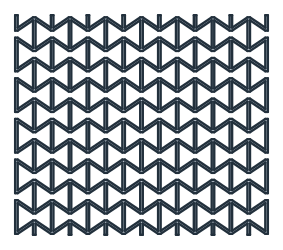
The cells only touch, so the sheet holds exactly 126 cells of material, and every pocket between them remains a hole:
[8]:
print(f"sheet {planex_sheet.mass:.12f}, " \
      f"{len(offsets)} cells {len(offsets) * planex_cell.mass:.12f}, " \
      f"{len(planex_sheet.Face().inner)} holes")
sheet 850.849870466301, 126 cells 850.849870466304, 96 holes
Into 3D
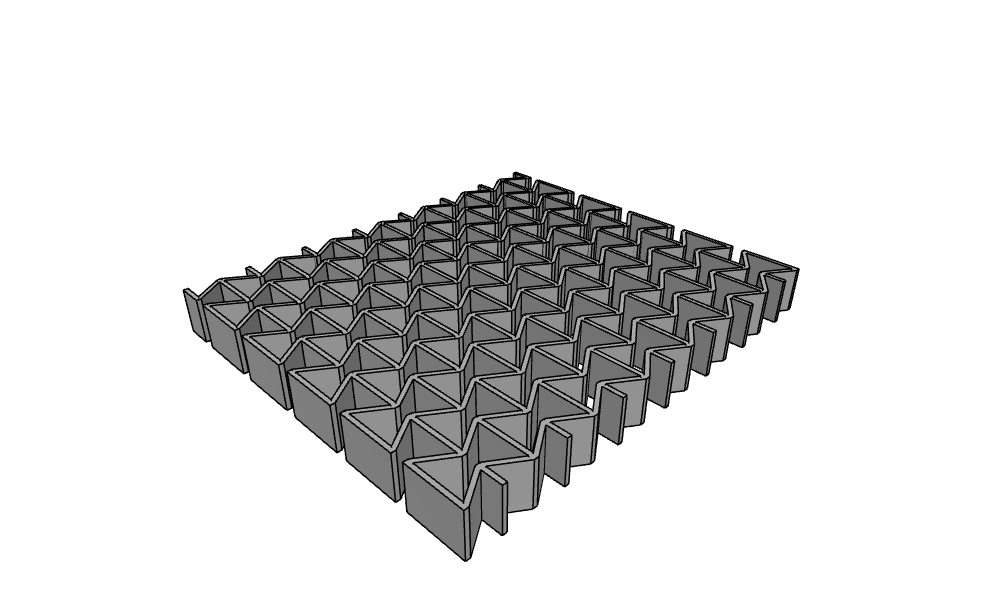
ToOCCShape passes the result to OpenCASCADE, where it is extruded 5 thick.
[9]:
solid = planex_geo.ToOCCShape().Extrude(5)
Draw(solid)
Drawing in planex
px.WorkPlane draws into a planex2d quick sketch, wp.sketch. A planex2d sketch, either px.QuickSketch or px.Sketch with constraints, also draws from references, such as lines ending on other edges, tangents and parallels, and it trims, mirrors and measures. See Quick sketch for details.