How long can adjusting slots be?
A motor plate bolted down through slots can slide to tension its belt, and the longer the slots, the more travel it has. As a slot grows, its end comes closer to the plate’s edge, and the web between them gets thinner. A parametric model answers how long the slots can be by trying lengths and recording what each one leaves, the way a design table is filled. Each solution goes into a spreadsheet as a row, with its dimensions and its measurements.
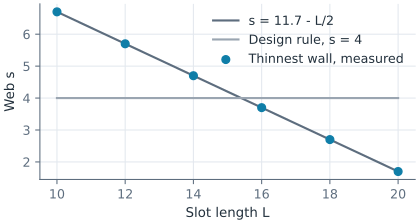
The example is the plate of the exercise Motor mount plate, 130 × 90 of aluminum 4 thick, with four slots 6.6 wide whose middles lie 50 from the vertical axis. Its design rule asks for a web of at least 4 between a slot and the edge. Along the slot’s axis, the web is half the plate’s length less the slot’s middle, half its length \(L\) and the radius of its end,
so the slots may be up to \(L = 15.4\) long. Lengths are in mm.
This page is part of a collection of manufacturing examples using planex2d.
Open this example in the playground, the interactive code editor in the browser, to change the code and run it.

[1]:
import csv
from pathlib import Path

import planex as px
import planex.measurements as pm
The plate
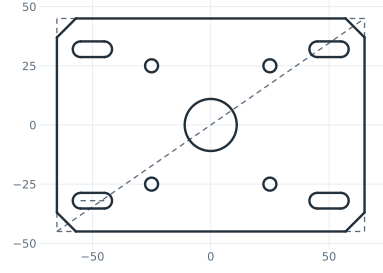
The sketch is the exercise’s, a centered rectangle with chamfered corners, the motor’s pilot bore, four screw holes and the slot repeated by a pattern. The slot’s length between the centers of its ends is the dimension slot_l (Figure 1):
[3]:
mount = px.Sketch(auto_constraint={"horizontal": True, "vertical": True})
mount.RectangleC(130, 90, id="plate")
mount.Constrain("plate.center", "origin", px.Coincident)
mount.Constrain("plate.Line.1", px.Distance, 130, id="length")
mount.Constrain("plate.Line.2", px.Distance, 90, id="width")
mount.Chamfer(["plate.Line.1.start", "plate.Line.2.start", "plate.Line.3.start", "plate.Line.4.start"], 8,
              id=["chamfer_1", "chamfer_2", "chamfer_3", "chamfer_4"])
mount.Circle(22 / 2, center=(1, 1), id="pilot")
mount.Constrain("pilot.center", "origin", px.Coincident)
mount.Constrain("pilot", px.Diameter, 22, id="pilot_d")
mount.Circle(5.5 / 2, center=(-24, -24), id="screw")
mount.Constrain("screw", px.Diameter, 5.5, id="screw_d")
mount.Constrain("screw.center", "V", px.Distance, 25, id="screw_x")
mount.Constrain("screw.center", "H", px.Distance, 25, id="screw_y")
mount.LinearPattern("screw", px.H, 2, 50, dir2=px.V, count2=2, spacing2=50, id="screws")
mount.Move((-55, -32)).Slot(10, 6.6, id="slot")
mount.Constrain("slot.spine", px.Distance, 10, id="slot_l")
mount.Constrain("slot.spine.mid", "V", px.Distance, 50, id="slot_x")
mount.Constrain("slot.spine.mid", "H", px.Distance, 32, id="slot_y")
mount.LinearPattern("slot", px.H, 2, 100, dir2=px.V, count2=2, spacing2=64, id="slots")
print("status", mount.status, "| degrees of freedom", mount.dof)
# mount.Plot(show_constraints=True)
status full | degrees of freedom 0
The design table
sk.AddToSpreadsheet appends the sketch’s current solution to a spreadsheet as a row, each driving dimension in a column of its own and more values from values=. A path ending in .csv writes a CSV file, one ending in .xlsx an Excel file with openpyxl. The example lengthens the slots from 10 to 20 in steps of 2. For each length it measures the plate’s thinnest wall with pm.MinThickness and its mass in grams, for aluminum of 2.7 g/cm³, and appends the row:
[5]:
Path("slots.csv").unlink(missing_ok=True)
for L in range(10, 21, 2):
    mount.Update({"slot_l": L})
    plate = mount.Face()
    web = plate.Measure(pm.MinThickness())
    mount.AddToSpreadsheet("slots.csv", name=f"L{L}", values={"web": web, "mass": plate.mass * 4 * 2.7e-3})
The file is a plain CSV with a header row, which any spreadsheet program opens. Read back with Python’s csv module, each row gives the slot length, the web and the mass. The web is compared with \(s = 11.7 - L/2\), and the longest slots that keep a web of 4 come out of the table (Figure 2):
[6]:
with open("slots.csv", newline="") as f:
    rows = list(csv.DictReader(f))
for row in rows:
    L, web = float(row["slot_l"]), float(row["web"])
    print(row["name"], "| web", round(web, 6), "| exact", round(11.7 - L / 2, 6),
          "| mass", round(float(row["mass"]), 1), "g")
longest = max(float(row["slot_l"]) for row in rows if float(row["web"]) >= 4)
print("longest slots in the table with a web of 4 or more", longest, "| limit", round(2 * (11.7 - 4), 6))
L10 | web 6.7 | exact 6.7 | mass 115.5 g
L12 | web 5.7 | exact 5.7 | mass 114.9 g
L14 | web 4.7 | exact 4.7 | mass 114.4 g
L16 | web 3.7 | exact 3.7 | mass 113.8 g
L18 | web 2.7 | exact 2.7 | mass 113.2 g
L20 | web 1.7 | exact 1.7 | mass 112.7 g
longest slots in the table with a web of 4 or more 14.0 | limit 15.4
The design table as CSV: slots.csv
See Design tables in a spreadsheet for writing and reading rows, and Part analysis for the thinnest wall.