Two faces
+, - and * unite, subtract and intersect two faces. They return a new shape, even when it holds a single face, while +=, -= and *= change the left face in place. Each edge is cut where it meets the other face, and the pieces are kept or dropped. Edges that end up on one line or one circle are joined again, so the results agree with their closed formulas.
[1]:
import math
import planex as px
Three operations
The example is a plate of 60 × 40 and a disc of radius 12 centered on its right edge. Their union is a lug, their difference a notch, and their intersection the piece the notch removes, each with half a disc (Figure 1).
[3]:
plate = px.QuickSketch().Rectangle(60, 40).Face()
disc = px.Circle((60, 20), 12).Face()
lug, notch, piece = plate + disc, plate - disc, plate * disc
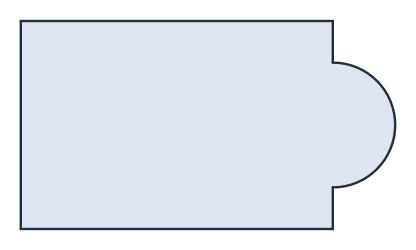
(a) Union: a lug
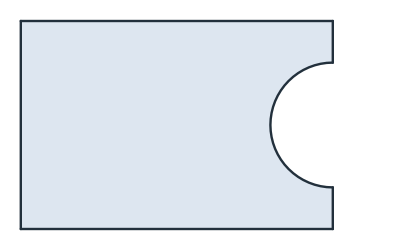
(b) Difference: a notch
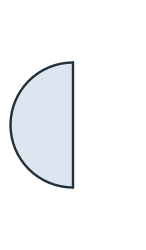
(c) Intersection: the piece
Half the disc has an area of 72π:
[5]:
half = 72 * math.pi
print("lug", lug.mass, "exact", 2400 + half)
print("notch", notch.mass, "exact", 2400 - half)
print("piece", piece.mass, "exact", half)
lug 2626.1946710584652 exact 2626.1946710584652
notch 2173.8053289415348 exact 2173.8053289415348
piece 226.1946710584651 exact 226.1946710584651
Union
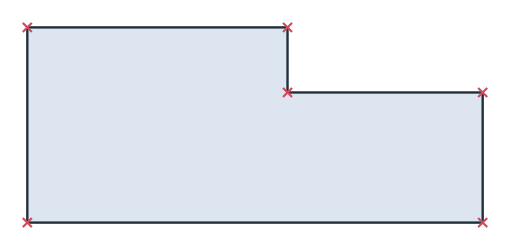
Overlapping faces unite into one face, and the overlap counts once. The first example is a cruciform, the union of a bar of 60 × 20 and a bar of 20 × 60 (Figure 2a). The second is two plates of 40 × 30 and 30 × 20 that share part of an edge. They become one face with one outline, and the two bottom edges, which lie on one line, are joined into one edge again (Figure 2b, with the six corners marked).
[6]:
horizontal = px.QuickSketch((-30, -10)).Rectangle(60, 20).Face()
vertical = px.QuickSketch((-10, -30)).Rectangle(20, 60).Face()
cross = horizontal + vertical

left = px.QuickSketch().Rectangle(40, 30).Face()
right = px.QuickSketch((40, 0)).Rectangle(30, 20).Face()
joined = left + right
print("cruciform", cross.mass, "exact", 2 * 60 * 20 - 20 * 20)
print("plates:", len(joined.wires), "outline,", len(joined.edges), "edges")
cruciform 2000.0 exact 2000
plates: 1 outline, 6 edges
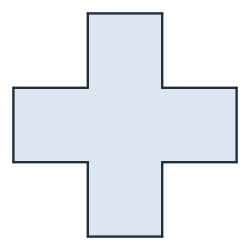
(a) A cruciform
(b) Two plates, one outline
Difference and intersection
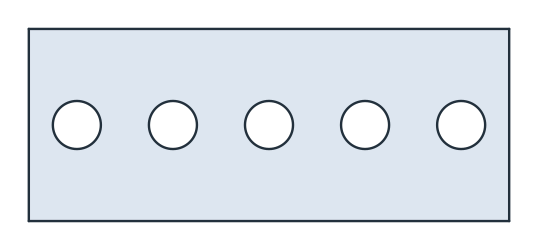
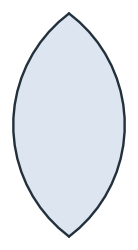
- cuts the right face out of the left one, and * keeps what both cover. The first example is a perforated strip of 100 × 40 with five holes of radius 5 on a pitch of 20, cut with -=, so the strip changes in place (Figure 3a). The second is a lens, the intersection of two discs of radius 10 whose centers are 12 apart (Figure 3b).
[8]:
strip = px.QuickSketch().Rectangle(100, 40).Face()
for k in range(5):
    strip -= px.Circle((10 + 20 * k, 20), 5).Face()

lens = px.Circle((0, 0), 10).Face() * px.Circle((12, 0), 10).Face()
(a) A perforated strip
(b) A lens
The lens is two circular segments, each of half-angle acos(6/10):
[10]:
print("strip", strip.mass, "exact", 4000 - 5 * 25 * math.pi)
print("lens", lens.mass, "exact", 2 * 100 * math.acos(0.6) - 6 * math.sqrt(400 - 144))
strip 3607.3009183012755 exact 3607.300918301276
lens 89.45904360032243 exact 89.45904360032245
Names are kept
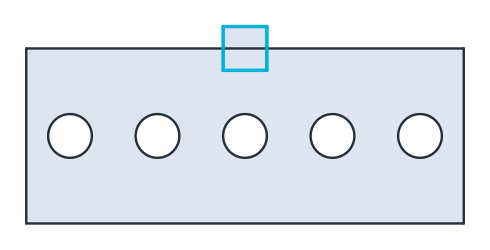
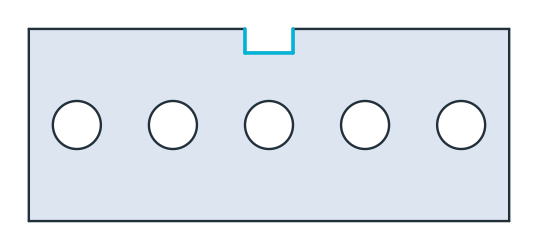
A difference keeps the name and the color of the left face, and every edge keeps its own. The example names the strip strip and centers a square of 10 × 10 named notch on the middle of its top edge (Figure 4a). In the strip minus the notch, the three edges that the notch cut into the strip are named notch (Figure 4b).
[11]:
strip.name = "strip"
notch = px.QuickSketch((45, 35)).Rectangle(10, 10, name="notch").Face()
result = strip - notch
print(result.name, sorted({e.name for e in result.edges if e.name}))
strip ['notch']
(a) The strip and the notch
(b) Strip minus notch