V-belt pulley
A V-belt pulley carries a belt in the groove of its rim and sits on a shaft by its hub, a key in the bore’s keyway taking the torque. A turned part like this is a profile revolved about its axis, the half section from the axis out, here with the hub standing out on one side. Model the pulley from the drawing in planex2d or in any CAD system, then check its volume, mass and center of mass against the values at the end of the page. A solution in planex2d follows.

[1]:
import math
import netgen.occ as occ
import planex as px
The profile
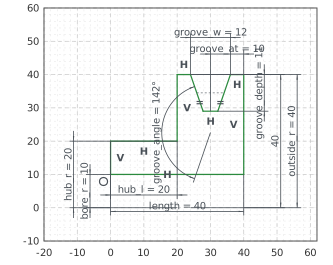
The profile is the half section above the axis, sketched in the front plane, the plane with its normal toward the viewer, \(-y\). Its \(x\) runs along the axis and \(z\) out from it, with the origin on the axis at the hub’s end. The outline runs from the bore along the axis, up the rim’s right face, into the groove and out of it, down the disc’s left face and along the hub back to the start. With auto_constraint={"horizontal": True, "vertical": True}, the lines drawn level or
plumb stay so (Figure 1).
The bore is 20 across and the hub 40 across and 20 long, and the pulley is 40 long in all, 80 across the rim. The groove is 11 deep, 12 wide at the rim and 38° between its flanks, its middle 10 from the right face. Its flanks are equal, so that the groove is symmetric. px.Angle measures between the lines in the directions they are drawn in. The right flank is drawn down into the groove and the left one up out of it, so the angle between them as drawn is 180° less the groove’s 38°:
[3]:
front = px.XZ
profile = px.Sketch(front, auto_constraint={"horizontal": True, "vertical": True})
profile.Move((0, 10)).Line(40, id="bore")
profile.Turn(90).Line(30, id="right_face")  # Turn(90) turns the pen left, Turn(-90) right
profile.Turn(90).Line(4, id="rim_right")
profile.Turn(71).Line(11, id="flank_right")
profile.Turn(-71).Line(4, id="groove_bottom")
profile.Turn(-71).Line(11, id="flank_left")
profile.Turn(71).Line(4, id="rim_left")
profile.Turn(90).Line(20, id="disc_face")
profile.Turn(-90).Line(20, id="hub_top")
profile.Close(px.Vertical, id="hub_end")  # drawn only roughly plumb: the flag holds it
profile.Constrain("bore.start", "V", px.Coincident)
profile.Constrain("bore.start", "H", px.Distance, 10, id="bore_r")
profile.Constrain("bore", px.Distance, 40, id="length")
profile.Constrain("hub_top", px.Distance, 20, id="hub_l")
profile.Constrain("hub_top", "H", px.Distance, 20, id="hub_r")
profile.Constrain("rim_left", "H", px.Distance, 40, id="outside_r")
profile.Constrain("rim_right", "H", px.Distance, 40)
profile.Constrain("groove_bottom", "rim_left", px.Distance, 11, id="groove_depth")
profile.Constrain("flank_left", "flank_right", px.Angle, 180 - 38, id="groove_angle")  # between the lines as drawn
profile.Constrain("flank_left", "flank_right", px.Equal)
profile.Constrain("flank_right.start", "flank_left.end", px.Distance, 12, id="groove_w")
profile.Constrain("groove_bottom.mid", "right_face", px.Distance, 10, id="groove_at")
print("status", profile.status, "| degrees of freedom", profile.dof)
status full | degrees of freedom 0
The pulley
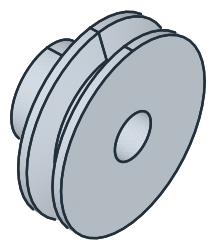
The profile’s face, taken to OpenCASCADE with ToOCCFace, is revolved a full turn about the \(x\) axis with netgen’s Revolve. By Pappus’s theorem, the volume is the profile’s area times the length of the circle that its centroid runs on, \(2\pi\) times its distance from the axis (Figure 2):
[5]:
face = profile.Face()
pulley = face.ToOCCFace().Revolve(occ.Axis((0, 0, 0), occ.X), 360)
print("volume", round(pulley.mass, 3), "| Pappus", round(2 * math.pi * face.center[2] * face.mass, 3))
volume 93035.202 | Pappus 93035.202
The keyway
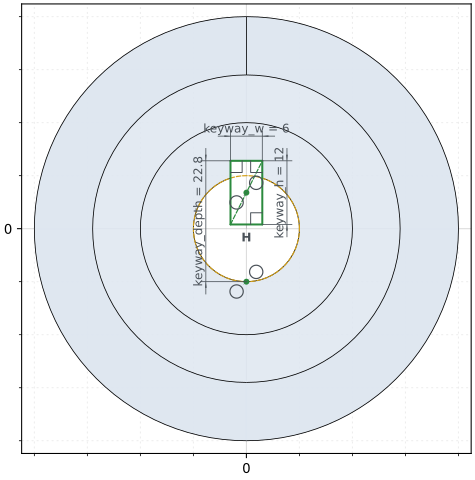
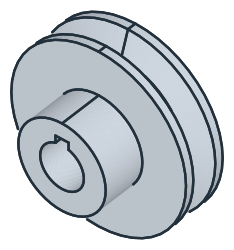
The keyway is sketched on the hub’s end, the face lowest in \(x\). Its default axes would have \(v\) pointing down, and px.Plane(end, axis=(0, -1, 0)) turns them so that the sketch is seen as the side view shows it, \(-y\) to the right and \(z\) up. Project brings the bore’s edge into the sketch, the shorter of the end face’s two edges. The keyway is a rectangle drawn with RectangleC around its center, 6 wide and 12 high, enough to reach from its top down into the
bore. Its center lies on the vertical axis and its bottom stays horizontal. As on the keyed hub, its depth runs from the far side of the bore to its top, 22.8 for a bore of 20, which sets the rectangle’s height on the axis. It is pocketed 40 deep, through the hub (Figure 3):
[7]:
end = pulley.faces.Min(occ.X)
keyway = px.Sketch(px.Plane(end, axis=(0, -1, 0)), auto_constraint=True)
keyway.Project(min(end.edges, key=lambda e: e.mass), id="bore")
keyway.RectangleC((0, 6), 6, 12, id="keyway")  # 6 along the pen's direction, 12 across it; its lines keyway.Line.1 to .4
keyway.Vertex("bore_bottom", (0, -9))
keyway.Constrain("keyway.center", "V", px.Coincident)
keyway.Constrain("keyway.Line.1", px.Horizontal)
keyway.Constrain("keyway.Line.3", px.Distance, 6, id="keyway_w")
keyway.Constrain("keyway.Line.2", px.Distance, 12, id="keyway_h")
keyway.Constrain("bore_bottom", "bore.Edge.0", px.Coincident)
keyway.Constrain("bore_bottom", "V", px.Coincident)
keyway.Constrain("bore_bottom", "keyway.Line.3", px.Distance, 22.8, id="keyway_depth")
print("status", keyway.status, "| degrees of freedom", keyway.dof)
pulley = px.Pocket(pulley, keyway, 40)
status full | degrees of freedom 0
(a) The keyway at the hub's end, the bore projected
(b) The keyway through the hub
The checks
These are the volume, the mass in steel S235 (7.85 g/cm³) and the center of mass, with the origin on the axis at the hub’s end, to compare with your own model. The volume is the revolved profile less the keyway. The keyway is the rectangle 6 wide from the axis up to the keyway’s top, \(22.8 - 10\), less the bore’s area under it, times the 40 of the bore’s length. The keyway takes material above the axis, so the center of mass lies just below it:
[9]:
under = 3 * math.sqrt(10**2 - 3**2) + 10**2 * math.asin(3 / 10)  # the bore's area above the axis, |y| < 3
exact = 2 * math.pi * face.center[2] * face.mass - (6 * (22.8 - 10) - under) * 40
c = pulley.center
print("volume", round(pulley.mass, 1), "mm³, exact", round(exact, 1))
print("mass", round(pulley.mass * 7.85e-6, 3), "kg")
print("center of mass", round(c.x, 2), "along the axis,", round(-c.z, 3), "below it, off the plane y = 0 by", round(abs(c.y), 6))
volume 92326.7 mm³, exact 92326.7
mass 0.725 kg
center of mass 25.99 along the axis, 0.087 below it, off the plane y = 0 by 0.0
The pulley as STEP, for another CAD system:
[10]:
pulley.WriteStep("v_belt_pulley.step")
The pulley as STEP: v_belt_pulley.step