shapely
shapely provides predicates, distances and many GIS tools. planex2d faces go to shapely as polygons with a chosen tessellation, and shapely’s polygons come back as planex2d faces, whose segments FitArcs turns back into arcs.
[1]:
from shapely.geometry import LineString, Point
from shapely.ops import unary_union
import planex as px
A minimal example
The example is a washer, a disc of radius 30 with a bore of radius 10. It goes to shapely, answers three questions and comes back:
[3]:
washer = px.QuickSketch().Circle(30).Circle(10).Face()
g = washer.ToShapely(tol=1e-6)
print(g.contains(Point(0, 0)), g.contains(Point(20, 0)), g.distance(Point(40, 0)))

back = px.FromShapely(g)
print("area", washer.mass, "back from shapely", back.mass)
False True 10.0
area 2513.2741228718346 back from shapely 2513.2740390956237
The bore is not part of the washer, the point (20, 0) is, and the point (40, 0) is 10 from the outline. The area that comes back is that of the polygon, which lies within tol of the circles.
To shapely
The rest of the page uses a flange gasket with a radius of 60, a bore of radius 20, and six bolt holes of diameter 8 on a pitch circle of 80. One bolt hole is drawn, and CircularPattern repeats it about the center of the outline:
[4]:
s = px.QuickSketch().Circle(60, id="outline").Circle(20)
gasket = s.Circle(40, 0, 4, id="bolt").CircularPattern("bolt", "outline.center", 6).Face()
tol is the largest distance of the polygon from the arcs. The finer it is, the more points the polygon has, and the closer its area comes to the exact one:
[5]:
for tol in (1e-2, 1e-4, 1e-6):
    g = gasket.ToShapely(tol=tol)
    print("tol", tol, "points on the outline", len(g.exterior.coords), "area error", g.area - gasket.mass)
tol 0.01 points on the outline 175 area error -0.6941249174178665
tol 0.0001 points on the outline 1723 area error -0.006750985015969491
tol 1e-06 points on the outline 17209 area error -6.707198735966813e-05
With a coarse tol, the polygons are easy to see (Figure 1a), next to the exact face (Figure 1b):
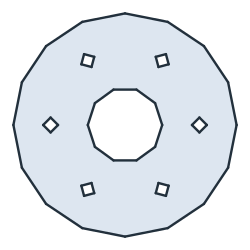
(a) ToShapely(tol=1.5): 50 segments
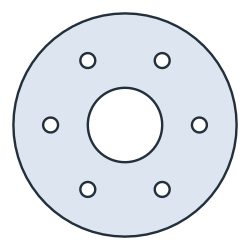
(b) The planex2d face: 8 arcs
Predicates and distances
shapely’s predicates and distances work on the polygon. The bore is not part of the gasket, the point (30, 0) between the bore and the bolt holes is, and a pin at (70, 0) is 10 away from the outline:
[7]:
g = gasket.ToShapely(tol=1e-6)
print(g.contains(Point(0, 0)), g.contains(Point(30, 0)), g.distance(Point(70, 0)))
False True 10.0
From shapely and back to arcs
The example is five discs of radius 0.8 in a row, united in shapely. They come back as short segments, with every vertex marked (Figure 2a), and FitArcs turns them into arcs again (Figure 2b):
[8]:
blobs = unary_union([Point(x, 0).buffer(0.8) for x in range(5)])
shape = px.FromShapely(blobs)
fitted = shape.Copy().FitArcs(tol=1e-3, max_edge_length=0.2)
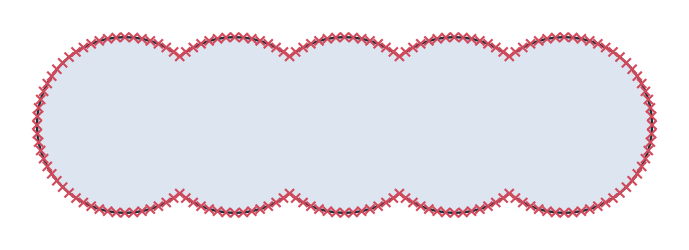
(a) From shapely: 176 edges
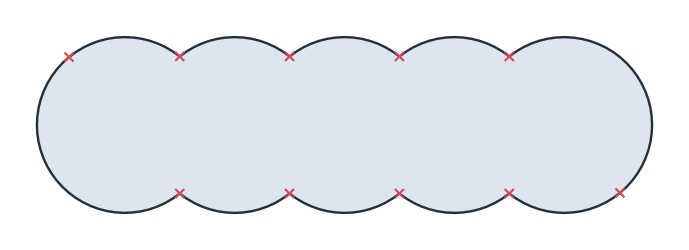
(b) Fitted: 10 edges
Line strings
A line string becomes a list of wires. The example is a zigzag of three segments, which comes back as one wire (Figure 3):
[10]:
zigzag = px.FromShapely(LineString([(0, 0), (10, 10), (20, 0), (30, 10)]))[0]