Constraints and dimensions
sk.Constrain(a, b, kind, value, id=...) adds a constraint between one or two references, read from a to b: Constrain("line", "circle", px.Tangent) makes the line tangent to the circle. A reference can be
an element by its id, such as
"bottom";a point of an element, such as
"bottom.start","bottom.end","bottom.mid"or"fillet.center";a point made with
Vertex;the sketch’s axes
px.Handpx.V, or its originsk.origin.
The geometric kinds also work as flags of the drawing calls (see Drawing with constraints). The dimensions take a value and usually an id, so that they can be changed later.
Kind |
Between |
Meaning |
|---|---|---|
|
A point and a point, line, circle or spline |
The point lies on the other reference |
|
A line, or two points |
Along |
|
Two lines |
Parallel, or at a right angle |
|
Two of line, arc, circle and spline |
Touching, on the side as drawn |
|
Two lines, or two circles and arcs |
Equal lengths or radii |
|
Two points and a line |
Mirror images of each other |
|
Two elements and a line |
The mirror image of one element’s line or circle is the other’s |
|
Two circles or arcs |
One common center |
|
A point or an element |
Stays where it is |
|
A line’s length, or points and lines |
A dimension |
|
A circle or arc |
A dimension |
|
Two lines, or a line and an axis |
A dimension in degrees |
|
Elements |
Keep their shape and move as one |
[1]:
import planex as px
A plate with a hole, all constraints shown
The example is the plate from the section overview, with a hole of diameter 10, 15 from the bottom and 20 from the left side. show_constraints places a sign next to every constraint: a circle at a coincidence, a square in a perpendicular corner, H and V, two short strokes along a tangent, an anchor for a fixed point, and the value of each dimension with its id (Figure 1a). show_ends marks the start of every line and arc in blue and its end in orange, which is what
.start and .end refer to, and show_direction adds arrows (Figure 1b). sk.Plot(show_constraints=True) draws the same with matplotlib. With backend="plotly", the picture is interactive, and every sign is explained on hover.
[3]:
sk = px.Sketch(id="plate")
sk.Move(sk.origin, px.Coincident)
sk.Line(37, 2.5, px.Horizontal, id="bottom")
sk.Arc(9, 95, px.Tangent, id="fillet")
sk.Line(-1, 17, px.Vertical, px.Tangent, id="right")
sk.Line(-46, 3, px.Perpendicular, id="top")
sk.Close(px.Perpendicular, id="left")
sk.Constrain("fillet", px.Radius, 10, id="r")
sk.Constrain("bottom.start", "right", px.Distance, 50, id="width")
sk.Constrain("bottom", "top", px.Distance, 30, id="height")

sk.Circle(20, 15, 5, id="hole")
sk.Constrain("hole", px.Diameter, 10, id="d")
sk.Constrain("hole.center", "bottom", px.Distance, 15, id="y_hole")
sk.Constrain("hole.center", "left", px.Distance, 20, id="x_hole")
print(sk.status, sk.dof, sorted(sk.dimensions))
full 0 ['d', 'height', 'r', 'width', 'x_hole', 'y_hole']
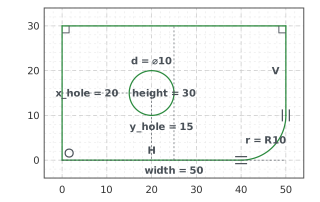
(a) show_constraints
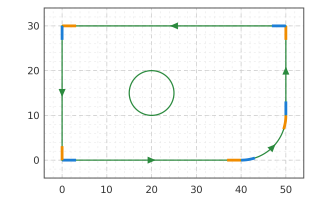
(b) show_ends and show_direction
Reference dimensions
A dimension with reference=True and no value drives nothing; it only measures. sk["diagonal"] is the distance from the plate’s origin to the hole’s center in the current solution, and it follows every change.
[5]:
sk.Constrain(sk.origin, "hole.center", px.Distance, id="diagonal", reference=True)
print("diagonal", sk["diagonal"], "exact", (20**2 + 15**2) ** 0.5)
sk.Update({"x_hole": 30, "y_hole": 10})
print("diagonal", sk["diagonal"], "exact", (30**2 + 10**2) ** 0.5, sk.status)
diagonal 25.0 exact 25.0
diagonal 31.622776601683793 exact 31.622776601683793 full
Removing a constraint
Remove(id) removes a constraint, and the element it held can move again. Without the hole’s diameter, the sketch has one degree of freedom left.
[6]:
sk.Remove("d")
print("without d:", sk.status, sk.dof, "degree of freedom")
sk.Constrain("hole", px.Radius, 5, id="d")
print("with d again:", sk.status, sk.dof, "degrees of freedom")
without d: under 1 degree of freedom
with d again: full 0 degrees of freedom