Construction elements and points
Construction elements and points are the helper geometry of a drawing: center lines, reference circles, the positions of holes. They place what comes next but never become part of the part, so they never appear in Wires(), faces or exports. Any element becomes construction with construction=True, and Vertex(id, point) adds a point with an id. A construction element also leaves the pen where it is, so the outline continues as if it were not there.
The points of every element can be referred to by id: "id.start", "id.end", "id.mid" and, for arcs and circles, "id.center".
[1]:
import math
import planex as px
A pillow block from a construction circle
The example is a pillow block with a base of 80 × 12, an axis 45 high, a boss of radius 22 around the axis and a bore of 25 (Figure 1). The boss is a construction circle around the point axis. Its outline is drawn in three steps.
First the construction: the axis, the boss, and the left flank’s tangent from the top of the left foot to the boss. The point given with the boss, (0, 45), picks the touch point on the left side.
[3]:
s = px.QuickSketch()
s.Vertex("axis", (40, 45))
s.Circle(40, 45, 22, id="boss", construction=True)
s.Move((0, 12))
s.Line(tangent=("boss", (0, 45)), id="left tangent", construction=True);
Then the outline. The pen is still at (0, 12), so the outline runs down the left foot, along the base and up the right foot, then tangent to the boss on the right. The crown follows the boss until it meets the left tangent, and Close draws the left flank along it. Last, the bore goes around the axis, and a construction line from the middle of the base up to the crown measures the overall height.
[4]:
s.Line((0, 0), id="left foot").Line((80, 0), id="base")
s.Line((80, 12), id="right foot")
s.Line(tangent=("boss", (80, 45)), id="right flank")
s.Arc("left tangent", congruent="boss", id="crown")
s.Close(id="left flank")
s.Move("axis").Circle(12.5, id="bore")
s.Move("base.mid", dir=(0, 1))
s.Line(until="crown", id="height", construction=True)
block = s.Face()
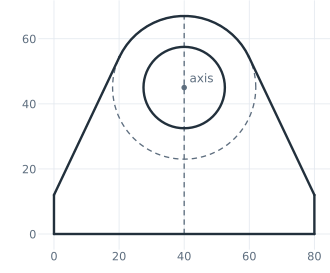
(a) The sketch, the boss and the height line dashed
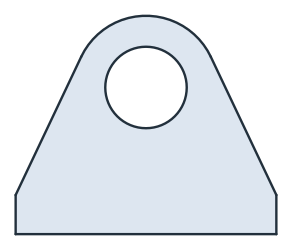
(b) The pillow block
The flanks touch the boss, so their distance from the axis is the boss radius of 22. The center of the crown is the axis, and the height line is 45 + 22 long:
[6]:
for ref in ("left flank", "right flank"):
    print(ref, "distance from the axis", s.Edge(ref).Distance((40, 45)))
print("crown center", s.Location("crown.center"), "axis", s.points["axis"])
print("height", s.Edge("height").mass, "exact", 45 + 22)
left flank distance from the axis 22.0
right flank distance from the axis 22.0
crown center (40.0, 45.0) axis (40.0, 45.0)
height 67.0 exact 67
A bolt circle from points
The example is a round flange with an outer diameter of 100, a bore of 40 and six holes of 9 on a bolt circle of 75 (Figure 2). The hole positions are construction points with the ids bolt0 to bolt5 (a). sk.points lists every point of the sketch, and a loop draws a hole around each (b).
[7]:
f = px.QuickSketch().Circle(50).Circle(20)
for k in range(6):
    a = math.radians(60 * k)
    f.Vertex(f"bolt{k}", (37.5 * math.cos(a), 37.5 * math.sin(a)))
points = f.Copy()
for ref in f.points:
    f.Move(ref).Circle(4.5)
flange = f.Face()
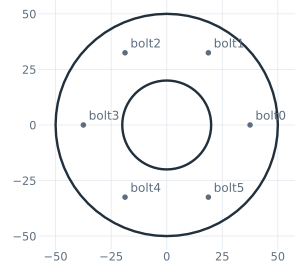
(a) The points bolt0 to bolt5
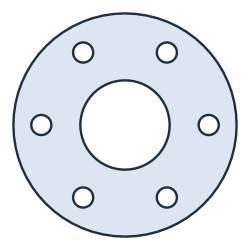
(b) The flange
[9]:
print("area", flange.mass, "exact", math.pi / 4 * (100**2 - 40**2 - 6 * 9**2))
area 6215.641065127406 exact 6215.641065127405
The same bolt circle can also be drawn as one hole and a CircularPattern of it. See Several loops for an example.