Vent plate
A vent plate covers an opening in a housing and lets air through a grid of holes, and four screws at its rounded corners hold it. The grid is a pattern, one hole repeated along the plate and across it. Model the plate from the drawing in planex2d or in any CAD system, then check its area against the value at the end of the page. A solution in planex2d follows.

[1]:
import math
import planex as px
The plate
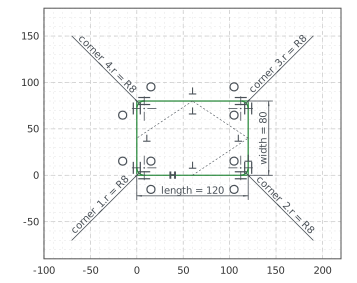
The plate is a rectangle, 120 by 80, drawn with Rectangle from the pen at the origin, 120 along \(x\) and 80 along \(y\). Its lines are plate.Line.1 to plate.Line.4, counterclockwise from the bottom edge. With auto_constraint={"horizontal": True, "vertical": True}, its edges, drawn level and plumb, stay so, and its corner sits at the origin. Fillet rounds the four corners with a radius of 8, and each fillet makes its radius a dimension, corner_1.r to
corner_4.r (Figure 1):
[3]:
plate = px.Sketch(auto_constraint={"horizontal": True, "vertical": True})
plate.Rectangle(120, 80, id="plate")
plate.Constrain("plate.Line.1.start", "origin", px.Coincident)
plate.Constrain("plate.Line.1", px.Distance, 120, id="length")
plate.Constrain("plate.Line.2", px.Distance, 80, id="width")
plate.Fillet(["plate.Line.1.start", "plate.Line.2.start", "plate.Line.3.start", "plate.Line.4.start"], 8,
             id=["corner_1", "corner_2", "corner_3", "corner_4"])
print("status", plate.status, "| degrees of freedom", plate.dof)
status full | degrees of freedom 0
The holes
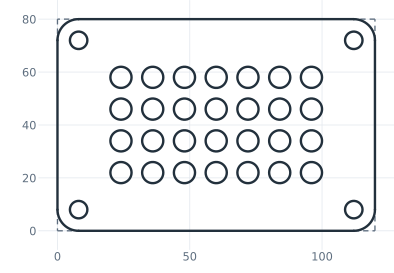
The mounting holes, 6.6 across for M6 screws, go into the centers of the corner arcs with concentric=, so they need no position of their own. The first vent hole, 8 across, is 24 from the left edge and 22 from the bottom edge. LinearPattern repeats it in a grid, 7 times along \(x\) and, in its second direction, 4 times up, 12 apart both ways. The copies are named by their two steps, grid.1.0.vent to grid.6.3.vent (Figure 2).
[5]:
for k in range(1, 5):
    plate.Circle(6.6 / 2, concentric=f"corner_{k}", id=f"mount_{k}")
plate.Constrain("mount_1", px.Diameter, 6.6, id="mount_d")
for k in range(2, 5):
    plate.Constrain(f"mount_{k}", "mount_1", px.Equal)
plate.Circle(8 / 2, center=(25, 20), id="vent")
plate.Constrain("vent", px.Diameter, 8, id="vent_d")
plate.Constrain("vent.center", "plate.Line.4", px.Distance, 24, id="vent_x")
plate.Constrain("vent.center", "plate.Line.1", px.Distance, 22, id="vent_y")
plate.LinearPattern("vent", px.H, 7, 12, dir2=px.V, count2=4, spacing2=12, id="grid")  # 7 along x, 4 up, the first included
print("status", plate.status, "| degrees of freedom", plate.dof)
status full | degrees of freedom 0
The checks
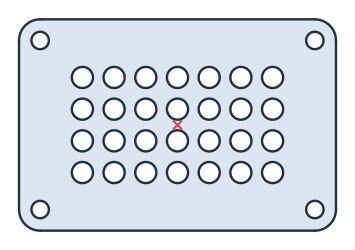
This is the area, to compare with your own model. It is the rectangle less what the corners round off, \((4 - \pi) \cdot 8^2\), less the 4 mounting holes and the 28 vent holes. The plate is symmetric about both of its middle lines, so its centroid lies at its middle (Figure 3):
[7]:
face = plate.Face()
exact = 120 * 80 - (4 - math.pi) * 8**2 - 4 * math.pi * 3.3**2 - 28 * math.pi * 4**2
c = face.center
print("area", round(face.mass, 2), "mm², exact", round(exact, 2))
print("centroid", tuple(round(v, 6) for v in c[:2]))
area 8000.78 mm², exact 8000.78
centroid (60.0, 40.0)
The plate as DXF in millimeters, for another CAD system or a laser cutter:
[9]:
plate.WriteDXF("vent_plate.dxf", unit=px.mm, scale=1) # scale=1: the numbers as they are
The plate as DXF: vent_plate.dxf