Pillow block
A pillow block carries a bearing and is bolted to a frame through its base. As a solid, it is a profile padded into a block, with holes pocketed from its faces. Model the block from the drawing in planex2d or in any CAD system, then check its volume, mass and center of mass against the values at the end of the page. A solution in planex2d follows.

[1]:
import math
import netgen.occ as occ
import planex as px
The profile
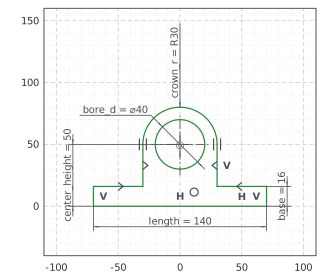
The profile is the front view, sketched in the front plane, the plane with its normal toward the viewer, \(-y\). It has \(x\) to the right and \(z\) up, with the origin in the middle of the bottom. The outline runs from the bottom left corner along the bottom, up the right end, over the right shoulder, up the right side, over the crown and down the left side to the left shoulder. With auto_constraint=True, the flags px.Horizontal and px.Vertical in the drawing calls
become constraints, Arc(30, 180) makes the crown a half circle tangent to both sides, and the bore goes around the crown’s center with concentric=.
The profile is symmetric about the vertical axis. The left side and the left shoulder mirror the lines of the right ones, and the mirror sets their directions too, so they carry no flags. With the sizes of the front view, nothing in the sketch is left free (Figure 1):
[3]:
front = px.XZ
profile = px.Sketch(front, auto_constraint=True)
profile.Move((-70, 0)).Line(140, px.Horizontal, id="bottom")
profile.Turn(90).Line(16, px.Vertical, id="right_end")  # Turn(90) turns the pen left, Turn(-90) right
profile.Turn(90).Line(40, px.Horizontal, id="right_shoulder")
profile.Turn(-90).Line(35, px.Vertical, id="right_side")
profile.Arc(30, 180, id="crown")
profile.Line(35, id="left_side")
profile.Turn(-90).Line(40, id="left_shoulder")
profile.Close(px.Vertical, id="left_end")
profile.Circle(40 / 2, concentric="crown", id="bore")
profile.Constrain("bottom.mid", "origin", px.Coincident)
profile.Constrain("bottom", px.Distance, 140, id="length")
profile.Constrain("right_end", px.Distance, 16, id="base")
profile.Constrain("bore.center", "bottom", px.Distance, 50, id="center_height")
profile.Constrain("bore", px.Diameter, 40, id="bore_d")
profile.Constrain("crown", px.Radius, 30, id="crown_r")
profile.Constrain("left_side", "right_side", "V", px.SymmetricCarriers)
profile.Constrain("left_shoulder", "right_shoulder", "V", px.SymmetricCarriers)
print("status", profile.status, "| degrees of freedom", profile.dof)
status full | degrees of freedom 0
The block
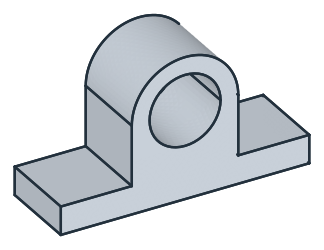
px.Pad extrudes the profile 22.5 to both sides of the front plane, 45 in all, so that the block is symmetric about the front plane as well. Its volume is the area of the profile times 45 (Figure 2):
[5]:
block = px.Pad(profile, 22.5, length2=22.5)
print("volume", block.mass, "area × 45", profile.Face().mass * 45)
volume 199668.5834705503 area × 45 199668.583470577
The holes
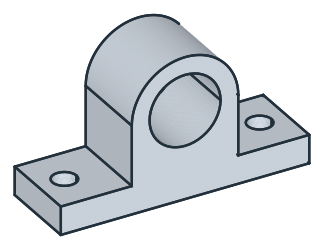
The bolt holes for M12 go through the base. They are sketched on the bottom of the block, its face lowest in \(z\), and until=px.last cuts them up through the base. They are placed roughly, 80 apart, and the spacing of 110 moves them to their place. The right hole is equal to the left one and both are mirrored about the vertical axis, so the sketch carries one diameter and the spacing, as the drawing gives them (Figure 3):
[7]:
holes = px.Sketch(block.faces.Min(occ.Z))
holes.Circle(13.5 / 2, center=(-40, 0), id="left_hole")
holes.Circle(13.5 / 2, center=(40, 0), id="right_hole")
holes.Constrain("left_hole", px.Diameter, 13.5, id="hole_d")
holes.Constrain("left_hole", "right_hole", px.Equal)
holes.Constrain("left_hole.center", "right_hole.center", px.Distance, 110, id="spacing")
holes.Constrain("left_hole.center", "H", px.Coincident)
holes.Constrain("left_hole.center", "right_hole.center", "V", px.Symmetric)
block = px.Pocket(block, holes, until=px.last)  # through to the last flat face it crosses
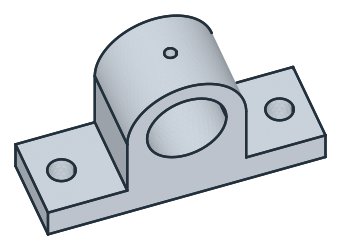
The oil hole runs from the top of the crown down into the bore. Its pocket starts 80 up and ends 30 deeper, on the bore’s axis. Below the wall of the crown it runs through the empty bore (Figure 4):
[9]:
oil = px.Sketch(px.Plane(px.XY, 80))  # the xy plane offset by 80: z = 80, on the top of the crown
oil.Circle(6 / 2, id="oil_hole")
oil.Constrain("oil_hole", px.Diameter, 6, id="oil_d")
oil.Constrain("oil_hole.center", "origin", px.Coincident)
block = px.Pocket(block, oil, 30)  # 30 deep, against the plane's normal: down
The checks
These are the volume, the mass in steel S235 (7.85 g/cm³) and the center of mass, with the origin in the middle of the bottom, to compare with your own model. The block is symmetric about two planes, so its center of mass lies on the vertical axis:
[11]:
c = block.center
print("volume", round(block.mass, 1), "mm³")
print("mass", round(block.mass * 7.85e-6, 3), "kg")
print("center of mass", round(c.z, 2), "above the bottom, off the axis by", round(math.hypot(c.x, c.y), 6))
volume 194804.9 mm³
mass 1.529 kg
center of mass 25.37 above the bottom, off the axis by 0.0
The block as STEP, for another CAD system:
[12]:
block.WriteStep("pillow_block.step")
The block as STEP: pillow_block.step