Nut retainer
A nut retainer holds a nut in its hexagonal opening so that a bolt can be screwed into it from the other side, and it is fixed through the holes at its two ends. Its outline is a slot and its opening a hexagon, both profile tools of the sketch, and the holes go into the centers of the slot’s round ends. Model the retainer from the drawing in planex2d or in any CAD system, then check its area against the value at the end of the page. A solution in planex2d follows.

[1]:
import math
import planex as px
The sketch
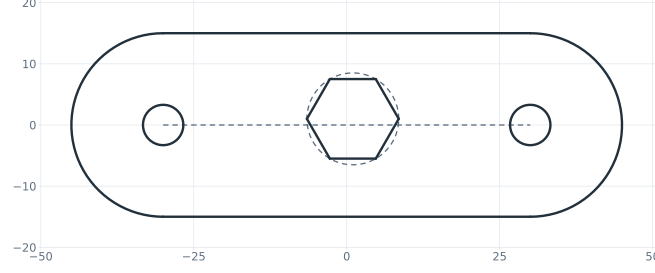
The outline is a Slot 60 long between the centers of its ends and 30 wide, drawn from the pen at \(x = -30\) along \(x\). Slot makes its width a dimension, plate.w. The holes for the screws, 6.6 across, go into the centers of the slot’s ends, plate.startcap and plate.endcap, with concentric=. The opening for an M8 nut is a Hexagon 13 across its flats, which makes that width a dimension too, nut.af, and keeps the hexagon regular (Figure 1):
[3]:
retainer = px.Sketch(auto_constraint={"horizontal": True, "vertical": True, "equal_radius": True})
retainer.Move((-30, 0)).Slot(60, 30, id="plate")  # 60 between the centers of its ends, 30 wide
retainer.Circle(6.6 / 2, concentric="plate.startcap", id="left_hole")
retainer.Circle(6.6 / 2, concentric="plate.endcap", id="right_hole")
retainer.Hexagon(13, center=(1, 1), id="nut");
The dimensions
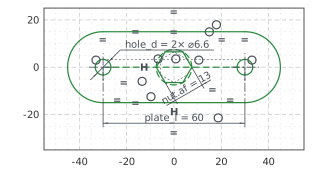
The slot’s spine, the construction line between the centers of its ends, has its middle at the origin, 60 long. The hexagon’s center, the center of its construction circle nut.circle, is the origin too. The holes are 6.6 across. The sketch was made with auto_constraint={"horizontal": True, "vertical": True, "equal_radius": True}, so the spine, drawn level, stays level, and the hexagon’s first side, drawn plumb, keeps two of its flats upright. The right hole, drawn as large as the left
one, stays equal to it. With these, nothing in the sketch is left free (Figure 2):
[5]:
retainer.Constrain("plate.spine.mid", "origin", px.Coincident)
retainer.Constrain("plate.spine", px.Distance, 60, id="plate_l")
retainer.Constrain("nut.circle.center", "origin", px.Coincident)
retainer.Constrain("left_hole", px.Diameter, 6.6, id="hole_d")
print("status", retainer.status, "| degrees of freedom", retainer.dof)
status full | degrees of freedom 0
The checks
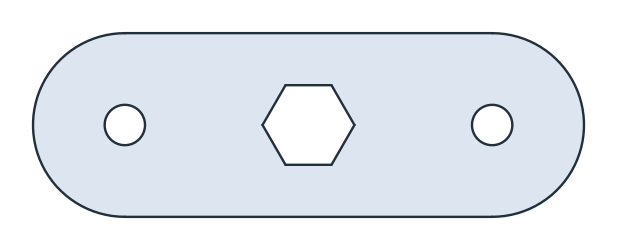
This is the area, to compare with your own model. It is the slot, a rectangle 60 by 30 and a disc of 30, less the two holes and the hexagon, \(\sqrt{3} / 2\) times the square of its width across flats. The retainer is symmetric about both axes, so its centroid is the origin (Figure 3):
[7]:
face = retainer.Face()
exact = 60 * 30 + math.pi * 15**2 - 2 * math.pi * 3.3**2 - math.sqrt(3) / 2 * 13**2
c = face.center
print("area", round(face.mass, 2), "mm², exact", round(exact, 2))
print("centroid", tuple(round(v, 6) for v in c[:2]))
area 2292.08 mm², exact 2292.08
centroid (0.0, -0.0)
The retainer as DXF in millimeters, for another CAD system or a laser cutter:
[9]:
retainer.WriteDXF("nut_retainer.dxf", unit=px.mm, scale=1) # scale=1: the numbers as they are
The retainer as DXF: nut_retainer.dxf