Saddle support
A saddle support carries a pipe in the cradle at its top and is bolted down through its base. Its shape is set by two views. The front view gives the base and the cradle, and the side view the base and the web tapering toward the top. Padded through, each profile is a prism, and the part is what the two prisms have in common, their intersection. Model the support from the drawing in planex2d or in any CAD system, then check its volume, mass and center of mass against the values at the end of the page. A solution in planex2d follows.

[1]:
import math
import netgen.occ as occ
import planex as px
The front profile
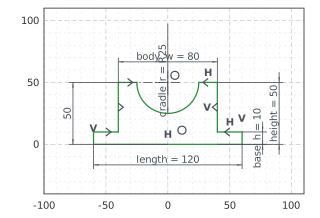
The front profile is sketched in the front plane, the plane with its normal toward the viewer, \(-y\). It has \(x\) to the right and \(z\) up, with the origin in the middle of the bottom. The outline runs along the bottom, up the base’s right end, across to the body, up to the top, around the cradle and down the left side. With auto_constraint=True, the flags px.Horizontal and px.Vertical become constraints. The left side’s lines that mirror the right side’s carry no
flags, since the mirror about the vertical axis gives them their directions.
The base is 120 long and 10 high, the body 80 wide and 50 high to the top. The cradle is a half circle of radius 25 for a pipe of 50, its center in the middle of the top. The left side mirrors the right one about the vertical axis (Figure 1):
[3]:
front = px.XZ
fp = px.Sketch(front, auto_constraint=True)
fp.Move((-60, 0)).Line(120, px.Horizontal, id="bottom")
fp.Turn(90).Line(10, px.Vertical, id="base_right")  # Turn(90) turns the pen left, Turn(-90) right
fp.Turn(90).Line(20, px.Horizontal, id="base_top_right")
fp.Turn(-90).Line(40, px.Vertical, id="body_right")
fp.Turn(90).Line(15, px.Horizontal, id="top_right")
fp.Turn(90).Arc(25, -180, id="cradle")  # down into the cradle, clockwise
fp.Turn(90).Line(15, id="top_left")
fp.Turn(90).Line(40, id="body_left")
fp.Turn(-90).Line(20, id="base_top_left")
fp.Close(px.Vertical, id="base_left")
fp.Constrain("bottom.mid", "origin", px.Coincident)
fp.Constrain("bottom", px.Distance, 120, id="length")
fp.Constrain("base_right", px.Distance, 10, id="base_h")
fp.Constrain("body_left", "body_right", px.Distance, 80, id="body_w")
fp.Constrain("top_right", "H", px.Distance, 50, id="height")
fp.Constrain("cradle", px.Radius, 25, id="cradle_r")
fp.Constrain("cradle.center", "V", px.Coincident)
fp.Constrain("cradle.center", "H", px.Distance, 50)
fp.Constrain("body_left", "body_right", "V", px.SymmetricCarriers)
fp.Constrain("top_left", "top_right", "V", px.SymmetricCarriers)
fp.Constrain("base_top_left", "base_top_right", "V", px.SymmetricCarriers)
print("status", fp.status, "| degrees of freedom", fp.dof)
status full | degrees of freedom 0
The side profile
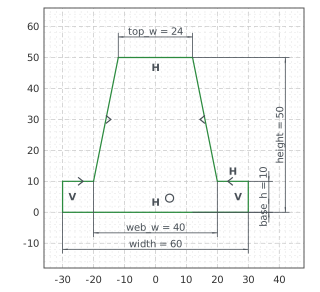
The side profile is sketched in the yz plane, seen from \(+x\), with \(y\) to the right and \(z\) up. The base is 60 wide and 10 high. The web stands on it 40 wide and tapers to 24 at the top, 50 above the bottom. Its flanks mirror each other about the vertical axis (Figure 2):
[5]:
side = px.Plane(normal=(1, 0, 0))
sp = px.Sketch(side, auto_constraint=True)
sp.Move((-30, 0)).Line(60, px.Horizontal, id="bottom")
sp.Turn(90).Line(10, px.Vertical, id="base_right")
sp.Turn(90).Line(10, px.Horizontal, id="base_top_right")
sp.Turn(-80).Line(40, id="web_right")
sp.Turn(80).Line(24, px.Horizontal, id="top")
sp.Turn(80).Line(40, id="web_left")
sp.Turn(-80).Line(10, id="base_top_left")
sp.Close(px.Vertical, id="base_left")
sp.Constrain("bottom.mid", "origin", px.Coincident)
sp.Constrain("bottom", px.Distance, 60, id="width")
sp.Constrain("base_right", px.Distance, 10, id="base_h")
sp.Constrain("web_right.start", "web_left.end", px.Distance, 40, id="web_w")
sp.Constrain("top", px.Distance, 24, id="top_w")
sp.Constrain("top", "H", px.Distance, 50, id="height")
sp.Constrain("web_left", "web_right", "V", px.SymmetricCarriers)
sp.Constrain("base_top_left", "base_top_right", "V", px.SymmetricCarriers)
print("status", sp.status, "| degrees of freedom", sp.dof)
status full | degrees of freedom 0
The intersection
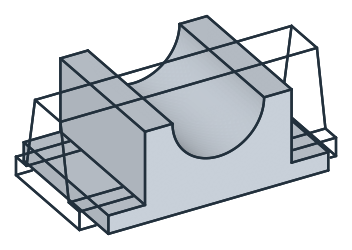
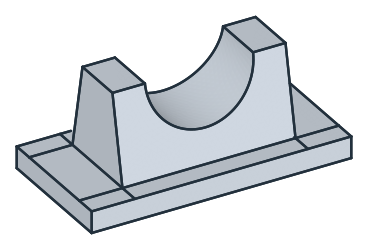
px.Pad extrudes each profile through, farther than the part reaches, the front profile 40 to both sides of its plane and the side profile 70. * keeps what the two prisms have in common (Figure 3):
[7]:
across = px.Pad(fp, 40, length2=40)
along = px.Pad(sp, 70, length2=70)
support = across * along
(a) The two profiles padded through
(b) Their intersection
The holes
The four bolt holes, 11 across, are sketched on the plane of the base’s top, the xy plane lifted by 10. One hole lies 50 left of the middle and 18 in front of it, and a linear pattern in two directions repeats it 100 apart along \(x\) and 36 apart along \(y\). They are pocketed 10 deep, through the base (Figure 4):
[9]:
holes = px.Sketch(px.Plane(px.XY, 10))
holes.Circle(11 / 2, center=(-50, -18), id="hole")
holes.Constrain("hole", px.Diameter, 11, id="hole_d")
holes.Constrain("hole.center", "V", px.Distance, 50, id="hole_x")
holes.Constrain("hole.center", "H", px.Distance, 18, id="hole_y")
holes.LinearPattern("hole", px.H, 2, 100, dir2=px.V, count2=2, spacing2=36, id="holes")
print("status", holes.status, "| degrees of freedom", holes.dof)
support = px.Pocket(support, holes, 10)  # 10 deep, against the plane's normal: down through the base
status full | degrees of freedom 0
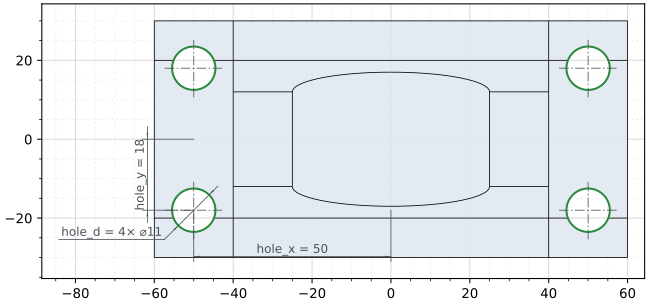
(a) The holes on the base's top
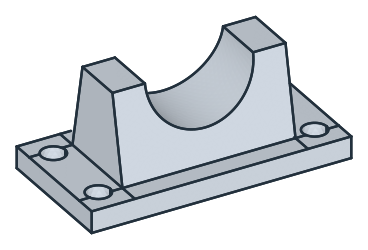
(b) The holes through the base
The checks
These are the volume, the mass in cast iron EN-GJL-250 (7.2 g/cm³) and the center of mass, with the origin in the middle of the bottom, to compare with your own model. The base is \(120 \cdot 60 \cdot 10\). The web is 80 long, and its width falls from 40 at the base to 24 at the top, 32 on average over its 40 of height. The cradle takes a half disc of radius 25 out of the web. The web’s width at a depth \(u\) below the top is \(24 + 0.4\,u\), so the cradle takes \(24 \cdot \pi\,25^2 / 2 + 0.4 \cdot 2 \cdot 25^3 / 3\). The holes take \(4 \cdot \pi\,5.5^2 \cdot 10\). The support is symmetric about two planes, so its center of mass lies on the vertical axis:
[11]:
cradle = 24 * math.pi * 25**2 / 2 + 0.4 * 2 * 25**3 / 3
exact = 120 * 60 * 10 + 80 * 32 * 40 - cradle - 4 * math.pi * 5.5**2 * 10
c = support.center
print("volume", round(support.mass, 1), "mm³, exact", round(exact, 1))
print("mass", round(support.mass * 7.2e-6, 3), "kg")
print("center of mass", round(c.z, 2), "above the bottom, off the axis by", round(math.hypot(c.x, c.y), 6))
volume 142870.1 mm³, exact 142870.1
mass 1.029 kg
center of mass 15.17 above the bottom, off the axis by 0.0
The support as STEP, for another CAD system:
[12]:
support.WriteStep("saddle_support.step")
The support as STEP: saddle_support.step