Sheet-metal bracket
A sheet-metal bracket is cut flat and then bent. The drawing gives the bent part, and the flat pattern, the blank that the laser or the punch cuts, follows from it. In a bend the outside stretches and the inside is compressed, and only the neutral fiber, at the share \(K\) of the thickness from the inside, keeps its length. The flat length is the straight flanges plus the bend allowance, the neutral fiber’s arc \(\theta\,(R + K t)\), and every hole of the flat pattern lies where it lands after the bend. Model the bracket and its flat pattern from the drawing in planex2d or in any CAD system, then check the neutral fiber, the volume, mass and center of mass against the values at the end of the page. A solution in planex2d follows.

[1]:
import math
import netgen.occ as occ
import planex as px
The folded profile
The bracket is an L of sheet 2 thick, bent 90° with an inside radius of 2, the base 40 long and the upright 30 high, both to the outside. Its profile is sketched in the front plane, the plane with its normal toward the viewer, \(-y\), with \(x\) to the right, \(z\) up and the origin at the outside corner, where the outer faces would meet. It is one chain, drawn roughly. It runs under the base toward the corner, around the outside of the bend, up the upright’s outside, across its end,
down its inside, around the inside of the bend and back along the base’s top. The two bend arcs are drawn around one center, so auto_constraint keeps them concentric and the upright as thick as the base. With "horizontal" and "vertical" switched on, the lines drawn level or plumb stay so without a flag each (Figure 1):
[3]:
front = px.XZ
profile = px.Sketch(front, auto_constraint={"horizontal": True, "vertical": True})
profile.Move((40, 0), dir=(-1, 0)).Line(36, id="base_under")
profile.Arc(4, -90, id="outer_bend")  # a negative sweep turns right: up the outside of the bend
profile.Line(26, id="upright_out")
profile.Turn(-90).Line(2, id="upright_end")  # Turn(-90) turns the pen right
profile.Turn(-90).Line(26, id="upright_in")
profile.Arc(2, 90, id="inner_bend")  # turning left: around the inside of the bend
profile.Line(36, id="base_top")
profile.Close(id="base_end")
profile.Constrain("base_under.start", "H", px.Coincident)
profile.Constrain("upright_out.start", "V", px.Coincident)
profile.Constrain("inner_bend", px.Radius, 2, id="bend_r")
profile.Constrain("base_top", "base_under", px.Distance, 2, id="thickness")
profile.Constrain("base_end", "upright_out", px.Distance, 40, id="base_l")
profile.Constrain("upright_end", "base_under", px.Distance, 30, id="upright_h")
print("status", profile.status, "| degrees of freedom", profile.dof)
status full | degrees of freedom 0
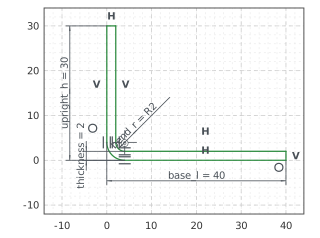
The bracket
px.Pad extrudes the profile 12.5 to both sides of the front plane, 25 wide. The hole in the base, 6.6 across, is sketched on the base’s underside, 25 from the upright’s outer face, the plane \(x = 0\), and in the middle of the width. The hole in the upright is sketched on its outer face, 18 above the base’s underside. Both are cut through the sheet with until=px.last (Figure 2):
[5]:
bracket = px.Pad(profile, 12.5, length2=12.5)
base_hole = px.Sketch(bracket.faces.Min(occ.Z))
base_hole.Circle(6.6 / 2, center=(24, 1), id="hole")
base_hole.Constrain("hole", px.Diameter, 6.6, id="hole_d")
base_hole.Constrain("hole.center", "V", px.Distance, 25, id="hole_x")
base_hole.Constrain("hole.center", "H", px.Coincident)
bracket = px.Pocket(bracket, base_hole, until=px.last)
upright = bracket.faces.Min(occ.X)
up_hole = px.Sketch(upright)
up_hole.Circle(6.6 / 2, center=up_hole.ToHV((0, 0, 17)), id="hole")  # ToHV: a 3D point in the sketch's coordinates
up_hole.Constrain("hole", px.Diameter, 6.6, id="hole_d")
up_hole.Constrain("hole.center", "H", px.Distance, 18, id="hole_z")
up_hole.Constrain("hole.center", "V", px.Coincident)
bracket = px.Pocket(bracket, up_hole, until=px.last)
for name, sk in (("base", base_hole), ("upright", up_hole)):
    print(name, "hole", sk.status, "at", tuple(round(v, 6) for v in sk.Measure("hole")["center"]))
base hole full at (25.0, -0.0, 0.0)
upright hole full at (0.0, 0.0, 18.0)
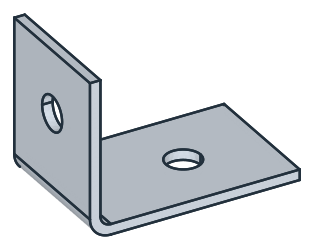
The flat pattern
The bend’s data are the thickness \(t = 2\), the inside radius \(R = 2\) and the \(K\)-factor 0.4 of this sheet and bend. Outside the bend, the flanges are straight, the base for \(40 - (R + t)\) and the upright for \(30 - (R + t)\). The bend allowance is the neutral fiber’s arc over 90°, \(\tfrac{\pi}{2}\,(R + K t)\), and the flat length is the three together. The base’s hole lies \(40 - 25\) from the base’s end, and the upright’s \(30 - 18\) from the upright’s
end, so 12 from the flat pattern’s far end. The flat pattern is a Rectangle, its length computed, with the two holes and the bend line, where the bend begins, as a construction line (Figure 3):
[7]:
t = 2
R = 2
K = 0.4
allowance = math.pi / 2 * (R + K * t)  # the neutral fiber's arc over the bend
flat_length = (40 - (R + t)) + allowance + (30 - (R + t))
flat = px.QuickSketch().Rectangle(flat_length, 25)
flat.Circle(6.6 / 2, center=(40 - 25, 12.5), id="base_hole")
flat.Circle(6.6 / 2, center=(flat_length - (30 - 18), 12.5), id="upright_hole")
for x in (40 - (R + t), 40 - (R + t) + allowance):  # where the bend begins and ends
    flat.Move((x, -3)).Line((x, 28), construction=True)
print("bend allowance", round(allowance, 4), "| flat length", round(flat_length, 4))
bend allowance 4.3982 | flat length 66.3982
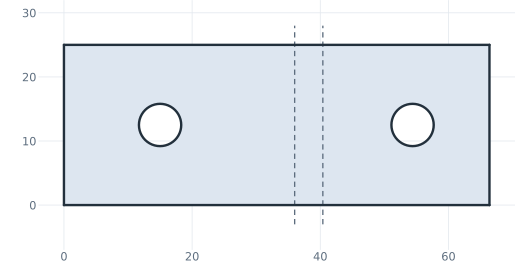
The checks
These are the neutral fiber, the volume, the mass in steel DC01 (7.85 g/cm³) and the center of mass, with the origin at the outside corner, to compare with your own model. Three checks follow:
A sheet profile of constant thickness has the area of its middle line times the thickness, here the flanges and the bend’s arc at \(R + t/2\).
The flat pattern is shorter than the middle line by \(\tfrac{\pi}{2} \cdot t\,(0.5 - K)\), since the neutral fiber lies inside the middle.
Along the neutral fiber, the holes lie as far apart as on the flat pattern. That is the base’s stretch from its hole to the bend, \(25 - (R + t)\), the bend allowance, and the upright’s stretch from the bend to its hole, \(18 - (R + t)\).
The volume is the profile’s area times 25, less the two holes through the sheet. The bracket is symmetric about the front plane, so its center of mass lies in it:
[9]:
area = profile.Face().mass
middle = (40 - (R + t)) + math.pi / 2 * (R + t / 2) + (30 - (R + t))
print("profile / t", round(area / t, 6), "| middle line", round(middle, 6))
print("flat length", round(flat_length, 6), "| middle line less π/2 t (0.5 - K)", round(middle - math.pi / 2 * t * (0.5 - K), 6))
print("holes on the flat", round((flat_length - 12) - 15, 6), "| along the neutral fiber",
      round((25 - (R + t)) + allowance + (18 - (R + t)), 6))
exact = area * 25 - 2 * math.pi * 3.3**2 * t
c = bracket.center
print("volume", round(bracket.mass, 2), "mm³, exact", round(exact, 2))
print("mass", round(bracket.mass * 7.85e-6 * 1000, 2), "g")
print("center of mass", (round(c.x, 3), round(c.z, 3)), "| off the front plane by", round(abs(c.y), 6))
profile / t 66.712389 | middle line 66.712389
flat length 66.39823 | middle line less π/2 t (0.5 - K) 66.39823
holes on the flat 39.39823 | along the neutral fiber 39.39823
volume 3198.77 mm³, exact 3198.77
mass 25.11 g
center of mass (12.379, 7.214) | off the front plane by 0.0
The bracket as STEP, for another CAD system, and its flat pattern as DXF in millimeters, for the laser:
[10]:
bracket.WriteStep("sheet_metal_bracket.step")
flat.WriteDXF("sheet_metal_bracket_flat.dxf", unit=px.mm, scale=1)  # scale=1: the numbers as they are
The bracket as STEP: sheet_metal_bracket.step, its flat pattern as DXF: sheet_metal_bracket_flat.dxf