Curves driven by dimensions
In a constraint sketch, the formula and the range of a parametric curve may name the ids of driving dimensions and the names of parameters. When one of them changes, the curve is fitted again, and the elements joined to it follow. The curve itself is a rigid body, fixed where its formula puts it, so the rest of the sketch can be built against it. See Parametric curves for the formulas, and an involute whose base radius is a dimension.
[1]:
import planex as px
A wavy channel
The example is a channel with a sinusoidal wall, as in the wavy fins of a heat exchanger. The wall runs four waves of wavelength \(\lambda = 20\) and amplitude \(a = 2\) about a mean height of 10. The shape of the wave is a pair of parameters, a and lam for \(\lambda\), so the fins of other sketches can share it (see Parameters shared by sketches), and the depth of the channel is a dimension of its inlet:
[3]:
wave = px.Parameters(a=2, lam=20)
sk = px.Sketch().Use(wave)
sk.Move((0, 10)).Curve(("t", "10 + a * sin(360 * t / lam)"), (0, "4 * lam"), id="wall")
sk.Line((80, 0), px.Vertical, id="outlet").Line((0, 0), px.Horizontal, id="bottom").Close(px.Vertical, id="inlet")
sk.Constrain("inlet", px.Distance, 10, id="depth")
print(sk.status, {kind: list(ids) for kind, ids in sk.constraints.items()})
full {'Fix': ['Fix.1'], 'Vertical': ['Vertical.1', 'Vertical.2'], 'Horizontal': ['Horizontal.1'], 'Distance': ['depth']}
The wall is drawn first. Its fix Fix.1 holds it where its formula puts it, and the outlet, the bottom and the inlet run from its ends, so the vertical and horizontal flags and the depth leave nothing free (Figure 1a).
Changing the wave
Over whole waves, the sine adds as much area above the mean height as it takes away below, so the channel’s area is its depth times its length, \(10 \cdot 4\lambda\), whatever the amplitude. A larger amplitude refits the wall and keeps the area, a longer wavelength makes the channel longer, and a new depth moves the bottom (Figure 1b):
[4]:
print("a 2, lam 20:", sk.Face().mass, "exact", 10 * 4 * 20)
wave.Update(a=4)
print("a 4, lam 20:", sk.Face().mass, "exact", 10 * 4 * 20)
wave.Update(lam=25)
print("a 4, lam 25:", sk.Face().mass, "exact", 10 * 4 * 25, "| wall end", sk.Location("wall.end")[:2])
sk.Update({"depth": 12})
print("depth 12:", sk.Face().mass, "exact", 12 * 4 * 25)
a 2, lam 20: 800.0 exact 800
a 4, lam 20: 800.0000000000009 exact 800
a 4, lam 25: 1000.0000000000007 exact 1000 | wall end (100.00000000000001, 9.999999999999996)
depth 12: 1200.0000000000005 exact 1200
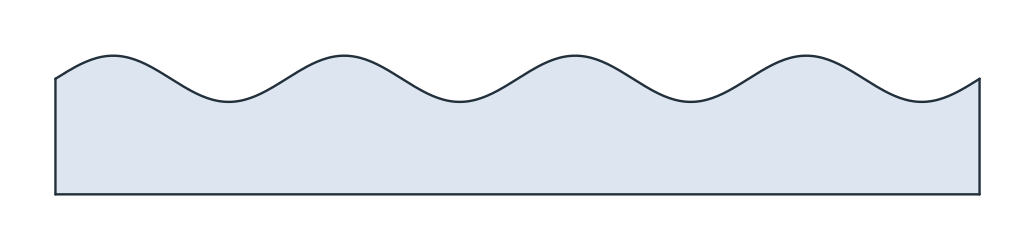
(a) a = 2, λ = 20, depth 10
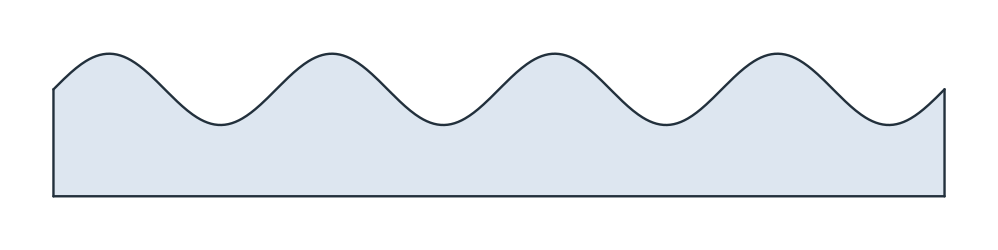
(b) a = 4, λ = 25, depth 12
Placing a curve
A curve that should sit against other geometry, rather than where its formula puts it, is freed by removing its fix. It then moves as a rigid body, with its shape kept, and constraints on .start, .end or along it place it. The example is an arch of height 5 over a span of 180, set onto a base line that starts at (40, 25):
[6]:
arch = px.Sketch()
arch.Curve(("t", "5 * sin(t)"), (0, 180), id="arch")
arch.Remove("Fix.1")
arch.Move((40, 25)).Line((60, 25), id="base")
arch.Constrain("base.start", px.Fix).Constrain("base", px.Horizontal).Constrain("base", px.Distance, 220, id="L")
arch.Constrain("arch.start", "base.start", px.Coincident)
arch.Constrain("arch.end", "base", px.Coincident)
print(arch.status, "start", arch.Location("arch.start")[:2], "end", arch.Location("arch.end")[:2])
full start (40.0, 25.0) end (220.0, 25.0)
The rules
A formula and a range name driving dimensions by their ids and parameters by their names, and the curve is fitted again whenever one of them changes.
A dimension that a formula uses cannot be removed or driven while the curve exists. Its error says which curve uses it.
The curve is fixed by default. Without its fix, it is a rigid body that constraints on its ends, or on points along it, place.
h,vandtare no ids anywhere in a sketch, since the formulas use them.