Pad and Pocket
px.Pad(profile, length) extrudes a planar face, shape or sketch into an OpenCASCADE solid, and px.Pocket(target, profile, length) cuts that extrusion out of a solid. Both are thin wrappers around the OpenCASCADE extrusion, ToOCCShape().Extrude(...), that take care of what is otherwise written by hand:
the direction along the plane’s normal, or against it for a pocket;
a length on both sides of the plane;
an end on a plane or a face instead of a length;
the names: every side face of the solid carries the name of the profile edge it comes from, so the faces can be selected by name for meshing and boundary conditions.
[1]:
import math
import netgen.occ as occ
from ngsolve_webgpu.jupyter import Draw
import planex as px
A clamp plate
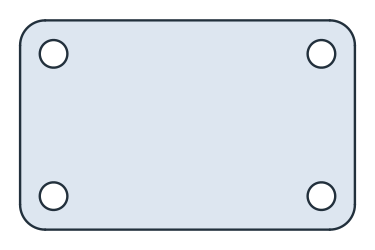
The example is a clamp plate of 80 × 50, 12 thick, with corners rounded to a radius of 6 and four bolt holes of 6.6 on a 64 × 34 rectangle (Figure 1). The outline and the holes are one sketch, with the outline named side and the holes bolt hole. The holes are circles, which have no vertices, so Fillet(plate.vertices, 6) rounds exactly the four corners of the outline.
[3]:
thickness = 12.0
sketch = px.QuickSketch().RectangleC(80, 50, name="side")
for x in (-32, 32):
    for y in (-17, 17):
        sketch.Circle((x, y), 6.6 / 2, name="bolt hole")
plate = sketch.Face()
plate.Fillet(plate.vertices, 6)
plate.name = "plate"
px.Pad makes the solid. Its side faces carry the names of the edges they come from, the solid carries the name of the face, and the two end faces have no name. The volume is the area of the profile times the thickness:
[5]:
solid = px.Pad(plate, thickness)
print(solid.name, sorted({f.name for f in solid.faces if f.name}))
print("volume", solid.mass, "area × thickness", plate.mass * thickness)
plate ['bolt hole', 'side']
volume 45986.994714466215 area × thickness 45986.99471446634
The same solid comes from the OpenCASCADE extrusion of the exported face, and the difference between both is empty:
[6]:
by_hand = plate.ToOCCShape().Extrude(thickness)
print("OpenCASCADE extrusion", by_hand.mass, "difference", (solid - by_hand).mass)
OpenCASCADE extrusion 45986.994714466215 difference 0.0
Pockets from a sketch on the top face
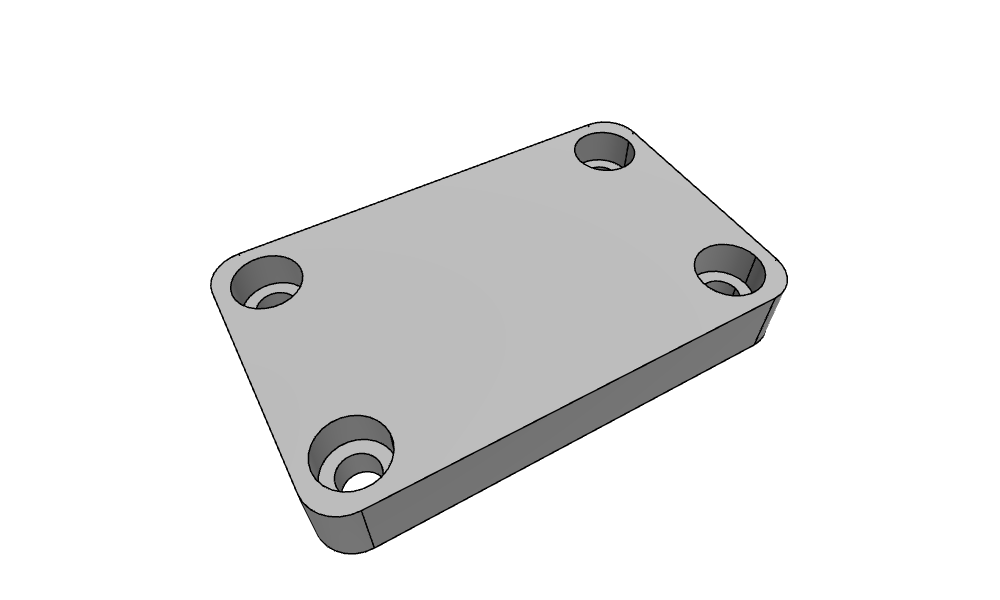
The counterbores for M6 socket head screws, 11 wide and 6.5 deep, are sketched on the top face of the solid and cut with px.Pocket. A pocket runs against the normal of the sketch’s plane by default, into the material. px.QuickSketch(top) sketches on the top face, with the global origin and x axis projected onto it, so the coordinates in the sketch are those of the plate. See The plane in 3D for choosing another origin or axis.
[7]:
top = solid.faces.Max(occ.Z)
counterbores = px.QuickSketch(top)
for x in (-32, 32):
    for y in (-17, 17):
        counterbores.Circle((x, y), 11 / 2, name="counterbore")
clamp = px.Pocket(solid, counterbores, 6.5)
Draw(clamp, euler_angles=[-40, 0, 30])
With until=px.last, a pocket runs through the whole part, to the last flat face it crosses. The clamping slot, 8 wide with its end centers 40 apart, is cut through the middle of the plate that way, from the same top face:
[8]:
slot = px.QuickSketch(top)
slot.Move((-20, 0)).Slot(40, 8, name="slot")
clamp = px.Pocket(clamp, slot, until=px.last)
Draw(clamp, euler_angles=[-40, 0, 30])
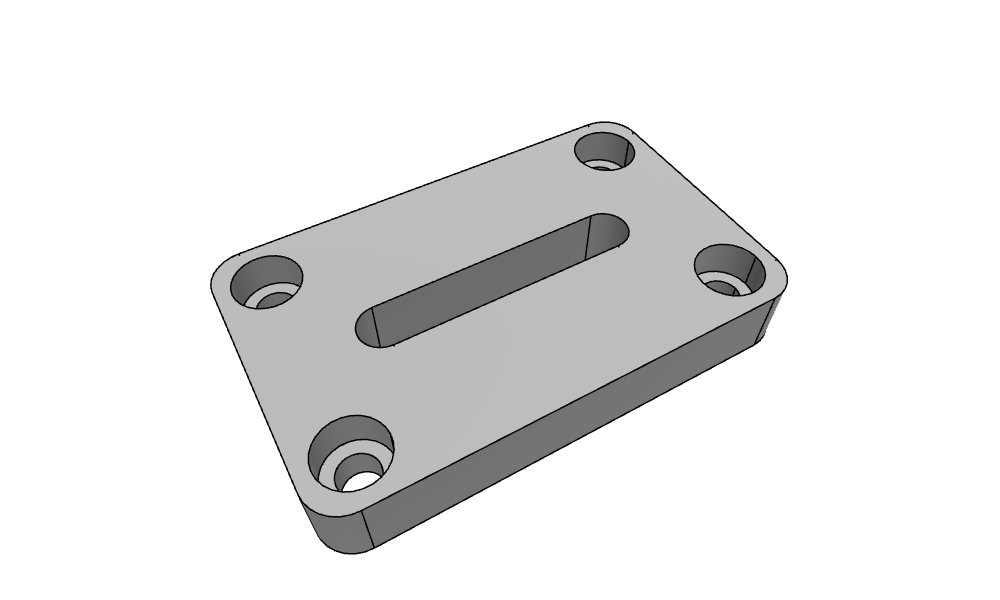
The volume is the plate minus four counterbore rings, 6.5 deep, and the slot through the full thickness:
[9]:
expected = solid.mass - 4 * math.pi * (5.5**2 - 3.3**2) * 6.5 - slot.Face().mass * thickness
print("volume", clamp.mass, "expected", expected)
print(sorted({f.name for f in clamp.faces if f.name}))
volume 39962.456846867026 expected 39962.45684686602
['bolt hole', 'counterbore', 'side', 'slot']
Up to a face
until= ends a pad or a pocket on a plane instead of at a length. It takes px.first or px.last, the first or the last flat face of the target along the direction, a flat face of a solid given as it is, a planex2d face, shape or sketch, or a px.Plane. The extrusion ends where it reaches that plane, so the profile does not have to lie over the face it ends on. A face given as it is works wherever planex2d takes a plane, in px.Sketch(face), px.QuickSketch(face) and
px.Plane(face) as well.
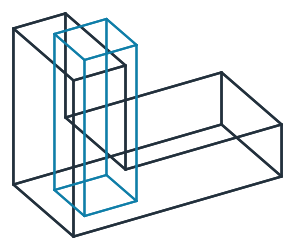
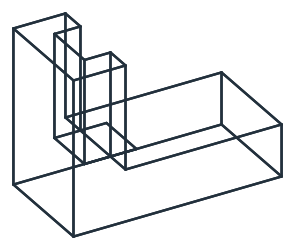
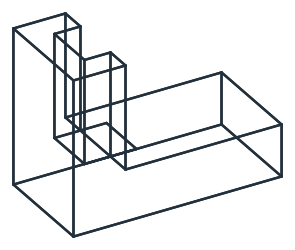
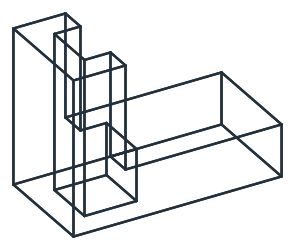
The example is an L-shaped block, an upright of 10 × 20 × 30 on a foot of 40 × 20 × 10, with the foot’s top face named foot_top. A pocket of 10 × 10 is sketched on the upright’s top face, half of it over the upright and half beyond it, over the foot (Figure 2a, with the pocket’s prism in blue):
[10]:
upright = occ.Box(occ.Pnt(0, 0, 0), occ.Pnt(10, 20, 30))
foot = occ.Box(occ.Pnt(0, 0, 0), occ.Pnt(40, 20, 10))
foot.faces.Max(occ.Z).name = "foot_top"
block = upright + foot
top = block.faces.Max(occ.Z)
profile = px.QuickSketch(top).Move((5, 5)).Rectangle(10, 10)
The pocket runs down from the top face. until=px.first and the foot’s top face, given as it is, both end it on the plane of the foot’s top, at a height of 10, and until=px.last takes it through the bottom. Over the upright, the first two remove \(5 \times 10 \times 20 = 1000\) and the last \(5 \times 10 \times 30 = 1500\), and over the foot, the last also cuts \(5 \times 10 \times 10 = 500\) out of the foot (Figure 2b to d):
[11]:
first = px.Pocket(block, profile, until=px.first)
to_face = px.Pocket(block, profile, until=block.faces["foot_top"][0])
through = px.Pocket(block, profile, until=px.last)
for name, solid in (("px.first", first), ("foot_top", to_face), ("px.last", through)):
    print(name, "removes", round(block.mass - solid.mass, 9))
px.first removes 1000.0
foot_top removes 1000.0
px.last removes 2000.0
(a) The block and the pocket's prism
(b) Until px.first
(c) Until the foot's top face
(d) Until px.last
A pad works the same way. A boss of diameter 8, sketched on the foot’s top face, rises up to the plane of the upright’s top face, 20 above the foot:
[13]:
boss = px.QuickSketch(block.faces["foot_top"][0]).Circle((30, 10), 8 / 2)
post = px.Pad(boss, until=top)
print("volume", post.mass, "exact", math.pi * 4**2 * 20)
volume 1005.3096491487338 exact 1005.3096491487338
Options
Argument |
Meaning |
|---|---|
|
The extent along the direction, from the profile’s plane |
|
The extent against the direction, so the solid reaches across the plane; 0 by default |
|
The direction of the extrusion, any direction that leaves the plane, also tilted; by default the plane’s normal, for a pocket its negative |
|
|
|
Instead of a length: a |
The solid carries the name, maxh and color of the profile’s face. Each side face carries the properties of its profile edge, the two end faces the color and maxh of the face, and the edges along the direction the properties of the profile vertex they start at. See Placing a sketch for sketches on the faces of solids and OpenCASCADE for the export in general.