Bicycle tracks
How much area lies between the tracks of a bicycle that is ridden once around a closed loop? The rear wheel cuts the curves short, so its track runs inside the front wheel’s. When the bicycle comes back to its start, pointing the same way, the area between the two tracks is \(\pi L^2\), where \(L\) is the wheelbase, the distance between the points where the wheels touch the ground. The shape and the size of the loop do not matter. Around a roundabout or around a car park, a bicycle with a wheelbase of 1.05 m leaves 3.46 m² between its tracks.
The bicycle works like Prytz’s hatchet planimeter, a rod with a sharp edge at one end that measures areas when its other end is led around an outline. The edge can only slide along the rod, as the rear wheel can only roll along the frame. Robert Foote, Mark Levi and Serge Tabachnikov proved the relation between the areas of the two tracks.
The example rides three loops of different shapes until the bicycle comes back to its start, and checks the area between the tracks against \(\pi L^2\).
[1]:
import math

import matplotlib.pyplot as plt
import numpy as np
from IPython.display import HTML
from matplotlib.animation import FuncAnimation
import planex as px
The rear wheel on a straight
The bicycle is a segment of length \(L\), as in the kinematic single-track model. Its front end follows the path that the rider steers, and the rear wheel rolls along the frame without sliding sideways. While the front wheel moves straight on by a distance \(d\), the angle \(\varphi\) between the frame and the direction of travel shrinks as \(\tan(\varphi/2) = \tan(\varphi_0/2)\,e^{-d/L}\), and the rear wheel draws a tractrix. A path given as a fine polyline consists of such
straight steps, so ride follows the rear wheel step by step with this formula, without a numerical integration.
[3]:
L = 1.05  # the wheelbase, m


def ride(points, heading):
    """the rear wheel's track while the front wheel runs through points, with the frame starting at the heading (in
    radians), and the heading at the end"""
    rear = [points[0] - L * np.array([math.cos(heading), math.sin(heading)])]
    for p, q in zip(points[:-1], points[1:]):
        direction = math.atan2(q[1] - p[1], q[0] - p[0])
        phi = math.remainder(heading - direction, 2 * math.pi)  # the frame against the direction of travel
        heading = direction + 2 * math.atan(math.tan(phi / 2) * math.exp(-math.dist(p, q) / L))
        rear.append(q - L * np.array([math.cos(heading), math.sin(heading)]))
    return np.array(rear), heading
The front wheel’s path comes from a planex2d wire. Polylines gives its points with chords that follow the curve to 10⁻⁸, and path divides the long chords of straight edges into steps of at most 1 cm. The rear track is curved where the front wheel runs straight, and these steps draw it finely enough to measure.
[4]:
def path(wire, step=0.01):
    """points along the closed wire, at most step apart, the first one repeated at the end"""
    corners = [np.asarray(p) for p in wire.Polylines(1e-8)[0]]
    if math.dist(corners[0], corners[-1]) > 0:
        corners.append(corners[0])
    points = [corners[0]]
    for q in corners[1:]:
        n = math.ceil(math.dist(points[-1], q) / step)
        points += [points[-1] + (q - points[-1]) * k / n for k in range(1, n + 1)]
    return np.array(points)


def heading(points):
    """the direction in which the front wheel starts"""
    return math.atan2(points[1][1] - points[0][1], points[1][0] - points[0][0])
A car park loop
The example is a loop around a small car park, with straights of 4 m joined by half circles of radius 2.5 m, ridden counterclockwise. The relation holds for a ride that ends where it started, with the frame pointing the same way. The bicycle starts on the lower straight with its frame 1 rad (57°) off the direction of travel and rides two laps. During the first lap, the rear wheel settles onto its track, but the frame ends at another heading than it started with. The second lap starts with the heading at which the first one ended, and it ends with the same heading to 10⁻⁹ rad. From then on, every lap is the same, and both tracks are closed.
[5]:
loop = px.QuickSketch((-2, -2.5)).Line(4).Arc(2.5, 180).Line(4).Arc(2.5, 180).Wire()
points = path(loop)
start = heading(points) + 1.0
rear, end = ride(points, start)
print("lap 1: the frame ends", round(math.remainder(end - start, 2 * math.pi), 6), "rad from its start")
start = end
rear, end = ride(points, start)
print("lap 2: the frame ends", math.remainder(end - start, 2 * math.pi), "rad from its start")
lap 1: the frame ends -1.433004 rad from its start
lap 2: the frame ends -7.477760077811979e-10 rad from its start
The area between the tracks is the face inside the front track less the face inside the rear track, one Boolean operation (Figure 1). It is compared with \(\pi L^2\):
[6]:
front = px.Face([loop])
back = px.FromPolyline(rear[:-1], closed=True).Face()
between = front - back
print("between the tracks", between.mass, "m², πL²", math.pi * L**2)
between the tracks 3.46361270110868 m², πL² 3.463605900582747

The difference of two millionths of \(\pi L^2\) comes from drawing the rear track as a polygon with corners 1 cm apart.
Any loop
The shape of the loop does not matter. The examples are an ellipse of 8 × 5 m and an irregular route through eight points as a closed spline. The route has a dent where the rider turns right, and there the rear wheel cuts the curve on the other side, so its track crosses to the outside of the front track. The relation holds for the areas that the two tracks enclose, so the area outside the front track counts as negative. The area between the tracks is then the area inside the front track only,
front - back, less the area inside the rear track only, back - front (Figure 2). Each loop is ridden twice, as the car park was, so that both tracks close. For both loops, the area between the tracks is compared with \(\pi L^2\):
[8]:
routes = {"ellipse": px.Ellipse((0, 0), 4, 2.5),
          "route": px.Spline([(0, -2), (3, -1.5), (4, 0.5), (2, 2), (0, 1.25), (-2.5, 2.5), (-4, 0), (-2.5, -2)],
                             periodic=True)}
panels = []
for name, wire in routes.items():
    points = path(wire)
    rear, end = ride(points, heading(points) + 1.0)
    rear, end = ride(points, end)  # the second lap: both tracks closed
    front = px.Face([wire])
    back = px.FromPolyline(rear[:-1], closed=True).Face()
    inside, outside = front - back, back - front
    print(name, "inside", round(inside.mass, 6), "outside", round(outside.mass, 6),
          "| between", inside.mass - outside.mass, "πL²", math.pi * L**2)
    parts = [part for part in (inside, outside) if part.faces]
    panels.append((px.Compound(parts), name.capitalize(), {"fills": [(inside, LIGHT), (outside, GUIDE)]}))
ellipse inside 3.463606 outside 0.0 | between 3.463605995754822 πL² 3.463605900582747
route inside 3.829484 outside 0.365878 | between 3.4636060355919907 πL² 3.463605900582747

(a) Ellipse

(b) Route
The ride
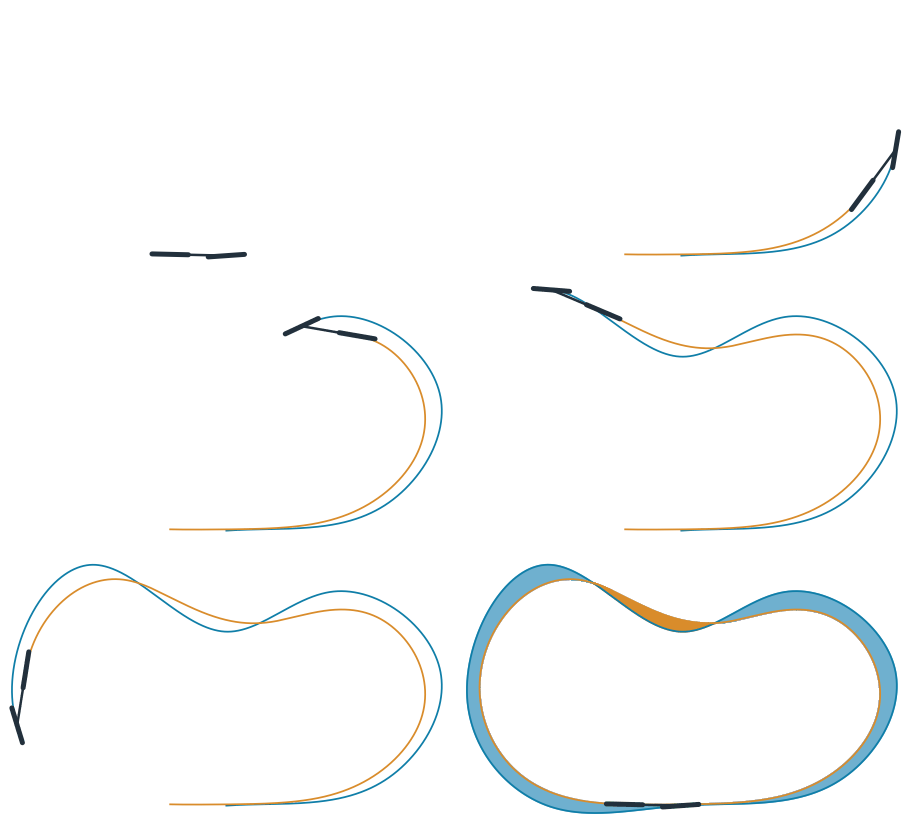
The animation shows the bicycle on the closed lap of the irregular route, with the front track in blue and the rear track in amber. At the end, the area inside the front track only is filled in blue, and the area where the rear track runs outside is filled in amber:
[10]:
points = path(routes["route"])
rear, end = ride(points, heading(points) + 1.0)
rear, end = ride(points, end)
front, back = px.Face([routes["route"]]), px.FromPolyline(rear[:-1], closed=True).Face()
inside, outside = front - back, back - front
shown = range(0, len(points), len(points) // 200)
low, high = points.min(axis=0) - 0.4, points.max(axis=0) + 0.4
fig, ax = plt.subplots(figsize=(7, 4.2))


def wheel(center, angle, radius=0.34):
    """a wheel seen from above: a short thick line along its direction"""
    d = radius * np.array([math.cos(angle), math.sin(angle)])
    ax.plot(*np.transpose([center - d, center + d]), color=INK, lw=4, solid_capstyle="round")


def frame(k):
    ax.clear()
    i = list(shown)[min(k, len(shown) - 1)]
    if k >= len(shown):
        inside.Plot(ax=ax, face_col=LIGHT, line_col=LIGHT, legend=False)
        outside.Plot(ax=ax, face_col=GUIDE, line_col=GUIDE, legend=False)
        ax.text(0, 0, f"{inside.mass:.2f} − {outside.mass:.2f} = πL²", ha="center", va="center", color=INK, fontsize=12)
    ax.plot(*points[: i + 1].T, color=PLANEX, lw=1.4)
    ax.plot(*rear[: i + 1].T, color=GUIDE, lw=1.4)
    f, r = points[i], rear[i]
    ax.plot(*np.transpose([r, f]), color=INK, lw=2)
    wheel(r, math.atan2(f[1] - r[1], f[0] - r[0]))
    wheel(f, heading(points[i:i + 2]) if i + 1 < len(points) else heading(points[:2]))
    ax.set_aspect("equal", adjustable="box")
    ax.set_xlim(low[0], high[0])
    ax.set_ylim(low[1], high[1])
    ax.axis("off")


animation = FuncAnimation(fig, frame, frames=len(shown) + 25, interval=40)
plt.close(fig)
HTML(animation.to_jshtml())
[10]:
See Two faces for Boolean operations on two faces and Splines for Polylines.