Auto constraints
With auto constraining on, a constraint sketch turns the relations that the drawing shows exactly into constraints. A chain that runs on smoothly stays tangent at its joints, and a circle drawn around the center of an arc stays concentric with it, whatever the dimensions do later. Which relations are found is a setting, per sketch with auto_constraint= and for all sketches in px.config. Auto constraints never add a dimension, so the sizes of the part still come from the dimensions.
[1]:
import os
import tempfile

import planex as px
The relations
Auto constraints know eleven relations and one setting. The first four relations are on by default, since a drawing that shows them almost always means them. The other seven are off, since a line drawn level is not always meant to stay level. The setting named_helpers is on.
Key |
Finds |
Default |
|---|---|---|
|
Points at one place |
on |
|
A joint where a chain runs on smoothly |
on |
|
Arcs and circles with one center |
on |
|
An end that lies on another element |
on |
|
Lines drawn level or plumb |
off |
|
Lines that meet at a right angle |
off |
|
Parallel lines that do not meet |
off |
|
Arcs and circles of one radius, lines of one length |
off |
|
Lines on one straight line |
off |
|
The helpers named in a drawing call, such as |
on |
A relation is found only where it holds to rounding. A line drawn a hundredth of a degree off level is not horizontal, and an arc that nearly touches a line is not tangent to it. Geometry that is close but not exact, such as a drawing read from a file with few decimals, gets its relations from AutoConstrain with a tolerance. See From a drawing to a parametric sketch for details.
Switching relations
auto_constraint=True finds the relations that are on, False finds none, and a dict switches auto constraining on and changes the relations it names. The example is a mounting plate of 80 × 40 with a rounded corner of radius 10, a slot 30 long and 10 wide, and two holes of diameter 8, drawn at its size. The same drawing is made with three settings:
[3]:
def plate(auto):
    sk = px.Sketch(auto_constraint=auto)
    sk.Line(80, id="bottom").Line((80, 40), id="right").Line((10, 40), id="top")
    sk.Arc((0, 30), center=(10, 30), id="corner").Close(id="left")
    sk.Move((20, 15), dir=(1, 0)).Line(30, id="slot_lower").Arc(5, 180, id="slot_end")
    sk.Line(30, id="slot_upper").Arc(5, 180, id="slot_start")
    sk.Circle((65, 12), 4, id="hole_a").Circle((65, 30), 4, id="hole_b")
    return sk


level = {"horizontal": True, "vertical": True, "equal_radius": True}
for auto in (False, True, level):
    sk = plate(auto)
    print(auto, "->", sk.dof, "degrees of freedom,", {kind: len(ids) for kind, ids in sk.constraints.items()})
False -> 27 degrees of freedom, {}
True -> 21 degrees of freedom, {'Tangent': 6}
{'horizontal': True, 'vertical': True, 'equal_radius': True} -> 14 degrees of freedom, {'Horizontal': 4, 'Vertical': 2, 'Tangent': 6, 'Equal': 1}
Without auto constraints, every element is free. With True, the six joints of the corner and of the slot are tangent. With the dict, the level and plumb sides become horizontal and vertical, and the two holes get one radius (Figure 1). The round ends of the slot already have one radius through their tangents to the two parallel sides, so they get no Equal of their own:
[4]:
print(plate(level).constraints["Equal"])
{'Equal.1': "hole_a", "hole_b", px.Equal}
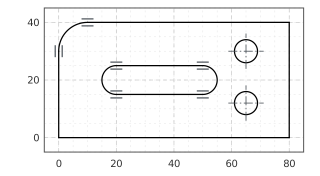
(a) auto_constraint=True
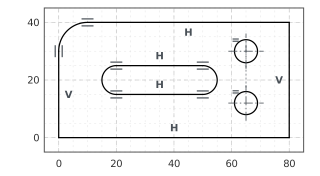
(b) Horizontal, vertical and equal radius on
What is left free are the sizes and positions, which only dimensions give. See Constraints and dimensions for them.
Helpers named in a call
A drawing call can take its geometry from a helper, such as parallel="base". The key named_helpers decides whether the helper also becomes its constraint. With it on, the default, the rail stays parallel to the base when the base turns. With it off, the helper only places the rail, unless a relation that is switched on finds the same thing anyway:
[6]:
for helpers in (True, False):
    sk = px.Sketch(auto_constraint={"named_helpers": helpers})
    sk.Line(50, id="base").Move((0, 10), dir=(1, 0)).Line(30, parallel="base", id="rail")
    print("named_helpers", helpers, "->", {kind: list(ids) for kind, ids in sk.constraints.items()})
named_helpers True -> {'Parallel': ['Parallel.1']}
named_helpers False -> {}
A key that is not one of the relations raises an error that lists the valid ones:
[7]:
try:
    px.Sketch(auto_constraint={"tangency": True})
except TypeError as err:
    print(err)
Sketch(auto_constraint=): no relation 'tangency' (coincident, tangent, concentric, point_on_curve, horizontal, vertical, perpendicular, parallel, equal_radius, equal_length, collinear, named_helpers)
The defaults for all sketches
Two entries of px.config hold the defaults. px.config.auto_constraint is the default of the argument, False as long as it is not changed. px.config.auto_constraint_options holds the relations that auto_constraint=True uses, and a dict given to a sketch changes only the relations it names. Assigning a dict to it works the same way and keeps the other relations:
[8]:
print(px.config.auto_constraint)
px.config.auto_constraint_options = {"horizontal": True, "vertical": True}
print(px.config.auto_constraint_options)
False
{'coincident': True, 'tangent': True, 'concentric': True, 'point_on_curve': True, 'horizontal': True, 'vertical': True, 'perpendicular': False, 'parallel': False, 'equal_radius': False, 'equal_length': False, 'collinear': False, 'named_helpers': True}
From here on, auto_constraint=True also finds level and plumb lines. The defaults come back by assigning them again:
[9]:
px.config.auto_constraint_options = {"horizontal": False, "vertical": False}
Geometry from a file
Geometry copied into a sketch gets the same relations as a drawing, whether it comes from a DXF file, from wires or from faces. px.Sketch(wires, copy=True, auto_constraint=True) copies the wires and constrains them. The plate, written to a DXF file by planex2d and read back, comes in with its six tangent joints:
[10]:
face = plate(True).Face()
with tempfile.TemporaryDirectory() as folder:
    path = os.path.join(folder, "plate.dxf")
    px.WriteDXF(face, path)
    copied = px.Sketch(px.FromDXF(path), copy=True, auto_constraint=True)
print(copied.dof, "degrees of freedom,", {kind: len(ids) for kind, ids in copied.constraints.items()})
21 degrees of freedom, {'Tangent': 6}
A drawing from another program often has its coordinates rounded to a few decimals, so its tangents hold only to that rounding and are not found here. See From a drawing to a parametric sketch for finding them with a tolerance.