Disc cam
A disc cam turns with its shaft and lifts a roller follower once per turn. Over the rise the roller climbs, over the dwells it rests, and over the return it comes back down. The lift is given as a law over the cam’s angle, and the drawing gives it as a table. The roller’s center then runs along the pitch curve, the base circle grown by the roller’s radius and the lift, and the cam’s profile is the pitch curve offset inward by the roller’s radius. Model the cam from the drawing in planex2d or in any CAD system, then check its lift, the roller’s contact and its area against the values at the end of the page. A solution in planex2d follows.

[1]:
import math
import planex as px
The lift
The cam lifts the roller by 12. It rises over 150° of its turn, dwells at the top for 30°, returns over 150° and dwells at the bottom for the last 30°. Rise and return follow the cycloidal law, \(s = h\left(t - \tfrac{\sin 2\pi t}{2\pi}\right)\) for the share \(t\) of the rise, whose speed and acceleration both start and end at zero, so the roller is not jerked at the dwells. The cam angle runs counterclockwise from the keyway. The cam turns clockwise, so the roller meets the angles in that order (Figure 1):
[3]:
def lift(angle):
    """the follower's lift at the cam angle in degrees"""
    if angle < 150:
        t = angle / 150
        return 12 * (t - math.sin(2 * math.pi * t) / (2 * math.pi))
    if angle < 180:
        return 12.0
    if angle < 330:
        t = (angle - 180) / 150
        return 12 * (1 - t + math.sin(2 * math.pi * t) / (2 * math.pi))
    return 0.0
![lift [mm] over cam angle [°]: lift 0 0, 30 0.584, 60 3.68, 90 8.32, 120 11.4, 150 12, 180 12, 210 11.4, 240 8.32, 270 3.68, 300 0.584, 330 0, 360 0](disc-cam-figure-1.svg)
The pitch curve and the profile
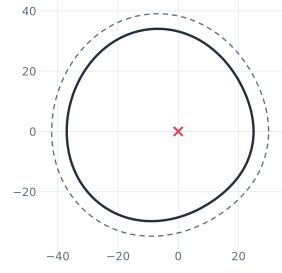
The base circle, the profile’s smallest radius, is 25, and the roller is 10 across. The roller’s center lies on the pitch curve, \(25 + 5 + s(\theta)\) from the cam’s center. The lift law has its pieces, so Curve takes the pitch curve as a Python function of the cam angle, over a full turn, and the curve closes on itself as one edge. It stays where the function puts it, held by the px.Fix that a curve gets by default. Offset draws the profile 5 inside it, the roller’s radius, and
keeps the offset’s distance as a dimension, profile.d (Figure 2):
[5]:
def pitch(angle):
    """the roller's center at the cam angle in degrees: the base circle, the roller's radius and the lift"""
    rho = 25 + 5 + lift(angle)
    return (rho * math.cos(math.radians(angle)), rho * math.sin(math.radians(angle)))


cam = px.Sketch(auto_constraint={"horizontal": True, "vertical": True})
cam.Curve(pitch, (0, 360), id="pitch", construction=True)  # its end meets its start: one closed edge
cam.Offset("pitch", -5, id="profile")  # negative: inward, by the roller's radius
cam("profile").construction = False
print("status", cam.status, "| degrees of freedom", cam.dof)
status full | degrees of freedom 0
The bore and the keyway
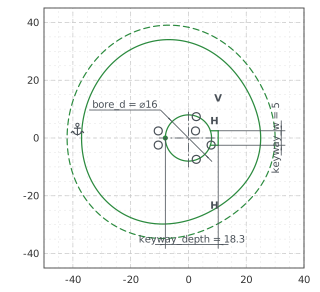
The bore is 16 across, and its keyway, 5 wide and 18.3 deep from the far side of the bore, lies on the \(x\) axis, at the cam angle 0°, where the rise begins. As on the keyed hub, the keyway is three lines drawn roughly from the bore, and a vertex on the bore’s far side is where its depth is measured from. The sketch was made with auto_constraint={"horizontal": True, "vertical": True}, so the keyway’s lines, drawn level and plumb, stay so without a constraint of their
own. With the dimensions, nothing in the sketch is left free (Figure 3):
[7]:
cam.Circle(16 / 2, center=(0, 0), id="bore")  # not at the pen, which is still on the pitch curve
cam.Move((4, 2.5), dir=(1, 0)).Line(4, id="keyway_upper")
cam.Turn(-90).Line(5, id="keyway_top")  # Turn(-90) turns the pen right
cam.Turn(-90).Line(4, id="keyway_lower")
cam.Vertex("bore_back", (-8, 0))
cam.Constrain("bore.center", "origin", px.Coincident)
cam.Constrain("bore", px.Diameter, 16, id="bore_d")
cam.Constrain("keyway_upper.start", "bore", px.Coincident)  # a point on a circle
cam.Constrain("keyway_lower.end", "bore", px.Coincident)
cam.Constrain("keyway_top", px.Distance, 5, id="keyway_w")
cam.Constrain("keyway_top.mid", "H", px.Coincident)
cam.Constrain("bore_back", "H", px.Coincident)
cam.Constrain("bore_back", "keyway_top", px.Distance, 18.3, id="keyway_depth")
print("status", cam.status, "| degrees of freedom", cam.dof)
status full | degrees of freedom 0
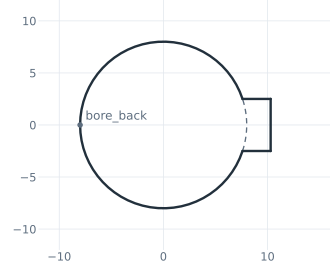
Trim cuts the bore between the keyway’s sides, and the bore and the keyway form one outline (Figure 4):
[9]:
cam.Trim(("bore", (8, 0))); # the piece of the bore nearest to (8, 0), between the sides, becomes construction
The checks
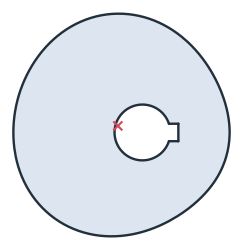
These are the lift, the roller’s contact, the area and the centroid, with the cam’s center at the origin and the keyway along the \(x\) axis, to compare with your own model (Figure 5):
the lift is the profile’s largest distance from the center less its smallest, the base circle’s 25;
a roller of 10 placed at each angle of the lift table, its center on the pitch curve, touches the profile: its center lies 5 from the cam, to within the offset’s tolerance.
[11]:
face = cam.Face()
radii = [math.hypot(*p) for line in face.outer.Polylines(1e-5) for p in line]  # the outline, not the bore
print("profile from", round(min(radii), 4), "to", round(max(radii), 4), "| lift", round(max(radii) - min(radii), 4))
worst = 0.0
for angle in range(0, 360, 30):
    a, rho = math.radians(angle), 25 + 5 + lift(angle)
    worst = max(worst, abs(face.Distance((rho * math.cos(a), rho * math.sin(a))) - 5))
print("the roller's center from the cam at the table's angles: off 5 by at most", f"{worst:.1e}")
c = face.center
print("area", round(face.mass, 2), "mm²")
print("centroid", tuple(round(v, 2) for v in c[:2]))
profile from 25.0 to 37.0 | lift 12.0
the roller's center from the cam at the table's angles: off 5 by at most 7.4e-05
area 2868.59 mm²
centroid (-7.05, 1.88)
The cam as DXF in millimeters, for another CAD system or a laser cutter:
[13]:
cam.WriteDXF("disc_cam.dxf", unit=px.mm, scale=1) # scale=1: the numbers as they are
The cam as DXF: disc_cam.dxf