Trim, split and project
Trim and Split work as in a quick sketch (see Trimming and splitting). Trim(a, b) cuts the element a where it meets b, or wherever it meets another element when b is not given, and turns one piece of it into construction:
the piece nearest to a point when
ais given as(id, point);otherwise the piece nearest to the pen.
The piece stays in the sketch as <id>.trimmed.1, so it can still be referenced, while the rest keeps the id. In a constraint sketch, every cut point is also constrained onto its cutter, so the trim follows when the cutter moves. Split keeps all pieces, numbered <id>.1, <id>.2 and so on along the element.
[1]:
import math
import planex as px
from netgen import occ
Cuts that follow
A post is drawn past a base (Figure 1a) and trimmed at the base, so the overshoot turns into construction (Figure 1b). When the base moves up, the post ends on it again (Figure 1c).
[3]:
sk = px.Sketch()
sk.Move((0, 0)).Line(40, 0, px.Horizontal, id="base")
sk.Move((10, 20)).Line(0, -30, px.Vertical, id="post")
drawn = sk.Copy()
sk.Trim("post")
trimmed = sk.Copy()
sk.Constrain("base.start", px.H, px.Distance, 5)
print("the post ends at y =", sk.Location("post.end")[1], "and the base runs at y =", sk.Location("base.start")[1])
the post ends at y = 5.0 and the base runs at y = 5.0
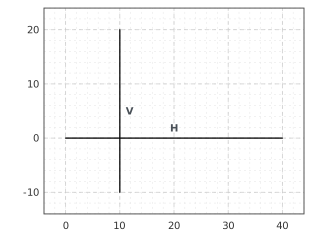
(a) Drawn past the base
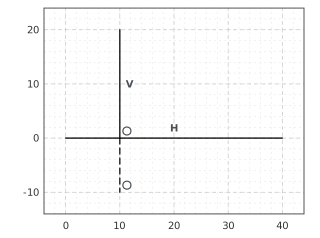
(b) Trim('post')
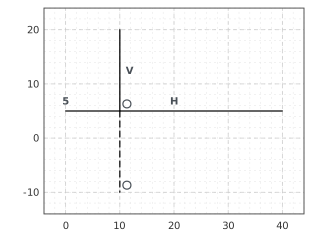
(c) The base moved up: the cut follows
A circle trimmed by a chord
A full circle has no vertices, so it is split only where something cuts it, and a circle cut at two points becomes two arcs. In the example, a chord lies 3 above the center of a ring, and the lower arc and the ends of the chord are trimmed away. The chord is trimmed twice by its own id, once at each end. The face is the circular segment above the chord, whose area has a closed form (Figure 2).
[5]:
c = px.Sketch()
c.Circle(0, 0, 10, id="ring")
c.Move((-20, 3)).Line(40, 0, px.Horizontal, id="chord")
c.Trim(("ring", (0, -10)), "chord")
c.Trim(("chord", (-19, 3)))
c.Trim(("chord", (19, 3)))
print("area", c.Face().mass, "exact", 10**2 * math.acos(3 / 10) - 3 * math.sqrt(10**2 - 3**2))
area 97.99219123544155 exact 97.99219123544155
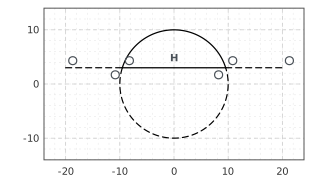
(a) Trimmed to the segment
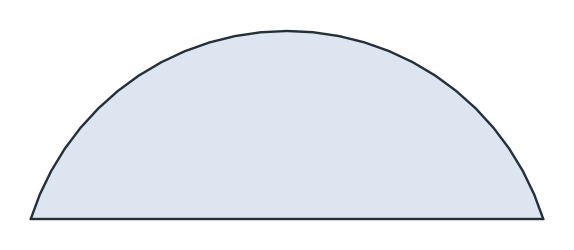
(b) Its face
Projecting OpenCASCADE geometry
Project(shape, id=...) brings the edges of an OpenCASCADE shape into the sketch as fixed references, drawn in gold and named <id>.Edge.N, with N being netgen’s own edge number. None of them can move, and new elements can be constrained to them. In the example, an arm ends at a corner of a projected plate and a bar ends on its far side (Figure 3a). Only the free start of the arm can still move, which leaves two degrees of freedom. A projected curve becomes a fixed spline through samples
of it, and a line from a fixed point can touch it (Figure 3b), which leaves one degree of freedom: its length.
[7]:
part = occ.WorkPlane().MoveTo(10, 10).Rectangle(30, 20).Face()
sk = px.Sketch()
sk.Project(part, id="plate")
print(sk.elements["Projection"], sk.elements["Line"])
corner = "plate.Edge.0.start"
sk.Move((0, 0)).Line(6, 5, id="arm").Line(12, 2, px.Horizontal, id="bar")
sk.Constrain("arm.end", corner, px.Coincident)
sk.Constrain("bar.end", "plate.Edge.1", px.Coincident)

profile = occ.WorkPlane().MoveTo(0, 0).Line(30, 0).Line(0, 10)
profile = profile.Spline([(15, 18), (0, 10)]).Close().Face()
ruler = px.Sketch()
ruler.Project(profile, id="profile")
curve = ruler.elements["Spline"][0]
ruler.Move((-4, 14), px.Fix).Line(30, 10, id="ruler")
ruler.Constrain("ruler", curve, px.Tangent)
print(sk.status, sk.dof, ruler.status, ruler.dof)
['plate'] ['plate.Edge.0', 'plate.Edge.1', 'plate.Edge.2', 'plate.Edge.3']
under 2 under 1
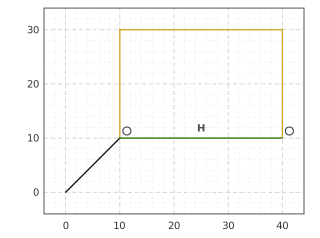
(a) An arm and a bar on a projected plate
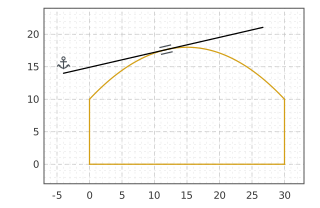
(b) A line from a fixed point, tangent to the curve
Origin, named points and planes
SetOrigin(point) moves the sketch’s axes and leaves the drawing where it is. Vertex(name, point) adds a construction point with that id. Every point of the sketch carries properties for the mesh, as in a QuickSketch. sk("plate.Line.1.end").name = "corner" names the vertex at the end of the rectangle’s first line, and maxh and hpref work the same way. Motions move the sketch’s plane and keep the drawing in it, and Scaled multiplies every length, including the
dimensions.
[9]:
sk = px.Sketch()
sk.Move(sk.origin, px.Coincident).Rectangle(40, 20, id="plate")
sk.Constrain("plate.Line.1", px.Horizontal)
sk.Constrain("plate.Line.1", px.Distance, 40, id="w")
sk.Constrain("plate.Line.2", px.Distance, 20, id="h")
sk.Vertex("hole", (10, 10))
sk.Constrain("hole", "plate.Line.4", px.Distance, 12)
sk.Constrain("hole", "plate.Line.1", px.Distance, 8)
sk("plate.Line.1.end").name = "corner"
sk("plate.Line.1.end").maxh = 1
hole = sk.points["hole"]
print(sk.status, round(hole[0], 9), round(hole[1], 9))
print({v.name for v in sk.ToOCCFace().vertices if v.name})
big = sk.Scaled((0, 0), 2)
hole = big.points["hole"]
print(big["w"], big["h"], round(hole[0], 9), round(hole[1], 9))
lifted = sk.Translated((0, 0, 10)).Rotated((0, 0, 0), (1, 0, 0), 90)
normal, corner = lifted.Normal(), lifted.ToXYZ((40, 20))
print([round(c, 9) + 0.0 for c in normal], [round(c, 9) + 0.0 for c in corner])
full 12.0 8.0
{'corner'}
80.0 40.0 24.0 16.0
[0.0, -1.0, 0.0] [40.0, -10.0, 20.0]