Drawing with constraints
A constraint sketch draws with the same calls as a quick sketch: Move, Turn, Line, Arc, Circle, Spline, the profile tools and Close. Three things are added once constraints are involved:
flags such as
px.Horizontalin a drawing call constrain the element while it is drawn;the references of the drawing calls, such as
tangent=oruntil=, can become constraints, withauto_constraint=True;where a constraint has several solutions, the drawing decides which one is meant.
[1]:
import warnings
import planex as px
Flags while drawing
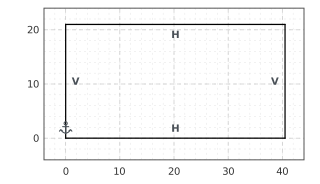
A flag after the numbers of a drawing call adds that constraint to the new element at once, and the sketch is solved. The example is a rectangle drawn roughly, with a fixed start, horizontal top and bottom and vertical sides (Figure 1). The solver squares it up and moves every side as little as it can. Its width and height are still free, which leaves two degrees of freedom.
[3]:
sk = px.Sketch((0, 0), px.Fix)
sk.Line(40, 1, px.Horizontal, id="bottom")
sk.Line(1, 20, px.Vertical, id="right")
sk.Line(-41, 2, px.Horizontal, id="top")
sk.Close(px.Vertical, id="left")
print(sk.status, sk.dof, "degrees of freedom")
print({i: round(sk.Geometry(i)["angle"], 9) for i in ("bottom", "right", "top", "left")})
under 2 degrees of freedom
{'bottom': 0.0, 'right': 90.0, 'top': 180.0, 'left': -90.0}
Helpers, with and without auto_constraint
The references of the drawing calls, such as until=, tangent=, perpendicular= and center=, place an element exactly. By default, that is all they do, and the element is afterwards as free as one drawn by eye. With auto_constraint=True, every reference also becomes the matching constraint.
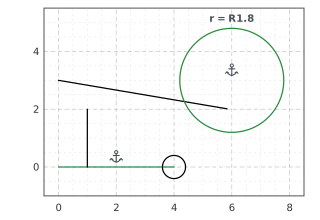
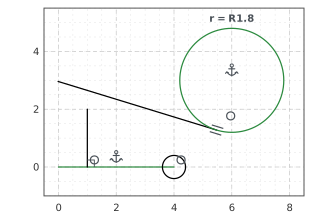
The example draws the same sketch both ways: a line dropped perpendicular onto a base, a belt tangent to a hub, and a pin at the end of the base. Then the hub grows from a radius of 1 to 1.8. Without auto_constraint, the belt keeps its place and the grown hub swallows it (Figure 2a). With it, the belt stays tangent, so its distance from the hub’s center equals the new radius (Figure 2b).
[5]:
def drawing(auto):
    sk = px.Sketch(auto_constraint=auto)
    sk.Move((0, 0)).Line(4, 0, px.Fix, id="base")
    sk.Circle(6, 3, 1, id="hub")
    sk.Constrain("hub.center", px.Fix)
    sk.Constrain("hub", px.Radius, 1, id="r")
    sk.Move((1, 2)).Direction(0, -1).Line("base", perpendicular="base", id="drop")
    sk.Move((0, 3)).Line(tangent="hub", id="belt")
    sk.Circle(0.4, center="base.end", id="pin")
    return sk


plain, auto = drawing(False), drawing(True)
for kind, entries in auto.constraints.items():
    if kind not in ("Fix", "Radius"):
        print(kind, list(entries.values()))
plain["r"] = auto["r"] = 1.8
for name, sk in (("helpers only", plain), ("auto_constraint", auto)):
    print(name, "belt", sk.Measure("hub.center", to="belt")["distance"], "from the hub's center, radius", sk["r"])
Coincident ["drop.end", "base", px.Coincident, "belt.end", "hub", px.Coincident, "pin.center", "base.end", px.Coincident]
Perpendicular ["base", "drop", px.Perpendicular]
Tangent ["belt", "hub", px.Tangent]
helpers only belt 1.0 from the hub's center, radius 1.8
auto_constraint belt 1.8000000000000003 from the hub's center, radius 1.8
(a) Helpers only, hub radius 1.8
(b) auto_constraint, hub radius 1.8
With auto_constraint, a constraint that a reference implies but that removes no degree of freedom, because it already follows from the others, is left out with a warning. In the example, top is horizontal by its flag, so parallel="base" adds nothing. A redundant constraint given on purpose stays. See diagnosis for how redundant constraints are reported.
[7]:
sk = px.Sketch(auto_constraint=True)
sk.Move((0, 0)).Line(3, 0, px.Horizontal, id="base")
with warnings.catch_warnings(record=True) as caught:
    warnings.simplefilter("always")
    sk.Move((0, 1)).Line(2, px.Horizontal, parallel="base", id="top")
for w in caught:
    print(w.message)
auto_constraint: left out "base", "top", px.Parallel, it follows from Horizontal.1, Horizontal.2
Which tangent: the drawing decides
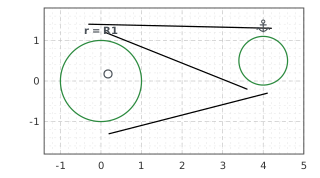
A line tangent to two circles has four solutions: above, below, and two that cross between the circles. The constraint takes the side from the drawing when it is created and keeps it. In the example, three lines are drawn roughly (Figure 3a), and each is made tangent to both circles (Figure 3b). When the left circle grows (Figure 3c), all three lines follow on their sides. They can still slide along themselves, so they are not fully constrained and stay black.
[8]:
sk = px.Sketch()
sk.Circle(0, 0, 1.0, id="left")
sk.Circle(4, 0.5, 0.6, px.Fix, id="right")
sk.Constrain("left.center", sk.origin, px.Coincident)
sk.Constrain("left", px.Radius, 1.0, id="r")
sk.Move((-0.3, 1.4)).Line((4.2, 1.3), id="upper")
sk.Move((0.2, -1.3)).Line((4.1, -0.3), id="lower")
sk.Move((0.1, 1.2)).Line((3.6, -0.2), id="cross")
drawn = sk.Copy()
for line in ("upper", "lower", "cross"):
    sk.Constrain(line, "left", px.Tangent)
    sk.Constrain(line, "right", px.Tangent)
tangent = sk.Copy()
sk["r"] = 1.6
for line in ("upper", "lower", "cross"):
    print(line, "distance from the left circle", sk.Measure(line, to="left")["distance"])
upper distance from the left circle 0.0
lower distance from the left circle 0.0
cross distance from the left circle 0.0
(a) Drawn
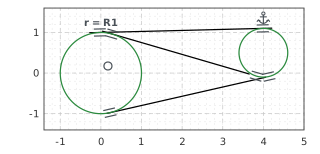
(b) Tangent to both
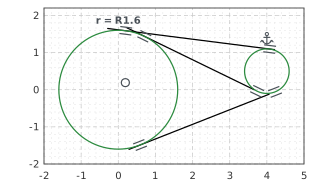
(c) Left radius 1.6: all three follow
See Constraints and dimensions for every kind of constraint, and Changing dimensions for how the solver follows a change.