A dimensioned drawing
px.Drawing(sk) draws a constraint sketch with its own dimension constraints: every Distance, Radius, Diameter and Angle of the sketch becomes a dimension of the drawing, with its extension lines, its dimension line and its value. The drawing has no dimensions of its own, so it always shows what defines the part. The example is a bearing plate of 120 × 80 with rounded corners, a bore of 40 and four holes of 9 on a bolt circle of 60.
[1]:
import planex as px
The sketch
The plate is drawn in millimeters, as its numbers say. Its outline is a rectangle around the origin, its corners filleted. Fillet gives each corner its radius as a dimension of its own; the three others are removed and their corners tied equal to the first, so that the four corners have one radius, which the drawing writes once. The bore lies at the origin; one hole lies on the bolt circle, a construction circle, and CircularPattern copies it three times:
[2]:
plate = px.Sketch(auto_constraint=True)
plate.RectangleC(120, 80, id="plate")
plate.Constrain("plate.center", "origin", px.Coincident)
plate.Constrain("plate.Line.1", px.Horizontal)
plate.Constrain("plate.Line.1", px.Distance, 120, id="length")
plate.Constrain("plate.Line.2", px.Distance, 80, id="width")
plate.Fillet(["plate.Line.1.start", "plate.Line.2.start", "plate.Line.3.start", "plate.Line.4.start"], 8,
             id=["corner_1", "corner_2", "corner_3", "corner_4"])
for k in (2, 3, 4):  # one radius for all four corners: the others equal to the first
    plate.Remove(f"corner_{k}.r")
    plate.Constrain(f"corner_{k}", "corner_1", px.Equal)
plate.Circle(20, id="bore")
plate.Constrain("bore.center", "origin", px.Coincident)
plate.Constrain("bore", px.Diameter, 40, id="bore_d")
plate.Circle(30, id="bolt_circle", construction=True)
plate.Constrain("bolt_circle", "bore", px.Concentric)
plate.Constrain("bolt_circle", px.Diameter, 60, id="pitch")
plate.Circle(4.5, center=(30, 1), id="hole")
plate.Constrain("hole.center", "bolt_circle", px.Coincident)
plate.Constrain("hole.center", "H", px.Coincident)
plate.Constrain("hole", px.Diameter, 9, id="hole_d")
plate.CircularPattern(["hole"], "origin", 4, id="holes")
print("status", plate.status, "| degrees of freedom", plate.dof)
status full | degrees of freedom 0
The drawing
unit=px.mm says that one unit of the sketch is a millimeter, so the values are written as the sketch’s numbers. A construction circle is not part of the outline; Center with pitch=True draws the bolt circle as a center line, so that its diameter has a circle to measure. The drawing shows itself in a notebook, on a sheet of its own at a standard scale:
[3]:
dw = px.Drawing(plate, unit=px.mm).Center("bolt_circle", pitch=True)
dw
[3]:
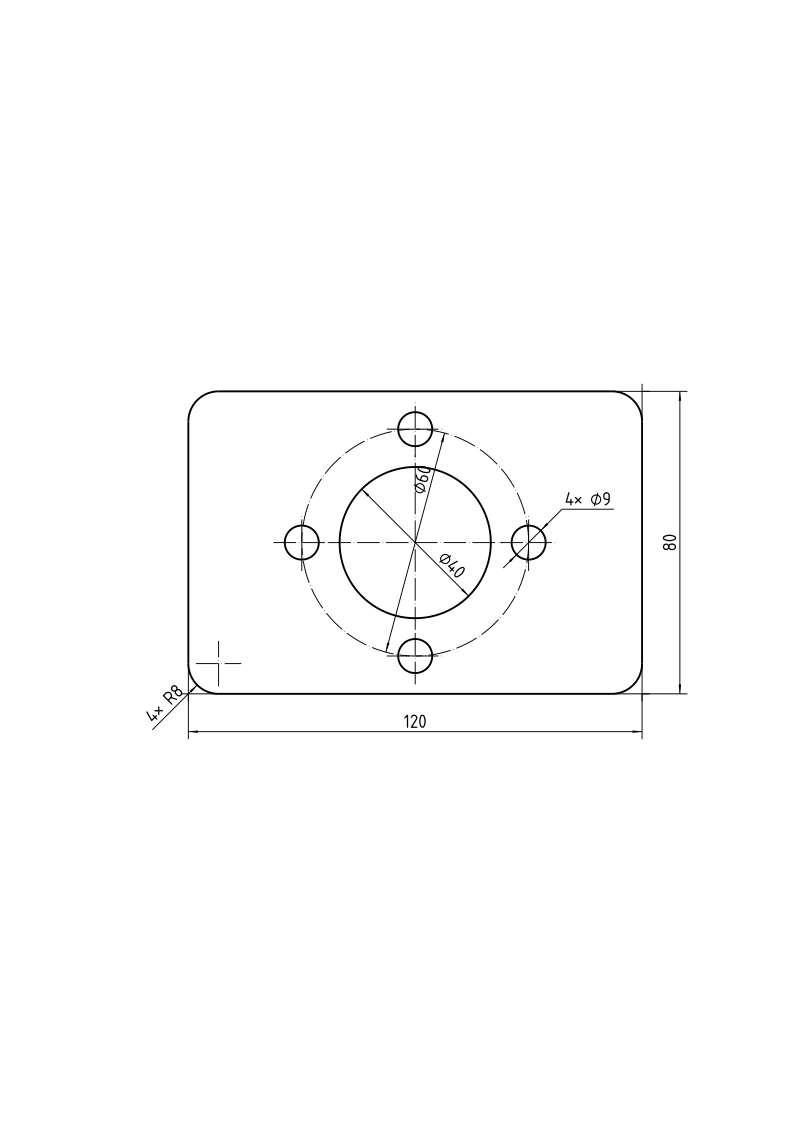
The layout puts each dimension outside the outline, in rows from the shortest to the longest, so that no two cross, and the diameters on lines through their centers. Equal features are one feature: the four holes, copies of one pattern, have their diameter written once with the count, “4× ⌀9”, and the four corners, tied equal, “4× R8”. Every circle has its cross of center lines, and the dimensioned corner a short cross at its center.
After a change
The drawing keeps the sketch, not a copy. After the sketch changed, Update reads it anew, and the drawing shows a longer plate with six holes, “6× ⌀9”:
[4]:
plate.Update({"length": 160, "holes.count": 6})
dw.Update()
[4]:
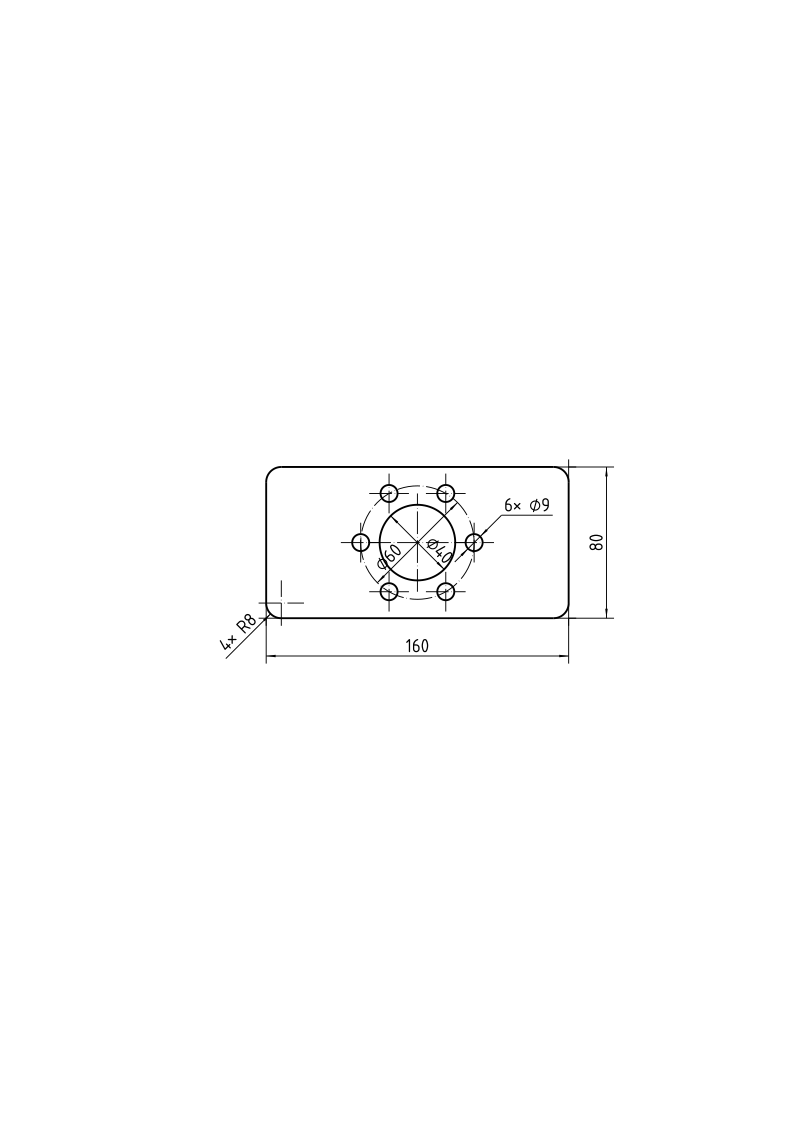
See Placing dimensions for dimensions where the layout does not put them and Views and sheets for several views of one part.